
Region splice
Three waveform selections move and resize within shared bounds without colliding.
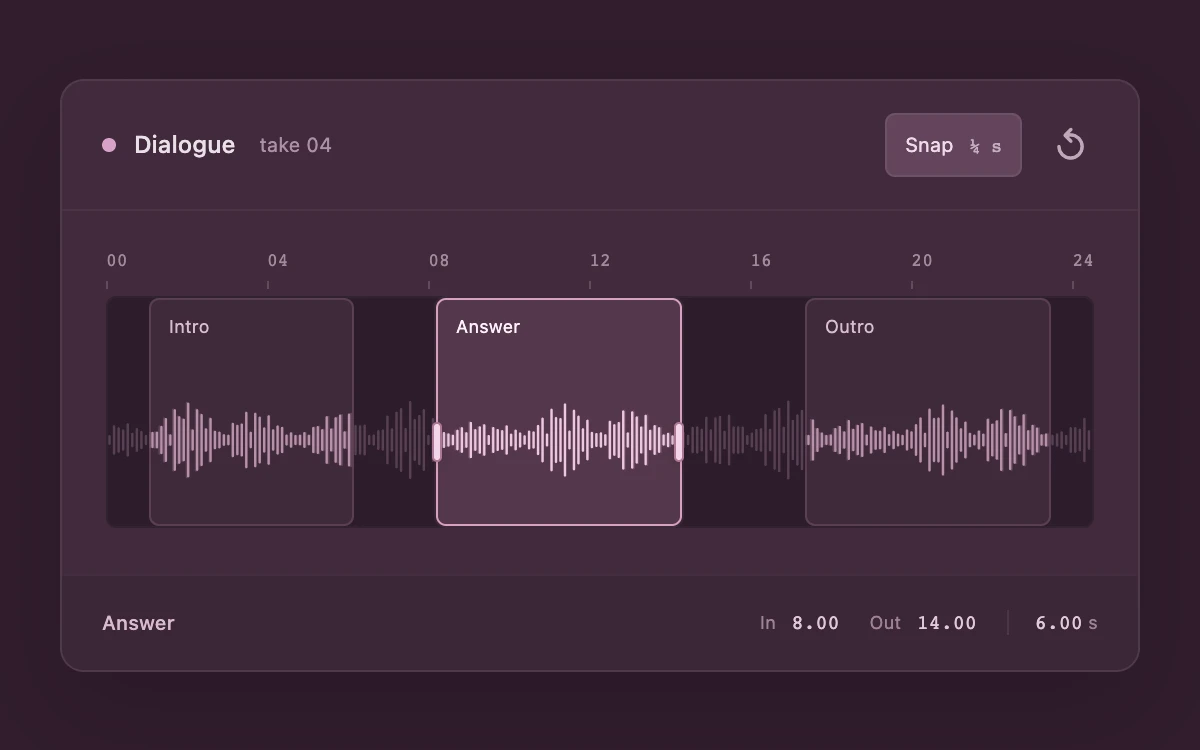
Drag a region or its selected edges; use arrows, Shift, Home and End; toggle quarter-second snapping or reset.
Subframe Original · MIT
Add to your project
Component source
Standalone React component. Styles are included.
React only. No additional packages.
Render the default export inside a container with a defined height. Its optional active prop stops movement when false. This example works with React 19; Next.js projects can use it as a client component.
View source code
/**
 * MIT License
 * Copyright (c) 2026 Subframe
 *
 * Permission is hereby granted, free of charge, to any person obtaining a copy
 * of this software and associated documentation files (the "Software"), to deal
 * in the Software without restriction, including without limitation the rights
 * to use, copy, modify, merge, publish, distribute, sublicense, and/or sell
 * copies of the Software, and to permit persons to whom the Software is
 * furnished to do so, subject to the following conditions:
 *
 * The above copyright notice and this permission notice shall be included in all
 * copies or substantial portions of the Software.
 *
 * THE SOFTWARE IS PROVIDED "AS IS", WITHOUT WARRANTY OF ANY KIND, EXPRESS OR
 * IMPLIED, INCLUDING BUT NOT LIMITED TO THE WARRANTIES OF MERCHANTABILITY,
 * FITNESS FOR A PARTICULAR PURPOSE AND NONINFRINGEMENT. IN NO EVENT SHALL THE
 * AUTHORS OR COPYRIGHT HOLDERS BE LIABLE FOR ANY CLAIM, DAMAGES OR OTHER
 * LIABILITY, WHETHER IN AN ACTION OF CONTRACT, TORT OR OTHERWISE, ARISING FROM,
 * OUT OF OR IN CONNECTION WITH THE SOFTWARE OR THE USE OR OTHER DEALINGS IN THE
 * SOFTWARE.
 */
"use client"
import * as React from "react"

type Region = { id: string; name: string; start: number; end: number }
type Mode = "move" | "start" | "end"
const INITIAL: Region[] = [
  { id: "intro", name: "Intro", start: 1, end: 6 },
  { id: "answer", name: "Answer", start: 8, end: 14 },
  { id: "outro", name: "Outro", start: 17, end: 23 },
]
const LENGTH = 24
const MINIMUM = 4
const GAP = 0.25
const clamp = (value: number, min: number, max: number) => Math.max(min, Math.min(max, value))
const PEAKS = Array.from(
  { length: 216 },
  (_, i) => 4 + 41 * Math.abs(Math.sin(i * 1.93) * Math.cos(i * 0.19)) * (0.25 + 0.75 * Math.abs(Math.sin(i * 0.075))),
)

function shiftRegion(regions: Region[], index: number, mode: Mode, amount: number) {
  const region = regions[index]
  const left = index ? regions[index - 1].end + GAP : 0
  const right = index < regions.length - 1 ? regions[index + 1].start - GAP : LENGTH
  let { start, end } = region
  if (mode === "move") {
    const delta = clamp(amount, left - start, right - end)
    start += delta
    end += delta
  }
  if (mode === "start") start = clamp(start + amount, left, end - MINIMUM)
  if (mode === "end") end = clamp(end + amount, start + MINIMUM, right)
  return regions.map((item, i) => (i === index ? { ...item, start, end } : item))
}

export default function Example({ active = true }: { active?: boolean }) {
  const [regions, setRegions] = React.useState(INITIAL)
  const [selected, setSelected] = React.useState(1)
  const [snap, setSnap] = React.useState(true)
  const [dragging, setDragging] = React.useState(false)
  const track = React.useRef<HTMLDivElement>(null)
  const drag = React.useRef<{ pointer: number; x: number; index: number; mode: Mode; before: Region[] } | null>(null)
  const region = regions[selected]
  function start(event: React.PointerEvent<HTMLButtonElement>, index: number, mode: Mode) {
    if (!active || event.button !== 0 || drag.current) return
    event.preventDefault()
    event.currentTarget.focus({ preventScroll: true })
    event.currentTarget.setPointerCapture(event.pointerId)
    drag.current = { pointer: event.pointerId, x: event.clientX, index, mode, before: regions }
    setSelected(index)
    setDragging(true)
  }
  function move(event: React.PointerEvent<HTMLButtonElement>) {
    const current = drag.current
    if (!active || !current || current.pointer !== event.pointerId || !track.current) return
    const width = track.current.getBoundingClientRect().width
    if (!width) return
    let amount = ((event.clientX - current.x) / width) * LENGTH
    if (snap) {
      const anchor = current.before[current.index][current.mode === "end" ? "end" : "start"]
      amount = Math.round((anchor + amount) * 4) / 4 - anchor
    }
    setRegions(shiftRegion(current.before, current.index, current.mode, amount))
  }
  function end(cancel = false) {
    if (cancel && drag.current) setRegions(drag.current.before)
    drag.current = null
    setDragging(false)
  }
  function key(event: React.KeyboardEvent<HTMLButtonElement>, index: number, mode: Mode) {
    if (!active) return
    if (event.key === "Escape") {
      end(true)
      return
    }
    if (!["ArrowLeft", "ArrowRight", "Home", "End"].includes(event.key)) return
    event.preventDefault()
    setSelected(index)
    const amount =
      event.key === "Home"
        ? -LENGTH
        : event.key === "End"
        ? LENGTH
        : (event.key === "ArrowLeft" ? -1 : 1) * (event.shiftKey ? 1 : 0.25)
    setRegions((current) => shiftRegion(current, index, mode, amount))
  }
  React.useEffect(() => {
    if (!active) {
      drag.current = null
      setDragging(false)
    }
  }, [active])
  const handlers = (index: number, mode: Mode) => ({
    onPointerDown: (event: React.PointerEvent<HTMLButtonElement>) => start(event, index, mode),
    onPointerMove: move,
    onPointerUp: () => end(),
    onPointerCancel: () => end(true),
    onLostPointerCapture: () => end(),
    onKeyDown: (event: React.KeyboardEvent<HTMLButtonElement>) => key(event, index, mode),
  })
  return (
    <div className="sf-region-splice" data-dragging={dragging}>
      <section className="editor" aria-label="Dialogue region editor">
        <header>
          <span>
            <i aria-hidden="true" />
            Dialogue <small>take 04</small>
          </span>
          <div>
            <button className="snap" disabled={!active} aria-pressed={snap} onClick={() => setSnap(!snap)}>
              Snap <span>¼ s</span>
            </button>
            <button
              className="reset"
              disabled={!active}
              aria-label="Reset regions"
              onClick={() => {
                end()
                setRegions(INITIAL)
                setSelected(1)
              }}
            >
              ↺
            </button>
          </div>
        </header>
        <div className="timeline">
          <div className="ruler" aria-hidden="true">
            {[0, 4, 8, 12, 16, 20, 24].map((time) => (
              <span key={time}>{String(time).padStart(2, "0")}</span>
            ))}
          </div>
          <div className="track" ref={track}>
            <div className="bed" aria-hidden="true">
              <svg viewBox="0 0 648 100" preserveAspectRatio="none">
                {PEAKS.map((height, index) => (
                  <path key={index} d={`M${index * 3 + 1} ${50 - height / 2}v${height}`} />
                ))}
              </svg>
            </div>
            {regions.map((item, index) => (
              <div
                className="region"
                key={item.id}
                data-selected={selected === index}
                style={{
                  left: (item.start / LENGTH) * 100 + "%",
                  width: ((item.end - item.start) / LENGTH) * 100 + "%",
                }}
              >
                <button
                  className="move"
                  disabled={!active}
                  aria-label={`Move ${item.name} region`}
                  aria-pressed={selected === index}
                  onClick={() => setSelected(index)}
                  {...handlers(index, "move")}
                >
                  <span>{item.name}</span>
                </button>
                <svg
                  className="region-wave"
                  viewBox={`${(item.start / LENGTH) * 648} 0 ${((item.end - item.start) / LENGTH) * 648} 100`}
                  preserveAspectRatio="none"
                  aria-hidden="true"
                >
                  {PEAKS.map((height, i) => (
                    <path key={i} d={`M${i * 3 + 1} ${50 - height / 2}v${height}`} />
                  ))}
                </svg>
                {selected === index &&
                  (["start", "end"] as const).map((edge) => (
                    <button
                      key={edge}
                      className="edge"
                      data-edge={edge}
                      role="slider"
                      disabled={!active}
                      aria-label={`${item.name} ${edge}`}
                      aria-valuemin={
                        edge === "start" ? (index ? regions[index - 1].end + GAP : 0) : item.start + MINIMUM
                      }
                      aria-valuemax={
                        edge === "end"
                          ? index < regions.length - 1
                            ? regions[index + 1].start - GAP
                            : LENGTH
                          : item.end - MINIMUM
                      }
                      aria-valuenow={Number(item[edge].toFixed(2))}
                      aria-valuetext={`${item[edge].toFixed(2)} seconds`}
                      {...handlers(index, edge)}
                    >
                      <i aria-hidden="true" />
                    </button>
                  ))}
              </div>
            ))}
          </div>
        </div>
        <footer>
          <strong>{region.name}</strong>
          <div>
            <span>
              In <output>{region.start.toFixed(2)}</output>
            </span>
            <span>
              Out <output>{region.end.toFixed(2)}</output>
            </span>
            <span className="duration">
              <output>{(region.end - region.start).toFixed(2)}</output> s
            </span>
          </div>
        </footer>
      </section>
      <style>{`
.sf-region-splice{width:100%;height:100%;display:grid;place-items:center;padding:26px;box-sizing:border-box;background:#311d2c;color:#eae0e8;font:12px/1.4 -apple-system,BlinkMacSystemFont,"Segoe UI",sans-serif;overflow:hidden;container-type:inline-size}.sf-region-splice *{box-sizing:border-box}.sf-region-splice button{font:inherit;color:inherit;cursor:pointer;touch-action:manipulation}.sf-region-splice button:disabled{cursor:default}.sf-region-splice :focus-visible{outline:2px solid #e9bbe0;outline-offset:3px}.sf-region-splice .editor{width:min(100%,540px);border:1px solid #ffffff13;background:#412a3c;border-radius:12px;box-shadow:0 18px 50px #13071640;overflow:hidden}.sf-region-splice header{height:65px;padding:0 20px;display:flex;align-items:center;justify-content:space-between;gap:12px;border-bottom:1px solid #ffffff0b}.sf-region-splice header>span{display:flex;align-items:center;gap:9px;font-weight:500;white-space:nowrap}.sf-region-splice header i{width:7px;height:7px;border-radius:50%;background:#d7a1c9}.sf-region-splice header small{color:#ac8fa6;font-size:10px;font-weight:400;margin-left:3px}.sf-region-splice header>div{display:flex;align-items:center;gap:10px}.sf-region-splice .snap{height:32px;padding:0 9px;border:1px solid #ffffff12;border-radius:5px;font-size:10px;background:transparent;color:#b99db1}.sf-region-splice .snap[aria-pressed=true]{background:#63445b;color:#f0dbeb}.sf-region-splice .snap span{margin-left:5px;font:9px ui-monospace,monospace;opacity:.7}.sf-region-splice .reset{background:transparent;border:0;width:28px;height:44px;font-size:19px;color:#c2a7ba}.sf-region-splice .timeline{padding:19px 22px 23px}.sf-region-splice .ruler{display:flex;justify-content:space-between;font:9px ui-monospace,monospace;color:#a38a9a;margin-bottom:13px}.sf-region-splice .ruler span{position:relative}.sf-region-splice .ruler span:after{content:"";position:absolute;top:16px;left:0;width:1px;height:4px;background:#9c7e9260}.sf-region-splice .track{position:relative;height:116px;background:#2d1d2b;border:1px solid #ffffff06;border-radius:5px}.sf-region-splice .bed{position:absolute;inset:28px 0 0;opacity:.28;overflow:hidden}.sf-region-splice .bed svg{width:100%;height:100%}.sf-region-splice svg path{stroke:#c69bb9;stroke-width:1.6;stroke-linecap:round}.sf-region-splice .region{position:absolute;top:0;bottom:0;background:#724f6845;border:1px solid #a1759344;border-radius:5px;min-width:0;transition:background-color 130ms ease,border-color 130ms ease}.sf-region-splice .region[data-selected=true]{background:#9c688659;border-color:#d7a0c0;box-shadow:0 0 0 1px #d7a0c012}.sf-region-splice .move{position:absolute;inset:0;border:0;background:transparent;width:100%;padding:0;touch-action:none;cursor:grab;z-index:1;text-align:left}.sf-region-splice .move>span{position:absolute;top:7px;left:9px;right:4px;font-size:9px;color:#d9bdd0;white-space:nowrap;overflow:hidden;text-overflow:ellipsis}.sf-region-splice .region[data-selected=true] .move>span{color:#fff1fa}.sf-region-splice .region-wave{position:absolute;top:28px;bottom:0;left:0;width:100%;height:calc(100% - 28px);pointer-events:none;overflow:hidden}.sf-region-splice .region-wave path{stroke:#b891aa}.sf-region-splice .region[data-selected=true] .region-wave path{stroke:#edc6df}.sf-region-splice .edge{position:absolute;top:30px;bottom:0;width:30px;background:transparent;border:0;z-index:2;touch-action:none;cursor:ew-resize;padding:0}.sf-region-splice .edge[data-edge=start]{left:-15px}.sf-region-splice .edge[data-edge=end]{right:-15px}.sf-region-splice .edge i{position:absolute;left:12px;top:31px;width:5px;height:20px;background:#f4d5e9;border:1px solid #ae7898;border-radius:3px;box-shadow:0 1px 4px #0002}.sf-region-splice[data-dragging=true] .move{cursor:grabbing}.sf-region-splice footer{height:48px;border-top:1px solid #ffffff0b;padding:0 20px;display:flex;align-items:center;justify-content:space-between;gap:10px;background:#3b2636}.sf-region-splice footer>strong{font-weight:500;font-size:10px;color:#d9bbce}.sf-region-splice footer>div{display:flex;gap:15px;font-size:9px;color:#9f8296;align-items:center}.sf-region-splice footer output{font:10px ui-monospace,monospace;font-variant-numeric:tabular-nums;color:#e3c9da;margin-left:5px}.sf-region-splice .duration{padding-left:13px;border-left:1px solid #ffffff15}.sf-region-splice .duration output{margin:0}.sf-region-splice button:active:not(.move):not(.edge){transform:scale(.98)}@media(prefers-reduced-motion:reduce){.sf-region-splice *{transition:none!important}}@container(max-width:390px){.sf-region-splice header{padding-inline:15px}.sf-region-splice header small{display:none}.sf-region-splice .timeline{padding-inline:16px}.sf-region-splice footer{padding-inline:15px}.sf-region-splice footer>div{gap:9px}.sf-region-splice .duration{padding-left:8px}}
`}</style>
    </div>
  )
}
Where it works well
Mark several passages in one recording while maintaining minimum durations and separation.
Reduced motion
Editing tracks the pointer directly, without inertial or decorative animation.
Things to know
Deterministic synthetic waveform and three local selection regions. No audio decoding, playback, export or destructive clip edits.