
Guided inspection
A library plan moves beneath a precisely aligned spotlight as a three-stop walkthrough explores its rooms.
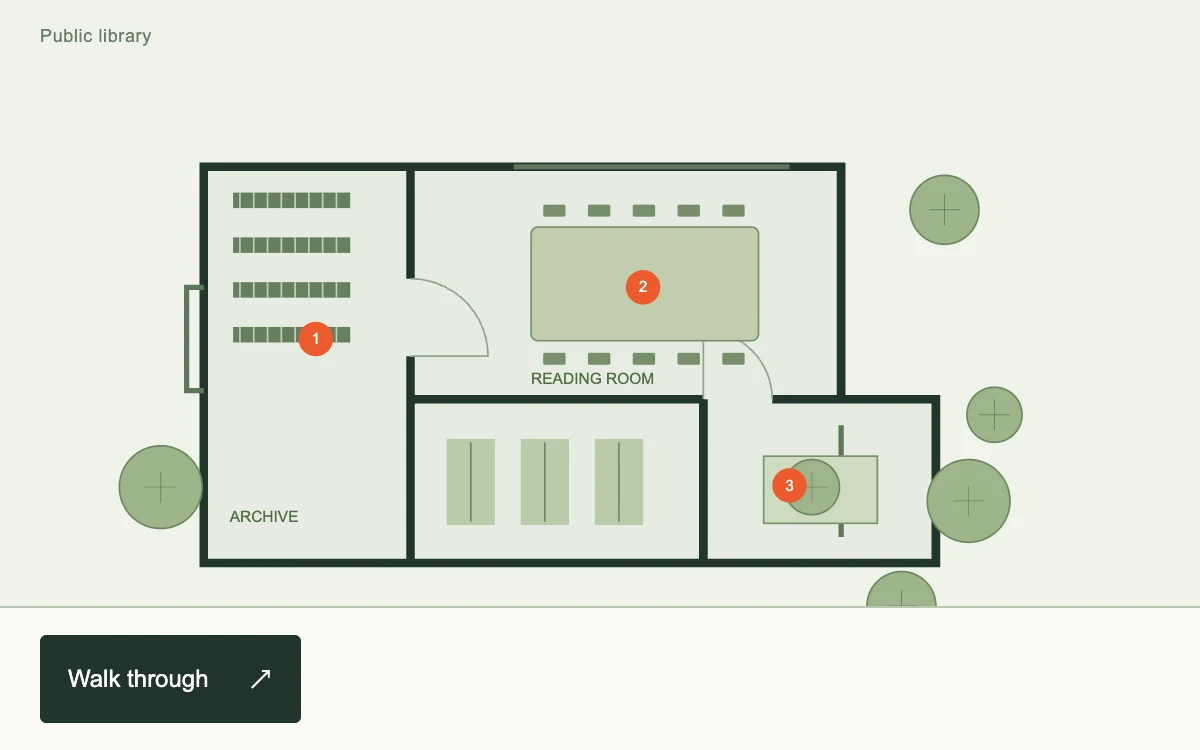
Start the walkthrough; advance through three points or use arrow keys. Escape exits.
Subframe Original · MIT
Add to your project
Component source
Standalone React component. Styles are included.
React only. No additional packages.
Render the default export inside a container with a defined height. Its optional active prop stops movement when false. This example works with React 19; Next.js projects can use it as a client component.
View source code
/**
 * MIT License
 * Copyright (c) 2026 Subframe
 *
 * Permission is hereby granted, free of charge, to any person obtaining a copy
 * of this software and associated documentation files (the "Software"), to deal
 * in the Software without restriction, including without limitation the rights
 * to use, copy, modify, merge, publish, distribute, sublicense, and/or sell
 * copies of the Software, and to permit persons to whom the Software is
 * furnished to do so, subject to the following conditions:
 *
 * The above copyright notice and this permission notice shall be included in all
 * copies or substantial portions of the Software.
 *
 * THE SOFTWARE IS PROVIDED "AS IS", WITHOUT WARRANTY OF ANY KIND, EXPRESS OR
 * IMPLIED, INCLUDING BUT NOT LIMITED TO THE WARRANTIES OF MERCHANTABILITY,
 * FITNESS FOR A PARTICULAR PURPOSE AND NONINFRINGEMENT. IN NO EVENT SHALL THE
 * AUTHORS OR COPYRIGHT HOLDERS BE LIABLE FOR ANY CLAIM, DAMAGES OR OTHER
 * LIABILITY, WHETHER IN AN ACTION OF CONTRACT, TORT OR OTHERWISE, ARISING FROM,
 * OUT OF OR IN CONNECTION WITH THE SOFTWARE OR THE USE OR OTHER DEALINGS IN THE
 * SOFTWARE.
 */
"use client"
import * as React from "react"

const STOPS = [
  {
    name: "Archive",
    note: "Low shelves keep the collection within reach.",
    x: 90,
    y: 125,
    w: 90,
    h: 60,
    scale: 1.65,
  },
  {
    name: "Reading room",
    note: "North light reaches the entire shared table.",
    x: 250,
    y: 75,
    w: 150,
    h: 100,
    scale: 1.45,
  },
  {
    name: "Quiet garden",
    note: "An open edge connects the library to the trees.",
    x: 360,
    y: 200,
    w: 100,
    h: 80,
    scale: 1.55,
  },
]
export default function Example({ active = true }: { active?: boolean }) {
  const [step, setStep] = React.useState<number | null>(null),
    [keyboard, setKeyboard] = React.useState(false)
  const root = React.useRef<HTMLDivElement>(null),
    start = React.useRef<HTMLButtonElement>(null),
    next = React.useRef<HTMLButtonElement>(null)
  const selected = step === null ? null : STOPS[step],
    s = selected?.scale ?? 1
  const tx = selected ? 300 - (selected.x + selected.w / 2) * s : 0,
    ty = selected ? 130 - (selected.y + selected.h / 2) * s : 0
  const maskId = "gi-" + React.useId().replaceAll(":", "")
  function change(value: number | null) {
    setStep(value)
    if (value === null) requestAnimationFrame(() => start.current?.focus())
    else requestAnimationFrame(() => next.current?.focus())
  }
  return (
    <div
      ref={root}
      className="sf-guided-inspection"
      data-quiet={!active || keyboard}
      onPointerDownCapture={() => setKeyboard(false)}
      onKeyDownCapture={() => setKeyboard(true)}
      onKeyDown={(e) => {
        if (e.key === "Escape" && step !== null) {
          e.preventDefault()
          change(null)
        }
        if (step !== null && e.key === "ArrowRight") {
          e.preventDefault()
          change((step + 1) % 3)
        }
        if (step !== null && e.key === "ArrowLeft") {
          e.preventDefault()
          change((step + 2) % 3)
        }
      }}
    >
      <header>
        <span>Public library</span>
      </header>
      <div className="gi-stage">
        <svg className="gi-map" viewBox="0 0 600 310" aria-label="Library floor plan with three guided points">
          <g className="gi-camera" style={{ transform: `translate(${tx}px,${ty}px) scale(${s})` }}>
            <path d="M70 55H440V190H495V285H70Z" fill="#e5ede0" stroke="#23362b" strokeWidth="5" />
            <path
              d="M190 55V120M190 165V285M190 190H360M360 190V285M440 190H400"
              fill="none"
              stroke="#23362b"
              strokeWidth="5"
            />
            <path d="M70 125H60V185H70M250 55H410M440 205V270" stroke="#61755e" strokeWidth="3" fill="none" />
            <path
              d="M190 120A45 45 0 0 1 235 165H190M400 190A40 40 0 0 0 360 150V190"
              fill="none"
              stroke="#90a58a"
              strokeWidth="1"
            />
            <rect x="260" y="90" width="132" height="66" rx="4" fill="#c0cdae" stroke="#798f70" />
            {Array.from({ length: 5 }, (_, i) => (
              <g key={i} fill="#788d6c">
                <rect x={267 + i * 26} y="77" width="13" height="7" rx="1" />
                <rect x={267 + i * 26} y="163" width="13" height="7" rx="1" />
              </g>
            ))}
            {Array.from({ length: 4 }, (_, i) => (
              <g key={i}>
                <rect x="87" y={70 + i * 26} width="68" height="9" fill="#667d5f" />
                {Array.from({ length: 8 }, (_, j) => (
                  <path key={j} d={`M${91 + j * 8} ${70 + i * 26}v9`} stroke="#bed1b3" strokeWidth="1" />
                ))}
              </g>
            ))}
            {Array.from({ length: 3 }, (_, i) => (
              <g key={i}>
                <rect x={211 + i * 43} y="213" width="28" height="50" fill="#bacbad" />
                <path d={`M${225 + i * 43} 215v46`} stroke="#6d8564" />
              </g>
            ))}
            <path d="M395 223h66v39h-66Z" fill="#cedbbf" stroke="#789270" />
            {[
              { x: 423, y: 241 },
              { x: 475, y: 310 },
              { x: 514, y: 249 },
              { x: 529, y: 199 },
              { x: 500, y: 80 },
              { x: 45, y: 241 },
            ].map((p, i) => (
              <g key={i} fill="#9eb48b" stroke="#6e8762">
                <circle cx={p.x} cy={p.y} r={16 + (i % 3) * 4} />
                <path d={`M${p.x - 9} ${p.y}h18M${p.x} ${p.y - 9}v18`} strokeWidth=".5" />
              </g>
            ))}
            <text x="85" y="261" fontSize="9" fill="#526b48">
              ARCHIVE
            </text>
            <text x="260" y="181" fontSize="9" fill="#526b48">
              READING ROOM
            </text>
          </g>
          <defs>
            <mask id={maskId}>
              <rect width="600" height="310" fill="white" />
              {selected && (
                <rect
                  className="gi-focus"
                  x={selected.x * s + tx - 8}
                  y={selected.y * s + ty - 8}
                  width={selected.w * s + 16}
                  height={selected.h * s + 16}
                  rx="4"
                  fill="black"
                />
              )}
            </mask>
          </defs>
          <rect
            width="600"
            height="310"
            fill="#142519"
            opacity={selected ? 0.45 : 0}
            mask={`url(#${maskId})`}
            style={{ pointerEvents: "none" }}
          />
          {!selected &&
            STOPS.map((p, i) => (
              <g key={p.name}>
                <circle cx={p.x + p.w / 2} cy={p.y + p.h / 2} r="10" fill="#ed5a2c" />
                <text x={p.x + p.w / 2} y={p.y + p.h / 2 + 3} textAnchor="middle" fontSize="9" fill="white">
                  {i + 1}
                </text>
              </g>
            ))}
        </svg>
      </div>
      <div className="gi-controls">
        {selected ? (
          <>
            <div>
              <span>{step! + 1} / 3</span>
              <h3>{selected.name}</h3>
              <p>{selected.note}</p>
            </div>
            <div className="gi-actions">
              <button onClick={() => change(null)} aria-label="Close tour">
                ×
              </button>
              <button disabled={step === 0} onClick={() => change(step! - 1)} aria-label="Previous point">
                ←
              </button>
              <button
                ref={next}
                onClick={() => change(step === 2 ? null : step! + 1)}
                aria-label={step === 2 ? "Finish tour" : "Next point"}
              >
                {step === 2 ? "✓" : "→"}
              </button>
            </div>
          </>
        ) : (
          <>
            <button ref={start} onClick={() => change(0)}>
              Walk through <span aria-hidden="true">↗</span>
            </button>
          </>
        )}
      </div>
      <style>{`.sf-guided-inspection{width:100%;height:100%;min-height:280px;position:relative;overflow:hidden;container-type:size;background:#eff3e9;color:#20342b;font-family:Arial,sans-serif;display:flex;flex-direction:column}.sf-guided-inspection *{box-sizing:border-box}.sf-guided-inspection header{height:36px;flex-shrink:0;padding:0 20px;display:flex;align-items:center;justify-content:space-between;font-size:9px;letter-spacing:.035em}.sf-guided-inspection header span{color:#677d67}.sf-guided-inspection .gi-stage{position:relative;flex:1;min-height:0;overflow:hidden}.sf-guided-inspection .gi-map{width:100%;height:100%;display:block}.sf-guided-inspection .gi-camera{transform-origin:0 0;transition:transform .55s cubic-bezier(.22,.75,.22,1)}.sf-guided-inspection .gi-focus{transition:x .55s cubic-bezier(.22,.75,.22,1),y .55s cubic-bezier(.22,.75,.22,1),width .55s cubic-bezier(.22,.75,.22,1),height .55s cubic-bezier(.22,.75,.22,1)}.sf-guided-inspection .gi-controls{display:flex;justify-content:space-between;align-items:center;gap:12px;min-height:72px;padding:12px 20px;border-top:1px solid #b8c7b3;background:#f8faf4;flex-shrink:0}.sf-guided-inspection button{border:0;background:none;min-width:44px;min-height:44px;color:inherit;font:12px Arial,sans-serif;cursor:pointer;touch-action:manipulation}.sf-guided-inspection button:focus-visible{outline:2px solid #ed5a2c;outline-offset:2px}.sf-guided-inspection button:disabled{opacity:.3;cursor:default}.sf-guided-inspection .gi-controls>button{background:#20342b;color:#fff;padding:0 14px;border-radius:3px;display:flex;align-items:center;gap:20px}.sf-guided-inspection .gi-controls h3{font-size:15px;font-weight:500;margin:3px 0}.sf-guided-inspection .gi-controls p{font-size:10px;line-height:1.4;max-width:280px;margin:4px 0 0;color:#60725f}.sf-guided-inspection .gi-controls div>span{font:9px monospace;color:#7f9279}.sf-guided-inspection .gi-actions{display:flex;gap:2px}.sf-guided-inspection .gi-actions button{font-size:20px}.sf-guided-inspection[data-quiet=true] *{transition:none!important}@container(max-width:400px){.sf-guided-inspection header{padding:0 14px;font-size:8px}.sf-guided-inspection .gi-controls{padding:10px 14px;gap:4px}.sf-guided-inspection .gi-controls p{max-width:145px;font-size:9px}.sf-guided-inspection .gi-actions{gap:0}.sf-guided-inspection .gi-actions button{min-width:44px}}@media(prefers-reduced-motion:reduce){.sf-guided-inspection *{transition:none!important}}`}</style>
    </div>
  )
}
Where it works well
Guide inspection of a diagram, product or technical illustration through one shared camera transform.
Reduced motion
Camera and spotlight update immediately; the three steps remain available.
Things to know
A local SVG floor plan, not a DOM element targeting or page-onboarding service.