
Illuminated metal keys
Three backlit keys cast amber, white or blue reflections across a shared metal housing.
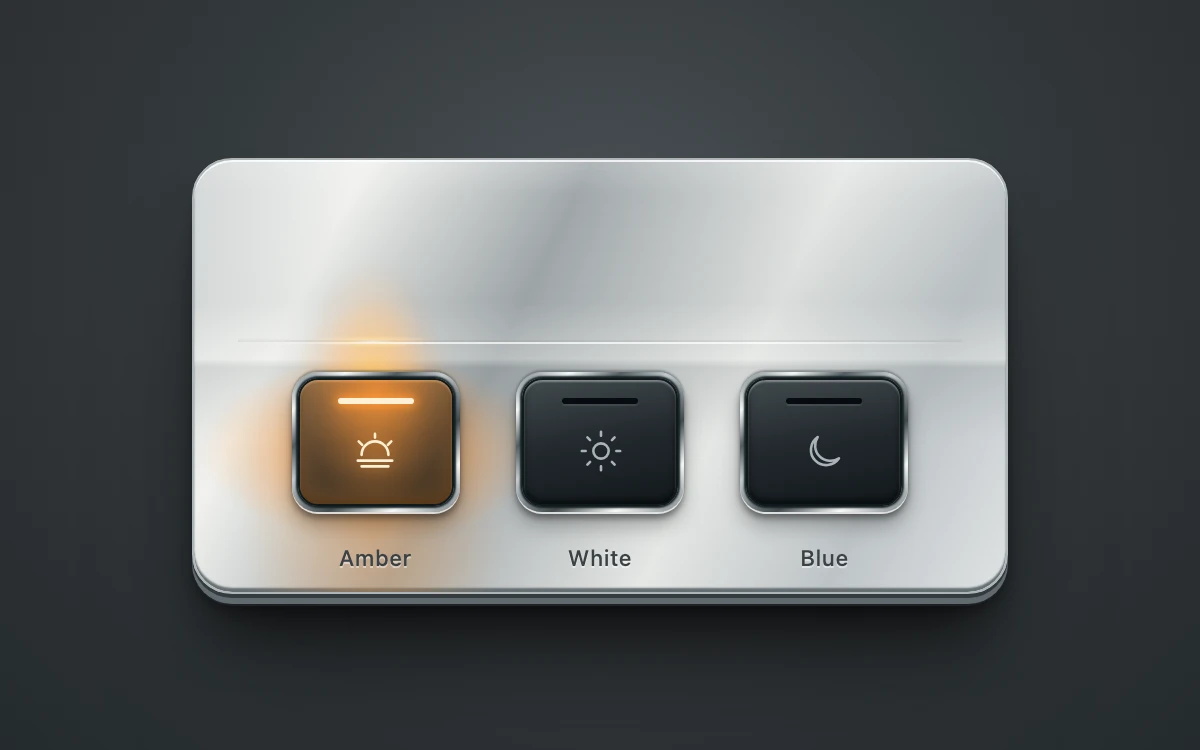
Select a light color to illuminate its key and the metal above it.
Subframe Original · MIT
Add to your project
Component source
Standalone React component. Styles are included.
React only. No additional packages.
Render the default export inside a container with a defined height. Its optional active prop stops movement when false. This example works with React 19; Next.js projects can use it as a client component.
View source code
/**
 * MIT License
 *
 * Copyright (c) 2026 Subframe
 *
 * Permission is hereby granted, free of charge, to any person obtaining a copy
 * of this software and associated documentation files (the "Software"), to deal
 * in the Software without restriction, including without limitation the rights
 * to use, copy, modify, merge, publish, distribute, sublicense, and/or sell
 * copies of the Software, and to permit persons to whom the Software is
 * furnished to do so, subject to the following conditions:
 *
 * The above copyright notice and this permission notice shall be included in all
 * copies or substantial portions of the Software.
 *
 * THE SOFTWARE IS PROVIDED "AS IS", WITHOUT WARRANTY OF ANY KIND, EXPRESS OR
 * IMPLIED, INCLUDING BUT NOT LIMITED TO THE WARRANTIES OF MERCHANTABILITY,
 * FITNESS FOR A PARTICULAR PURPOSE AND NONINFRINGEMENT. IN NO EVENT SHALL THE
 * AUTHORS OR COPYRIGHT HOLDERS BE LIABLE FOR ANY CLAIM, DAMAGES OR OTHER
 * LIABILITY, WHETHER IN AN ACTION OF CONTRACT, TORT OR OTHERWISE, ARISING FROM,
 * OUT OF OR IN CONNECTION WITH THE SOFTWARE OR THE USE OR OTHER DEALINGS IN THE
 * SOFTWARE.
 */

"use client"

import { type CSSProperties, useId, useState } from "react"

const LIGHTS = [
  { name: "Amber", color: "255, 151, 55", ink: "#fff1d6" },
  { name: "White", color: "218, 240, 248", ink: "#ffffff" },
  { name: "Blue", color: "76, 153, 255", ink: "#e2f2ff" },
]

export default function ContactMetal({ active = true }: { active?: boolean }) {
  const group = useId()
  const [selected, setSelected] = useState(0)
  const [keyboard, setKeyboard] = useState(false)

  return (
    <div
      className="sf-contact-metal"
      data-instant={!active || keyboard}
      onPointerDownCapture={() => setKeyboard(false)}
      onKeyDownCapture={() => setKeyboard(true)}
    >
      <fieldset className="sf-contact-metal-housing" aria-label="Light color">
        <legend className="sf-contact-metal-sr">Light color</legend>
        <div className="sf-contact-metal-plate" aria-hidden="true">
          {LIGHTS.map((light, index) => (
            <div
              key={light.name}
              className="sf-contact-metal-reflection"
              data-lit={selected === index}
              style={{ "--light": light.color, "--source-x": `${22 + index * 28}%` } as CSSProperties}
            />
          ))}
          <span className="sf-contact-metal-edge" />
        </div>
        <div className="sf-contact-metal-keys">
          {LIGHTS.map((light, index) => (
            <label
              key={light.name}
              className="sf-contact-metal-key"
              style={{ "--light": light.color, "--light-ink": light.ink } as CSSProperties}
              data-selected={selected === index}
            >
              <input
                type="radio"
                name={group}
                value={light.name}
                checked={selected === index}
                onChange={() => setSelected(index)}
              />
              <span className="sf-contact-metal-bezel">
                <span className="sf-contact-metal-lens">
                  <span className="sf-contact-metal-illumination" />
                  <svg viewBox="0 0 24 24" aria-hidden="true">
                    {index === 0 ? (
                      <>
                        <path d="M5 14a7 7 0 0 1 14 0M3 17h18M5 20h14M12 3v2M3.5 7l1.8 1.8M20.5 7l-1.8 1.8" />
                      </>
                    ) : index === 1 ? (
                      <>
                        <circle cx="12" cy="12" r="4" />
                        <path d="M12 2v2M12 20v2M2 12h2M20 12h2M4.9 4.9l1.4 1.4M17.7 17.7l1.4 1.4M4.9 19.1l1.4-1.4M17.7 6.3l1.4-1.4" />
                      </>
                    ) : (
                      <path d="M19.3 15.8A8 8 0 0 1 8.2 4.7a8 8 0 1 0 11.1 11.1Z" />
                    )}
                  </svg>
                  <span className="sf-contact-metal-emitter" />
                </span>
              </span>
              <span className="sf-contact-metal-label">{light.name}</span>
            </label>
          ))}
        </div>
      </fieldset>
      <style>{`
.sf-contact-metal{
  width:100%;height:100%;display:grid;place-items:center;overflow:hidden;
  background:radial-gradient(ellipse at 50% 32%,#4b5155 0%,#34393c 48%,#252a2d 100%);
  color:#333638;font:12px/1.2 -apple-system,BlinkMacSystemFont,"Segoe UI",sans-serif;
  container-type:inline-size;isolation:isolate;
}
.sf-contact-metal *{box-sizing:border-box}
.sf-contact-metal-housing{
  position:relative;width:408px;height:218px;min-inline-size:0;padding:0;margin:0;
  border:1px solid #aeb5b8;border-radius:20px;
  background:linear-gradient(116deg,#d1d5d6 0%,#f0f1ee 17%,#9fa6a9 39%,#e5e7e5 64%,#bdc3c6 82%,#dfe3e4 100%);
  box-shadow:0 1px 0 #ffffffc9 inset,0 -2px 1px #666e72 inset,0 2px 0 #343b3f,0 5px 0 #626a6e,0 6px 0 #1c2225,0 9px 6px #0004,0 27px 28px -10px #0009,0 48px 70px -20px #0006;
}
.sf-contact-metal-housing:before{
  content:"";position:absolute;inset:2px;border-radius:17px;pointer-events:none;
  background:repeating-linear-gradient(0deg,#fff0 0px,#fff0 2px,#fff1 2.5px,#00000004 3px);
  opacity:.3;
}
.sf-contact-metal-plate{
  position:absolute;inset:0;border-radius:19px;overflow:hidden;pointer-events:none;
  background:linear-gradient(180deg,#fff3 0%,#fff0 8%,#828a8d19 33%,#eff0ed4d 46%,#5c656824 48%,#fff0 65%);
}
.sf-contact-metal-reflection{
  position:absolute;inset:0;opacity:0;
  background:
    radial-gradient(ellipse 38px 66px at var(--source-x) 53%,rgba(var(--light),.88),rgba(var(--light),.48) 25%,rgba(var(--light),.1) 72%,rgba(var(--light),0) 100%),
    radial-gradient(ellipse 87px 46px at var(--source-x) 67%,rgba(var(--light),.75),rgba(var(--light),0) 100%),
    radial-gradient(ellipse 66px 106px at var(--source-x) 82%,rgba(var(--light),.4),rgba(var(--light),0) 100%);
  mix-blend-mode:normal;transition:opacity 220ms cubic-bezier(.22,1,.36,1);
}
.sf-contact-metal-reflection:after{
  content:"";position:absolute;inset:0;
  background:radial-gradient(ellipse 32px 3px at var(--source-x) 42%,rgba(255,255,247,.8),rgba(var(--light),.6) 35%,rgba(var(--light),0) 100%),radial-gradient(ellipse 29px 60px at var(--source-x) 53%,rgba(var(--light),.72),rgba(var(--light),0) 100%);
  mix-blend-mode:screen;
}
.sf-contact-metal-reflection[data-lit=true]{opacity:1}
.sf-contact-metal-edge{
  position:absolute;left:22px;right:22px;top:91px;height:1px;
  background:linear-gradient(90deg,#ffffff00,#ffffffb3 25%,#ffffffb3 75%,#ffffff00);
  box-shadow:0 -1px 0 #62686b19;
}
.sf-contact-metal-keys{
  position:absolute;left:12%;right:12%;top:106px;display:flex;justify-content:space-between;
}
.sf-contact-metal-key{position:relative;width:84px;display:flex;flex-direction:column;align-items:center;gap:16px;cursor:pointer;touch-action:manipulation;-webkit-tap-highlight-color:transparent;user-select:none}
.sf-contact-metal-key input{position:absolute;inset:-7px -7px 19px;width:calc(100% + 14px);height:90px;opacity:0;margin:0;cursor:pointer;z-index:4}
.sf-contact-metal-bezel{
  display:block;width:84px;height:70px;padding:3px;border-radius:13px;
  background:linear-gradient(145deg,#717d82 0%,#f5f8f7 15%,#545d62 29%,#c4cbce 42%,#424a4e 64%,#f6f9f7 81%,#747d82 100%);
  box-shadow:0 -1px 1px #333b3d66,0 1px 0 #ffffffc9,0 3px 3px #0006,0 7px 10px #0004;
  transition:transform 140ms cubic-bezier(.22,1,.36,1),box-shadow 140ms ease;
}
.sf-contact-metal-lens{
  position:relative;display:flex;align-items:center;justify-content:center;width:100%;height:100%;overflow:hidden;border:1px solid #11191a;border-radius:10px;
  background:linear-gradient(170deg,#424a4d 0%,#22292d 48%,#12191c 100%);
  box-shadow:0 1px 1px #ffffff5e inset,0 -2px 3px #0009 inset,0 0 1px 1px #152024;
}
.sf-contact-metal-illumination{
  position:absolute;inset:0;opacity:0;background:radial-gradient(ellipse at 50% 12%,rgba(var(--light),.8),rgba(var(--light),.22) 70%,rgba(var(--light),.14));
  box-shadow:0 0 15px rgba(var(--light),.35) inset;transition:opacity 220ms cubic-bezier(.22,1,.36,1);
}
.sf-contact-metal-lens svg{position:relative;width:23px;height:23px;margin-top:9px;fill:none;stroke:#aab2b6;stroke-width:1.35;stroke-linecap:round;stroke-linejoin:round;transition:stroke 180ms ease,filter 180ms ease}
.sf-contact-metal-emitter{position:absolute;left:25%;right:25%;top:9px;height:3px;border-radius:2px;background:#070c0e;box-shadow:0 1px 0 #ffffff15;transition:background-color 180ms ease,box-shadow 180ms ease}
.sf-contact-metal-label{font-size:11px;line-height:14px;font-weight:500;letter-spacing:.02em;color:#3b4245;text-shadow:0 1px 0 #ffffff73}
.sf-contact-metal-key[data-selected=true] .sf-contact-metal-illumination{opacity:1}
.sf-contact-metal-key[data-selected=true] .sf-contact-metal-lens svg{stroke:var(--light-ink);filter:drop-shadow(0 0 4px rgba(var(--light),.65))}
.sf-contact-metal-key[data-selected=true] .sf-contact-metal-emitter{background:var(--light-ink);box-shadow:0 0 5px 1px rgba(var(--light),1),0 0 16px 4px rgba(var(--light),.55)}
.sf-contact-metal-key input:active + .sf-contact-metal-bezel{transform:translateY(2px);box-shadow:0 -1px 1px #333b3d66,0 1px 0 #ffffffc9,0 1px 2px #0006}
.sf-contact-metal-key input:focus-visible + .sf-contact-metal-bezel{outline:2px solid #253e53;outline-offset:5px}
.sf-contact-metal-sr{position:absolute;width:1px;height:1px;padding:0;overflow:hidden;clip-path:inset(50%);white-space:nowrap}
.sf-contact-metal[data-instant=true] *{transition:none}
@media(prefers-reduced-motion:reduce){.sf-contact-metal *{transition:none}.sf-contact-metal-key input:active + .sf-contact-metal-bezel{transform:none}}
@container(max-width:460px){.sf-contact-metal-housing{width:82cqw;height:43.8cqw}.sf-contact-metal-keys{top:21.3cqw}.sf-contact-metal-key{width:16.9cqw;gap:3.2cqw}.sf-contact-metal-bezel{width:16.9cqw;height:14.1cqw}.sf-contact-metal-key input{height:18cqw}.sf-contact-metal-edge{top:18.3cqw}.sf-contact-metal-label{font-size:2.2cqw}.sf-contact-metal-lens svg{width:4.6cqw;height:4.6cqw}}
      `}</style>
    </div>
  )
}
Where it works well
Make a selected control feel connected to its surroundings through localized reflected light.
Reduced motion
Selection and reflected light update immediately. Keyboard selection also skips transitions.
Things to know
Three local color presets with authored CSS reflections. No connected light hardware, arbitrary DOM reflection engine or physically based lighting simulation. No canvas or WebGL required.