
Tactile keypad
Four physical keys crop, desaturate and rotate an aerial court photograph; Shift reverses the rotation.
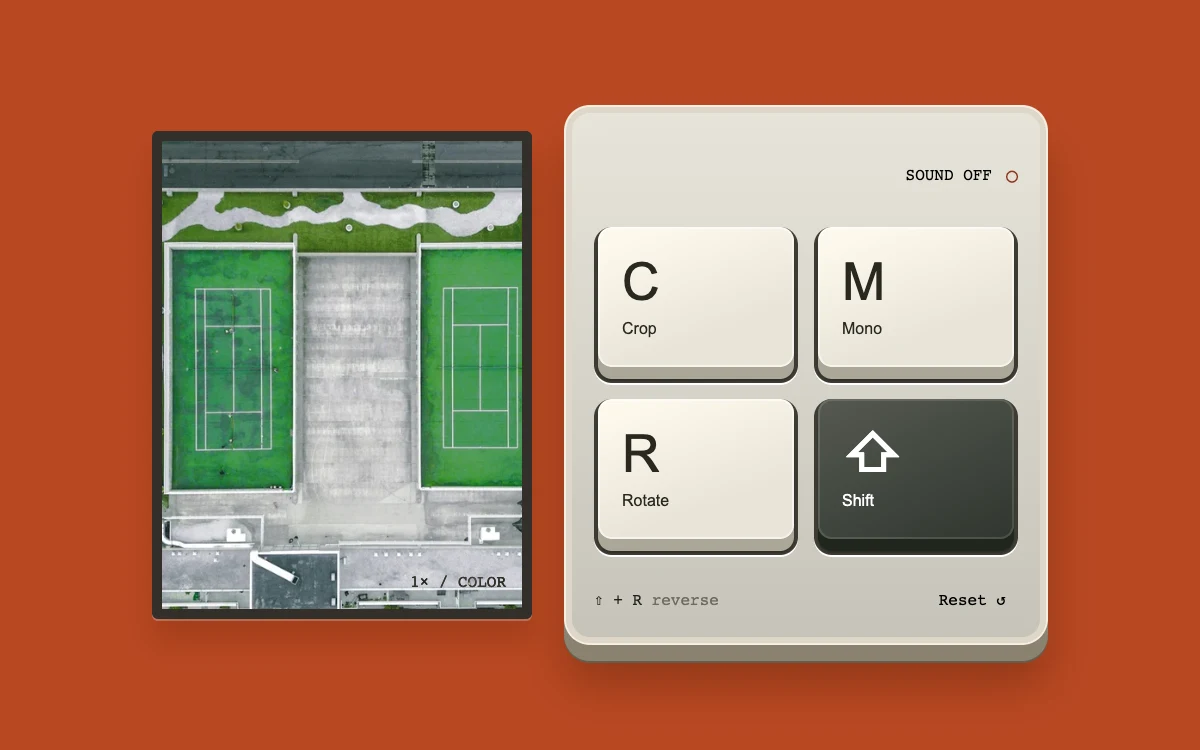
Press C, M and R or the keycaps. Hold Shift with R to rotate backward. Enable sound explicitly if desired.
Subframe Original · MIT
Add to your project
Component source
Standalone React component. Styles are included.
React only. No additional packages.
Download images (1)
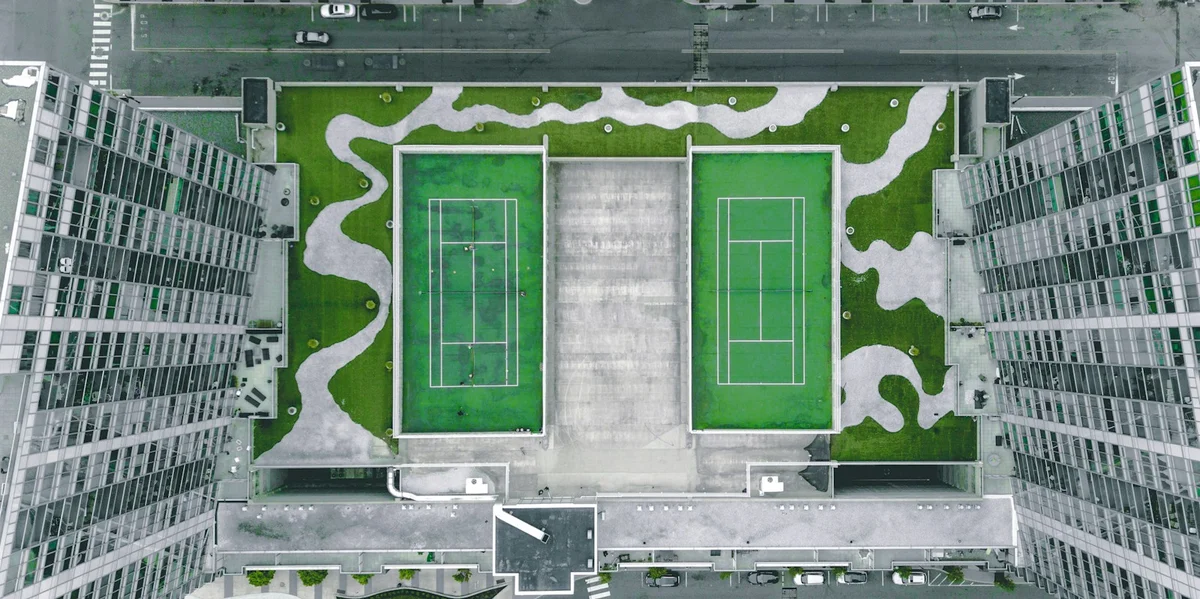
Save these files in your static assets folder at /motion/assets/, or update their paths in the component.
Render the default export inside a container with a defined height. Its optional active prop stops movement when false. This example works with React 19; Next.js projects can use it as a client component.
View source code
/**
 * MIT License
 * Copyright (c) 2026 Subframe
 *
 * Permission is hereby granted, free of charge, to any person obtaining a copy
 * of this software and associated documentation files (the "Software"), to deal
 * in the Software without restriction, including without limitation the rights
 * to use, copy, modify, merge, publish, distribute, sublicense, and/or sell
 * copies of the Software, and to permit persons to whom the Software is
 * furnished to do so, subject to the following conditions:
 *
 * The above copyright notice and this permission notice shall be included in all
 * copies or substantial portions of the Software.
 *
 * THE SOFTWARE IS PROVIDED "AS IS", WITHOUT WARRANTY OF ANY KIND, EXPRESS OR
 * IMPLIED, INCLUDING BUT NOT LIMITED TO THE WARRANTIES OF MERCHANTABILITY,
 * FITNESS FOR A PARTICULAR PURPOSE AND NONINFRINGEMENT. IN NO EVENT SHALL THE
 * AUTHORS OR COPYRIGHT HOLDERS BE LIABLE FOR ANY CLAIM, DAMAGES OR OTHER
 * LIABILITY, WHETHER IN AN ACTION OF CONTRACT, TORT OR OTHERWISE, ARISING FROM,
 * OUT OF OR IN CONNECTION WITH THE SOFTWARE OR THE USE OR OTHER DEALINGS IN THE
 * SOFTWARE.
 */
"use client"
import * as React from "react"

const KEYS = [
  { key: "c", label: "C", name: "Crop" },
  { key: "m", label: "M", name: "Mono" },
  { key: "r", label: "R", name: "Rotate" },
  { key: "shift", label: "⇧", name: "Shift" },
]
export default function Example({ active = true }: { active?: boolean }) {
  const [crop, setCrop] = React.useState(false),
    [mono, setMono] = React.useState(false),
    [turn, setTurn] = React.useState(0),
    [held, setHeld] = React.useState<string[]>([]),
    [sound, setSound] = React.useState(false)
  const pressed = React.useRef(new Map<string, string>()),
    audio = React.useRef<AudioContext | null>(null),
    enabled = React.useRef(false),
    shift = React.useRef(false)
  function release(token: string) {
    pressed.current.delete(token)
    shift.current = [...pressed.current.values()].includes("shift")
    setHeld([...pressed.current.values()])
  }
  function releaseAll() {
    pressed.current.clear()
    shift.current = false
    setHeld([])
  }
  function clickSound() {
    if (!enabled.current || !audio.current) return
    const ctx = audio.current
    if (ctx.state === "suspended") void ctx.resume()
    const oscillator = ctx.createOscillator(),
      gain = ctx.createGain()
    oscillator.type = "triangle"
    oscillator.frequency.setValueAtTime(420, ctx.currentTime)
    oscillator.frequency.exponentialRampToValueAtTime(85, ctx.currentTime + 0.035)
    gain.gain.setValueAtTime(0.11, ctx.currentTime)
    gain.gain.exponentialRampToValueAtTime(0.001, ctx.currentTime + 0.045)
    oscillator.connect(gain)
    gain.connect(ctx.destination)
    oscillator.start()
    oscillator.stop(ctx.currentTime + 0.05)
    oscillator.onended = () => {
      oscillator.disconnect()
      gain.disconnect()
    }
  }
  function press(key: string, token: string) {
    if (!active || pressed.current.has(token)) return
    pressed.current.set(token, key)
    shift.current = [...pressed.current.values()].includes("shift")
    setHeld([...pressed.current.values()])
    clickSound()
    if (key === "c") setCrop((v) => !v)
    if (key === "m") setMono((v) => !v)
    if (key === "r") setTurn((v) => v + (shift.current ? -1 : 1))
  }
  React.useEffect(() => {
    if (!active) releaseAll()
  }, [active])
  React.useEffect(() => {
    const clear = () => releaseAll()
    window.addEventListener("blur", clear)
    return () => {
      window.removeEventListener("blur", clear)
      void audio.current?.close()
    }
  }, [])
  async function toggleSound() {
    if (enabled.current) {
      enabled.current = false
      setSound(false)
      return
    }
    if (!("AudioContext" in window)) return
    try {
      audio.current ??= new AudioContext()
      await audio.current.resume()
      enabled.current = true
      setSound(true)
    } catch {
      enabled.current = false
      setSound(false)
    }
  }
  return (
    <div
      className="sf-tactile-keypad"
      onKeyDown={(e) => {
        if ((e.target as HTMLElement).tagName === "BUTTON" && (e.key === " " || e.key === "Enter")) return
        const key = e.key.toLowerCase()
        if (KEYS.some((k) => k.key === key)) {
          e.preventDefault()
          press(key, "keyboard-" + key)
        }
        if (e.key === "Escape") {
          setCrop(false)
          setMono(false)
          setTurn(0)
          releaseAll()
        }
      }}
      onKeyUp={(e) => release("keyboard-" + e.key.toLowerCase())}
      onBlur={(e) => {
        if (!e.currentTarget.contains(e.relatedTarget)) releaseAll()
      }}
    >
      <div className="tk-screen">
        <img
          src="/motion/assets/tennis-court.webp"
          alt="Two green tennis courts seen from directly above"
          draggable={false}
          style={{
            filter: mono ? "grayscale(1) contrast(1.25)" : "none",
            transform: `rotate(${turn * 90}deg) scale(calc(${crop ? 1.7 : 1.1} * ${
              Math.abs(turn % 2) ? "var(--tk-quarter-turn-scale,1.25)" : 1
            }))`,
          }}
        />
        <i>
          {crop ? "2×" : "1×"} / {mono ? "MONO" : "COLOR"}
        </i>
      </div>
      <div className="tk-body">
        <header>
          <button
            onClick={() => void toggleSound()}
            aria-pressed={sound}
            aria-label={sound ? "Disable key sound" : "Enable key sound"}
          >
            {sound ? "SOUND ON" : "SOUND OFF"}
            <span aria-hidden="true">{sound ? "●" : "○"}</span>
          </button>
        </header>
        <div className="tk-keys" role="group" aria-label="Image editing keypad">
          {KEYS.map(({ key, label, name }) => (
            <div className="tk-well" key={key}>
              <button
                className={"tk-key tk-" + key}
                aria-label={key === "shift" ? "Hold Shift while pressing R to rotate counterclockwise" : name}
                aria-pressed={key === "c" ? crop : key === "m" ? mono : held.includes(key)}
                data-down={held.includes(key)}
                onPointerDown={(e) => {
                  if (e.button !== 0) return
                  e.preventDefault()
                  e.currentTarget.focus()
                  e.currentTarget.setPointerCapture(e.pointerId)
                  press(key, "pointer-" + e.pointerId)
                }}
                onPointerUp={(e) => release("pointer-" + e.pointerId)}
                onPointerCancel={(e) => release("pointer-" + e.pointerId)}
                onLostPointerCapture={(e) => release("pointer-" + e.pointerId)}
                onKeyDown={(e) => {
                  if (e.key === " " || e.key === "Enter") {
                    e.preventDefault()
                    press(key, "button-" + key)
                  }
                }}
                onKeyUp={(e) => {
                  if (e.key === " " || e.key === "Enter") {
                    e.preventDefault()
                    release("button-" + key)
                  }
                }}
                onClick={(e) => {
                  if (e.detail === 0 && !held.includes(key)) {
                    press(key, "assistive-" + key)
                    release("assistive-" + key)
                  }
                }}
              >
                <span>{label}</span>
                <small>{name}</small>
              </button>
            </div>
          ))}
        </div>
        <footer>
          <span>
            ⇧ + R <i>reverse</i>
          </span>
          <button
            onClick={() => {
              setCrop(false)
              setMono(false)
              setTurn(0)
            }}
          >
            Reset ↺
          </button>
        </footer>
      </div>
      <style>{`.sf-tactile-keypad{box-sizing:border-box;width:100%;height:100%;min-height:280px;display:flex;align-items:center;justify-content:center;gap:16px;padding:20px 14px;background:#b94822;color:#23221f;font-family:Arial,sans-serif;overflow:hidden;container-type:size}.sf-tactile-keypad *{box-sizing:border-box}.sf-tactile-keypad .tk-screen{position:relative;width:190px;height:244px;flex-shrink:0;background:#252b2a;overflow:hidden;border:5px solid #332f29;border-radius:3px;box-shadow:0 12px 14px #52170035,0 1px 0 #ffffff4d}.sf-tactile-keypad .tk-screen img{width:100%;height:100%;object-fit:cover;user-select:none}.sf-tactile-keypad .tk-screen>i{position:absolute;color:white;font:8px monospace;mix-blend-mode:difference;font-style:normal}.sf-tactile-keypad .tk-screen>i{bottom:9px;right:8px}.sf-tactile-keypad .tk-body{padding:12px 14px 0;width:242px;background:linear-gradient(#e8e4da,#c6c3b9);border-radius:13px;border:1px solid #f6eee0;box-shadow:0 8px 0 #8a8271,0 9px 0 #655e4e,0 20px 22px #56200a65,inset 0 0 0 3px #ddd7ca;flex-shrink:0}.sf-tactile-keypad header{display:flex;align-items:center;justify-content:flex-end;gap:8px;margin-bottom:4px}.sf-tactile-keypad header button{border:0;background:none;padding:0;font:8px monospace;height:44px;cursor:pointer;display:flex;gap:7px;align-items:center}.sf-tactile-keypad header button span{font-size:10px;color:#8b351c}.sf-tactile-keypad .tk-keys{display:grid;grid-template-columns:1fr 1fr;gap:8px}.sf-tactile-keypad .tk-well{height:78px;background:#3e3c35;border-radius:9px;padding:2px;box-shadow:0 1px 0 #fff}.sf-tactile-keypad .tk-key{width:100%;height:70px;position:relative;border:0;border-radius:7px;background:linear-gradient(160deg,#fcf8ed 12%,#e9e4d7 70%);color:#282820;box-shadow:0 6px 0 #aba798,0 7px 1px #15181466,inset 0 0 0 1px #ffffff90;transform:translateY(-2px);cursor:pointer;touch-action:none;text-align:left;padding:10px 12px;transition:transform 80ms ease-out,box-shadow 80ms ease-out;user-select:none}.sf-tactile-keypad .tk-key>span{font-size:26px;line-height:1;font-weight:500}.sf-tactile-keypad .tk-key small{font-size:8px;display:block;margin-top:6px}.sf-tactile-keypad .tk-shift{background:linear-gradient(155deg,#555951,#30362f);color:#fff;box-shadow:0 6px 0 #20261e,0 7px 1px #15181466,inset 0 0 0 1px #ffffff20}.sf-tactile-keypad .tk-key[data-down=true]{transform:translateY(3px);box-shadow:0 1px 0 #7c7c70,inset 0 0 0 1px #ffffff50;transition:none}.sf-tactile-keypad footer{display:flex;justify-content:space-between;align-items:center;font:8px monospace;min-height:40px}.sf-tactile-keypad footer i{font-style:normal;color:#6e6d61}.sf-tactile-keypad footer button{background:none;border:0;font:8px monospace;cursor:pointer;min-height:44px;min-width:44px}.sf-tactile-keypad button:focus-visible{outline:2px solid #235c99;outline-offset:3px}@container(max-width:440px){.sf-tactile-keypad{gap:12px;padding:20px 12px}.sf-tactile-keypad .tk-screen{--tk-quarter-turn-scale:2.05;width:100px;height:214px;border-width:3px}.sf-tactile-keypad .tk-body{width:170px;padding:6px 9px 0;border-radius:10px}.sf-tactile-keypad .tk-keys{gap:6px}.sf-tactile-keypad .tk-well{height:65px}.sf-tactile-keypad .tk-key{height:57px;padding:7px 10px}.sf-tactile-keypad .tk-key>span{font-size:22px}.sf-tactile-keypad header button{font-size:6px;gap:3px}.sf-tactile-keypad footer{font-size:7px}.sf-tactile-keypad footer i{display:none}}@media(prefers-reduced-motion:reduce){.sf-tactile-keypad .tk-key{transition:none}}`}</style>
    </div>
  )
}
Where it works well
Make infrequent creative shortcuts discoverable through a small, functioning material control.
Reduced motion
Keys change depth immediately; image edits do not animate.
Things to know
Local image transformations only. Optional switch sound is synthesized with Web Audio after explicit opt-in.