
Sounds with a shape
Three graphic record sleeves rotate through a compact, tactile collection.
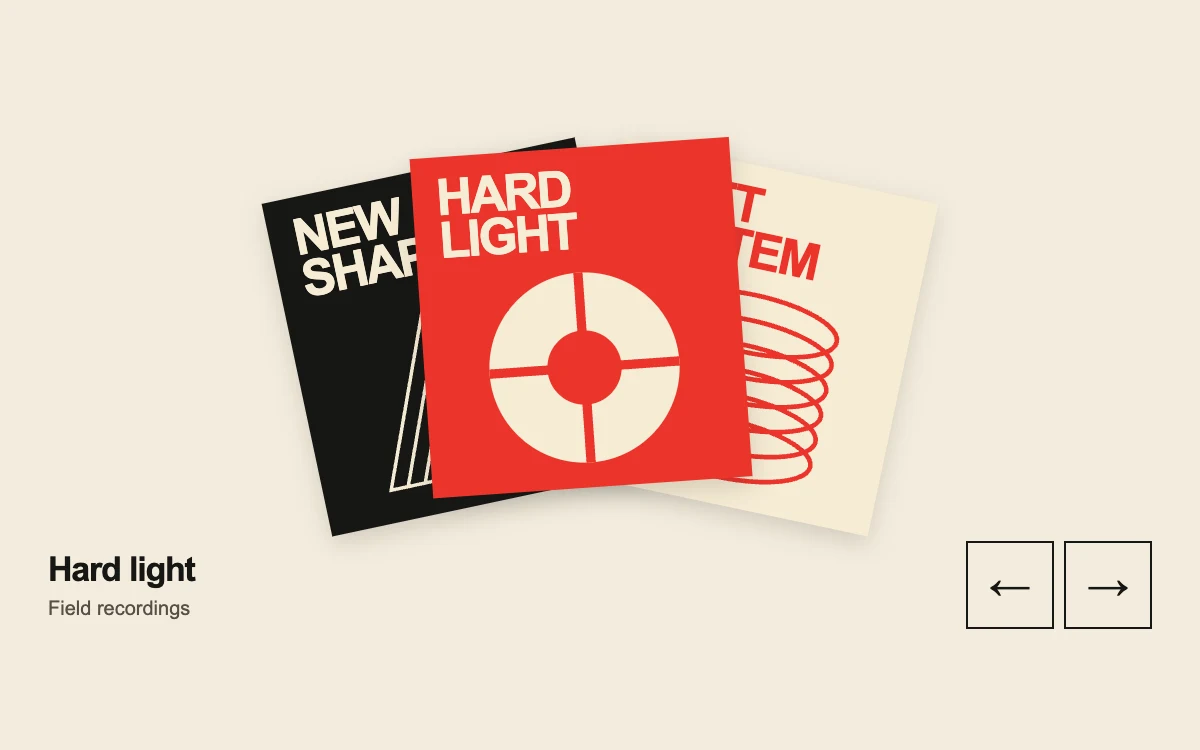
Select a sleeve or browse with the arrow buttons
Subframe Original · MIT
Add to your project
Component source
Standalone React component. Styles are included.
React only. No additional packages.
Render the default export inside a container with a defined height. Its optional active prop stops movement when false. This example works with React 19; Next.js projects can use it as a client component.
View source code
/**
 * MIT License
 *
 * Copyright (c) 2026 Subframe
 *
 * Permission is hereby granted, free of charge, to any person obtaining a copy
 * of this software and associated documentation files (the "Software"), to deal
 * in the Software without restriction, including without limitation the rights
 * to use, copy, modify, merge, publish, distribute, sublicense, and/or sell
 * copies of the Software, and to permit persons to whom the Software is
 * furnished to do so, subject to the following conditions:
 *
 * The above copyright notice and this permission notice shall be included in all
 * copies or substantial portions of the Software.
 *
 * THE SOFTWARE IS PROVIDED "AS IS", WITHOUT WARRANTY OF ANY KIND, EXPRESS OR
 * IMPLIED, INCLUDING BUT NOT LIMITED TO THE WARRANTIES OF MERCHANTABILITY,
 * FITNESS FOR A PARTICULAR PURPOSE AND NONINFRINGEMENT. IN NO EVENT SHALL THE
 * AUTHORS OR COPYRIGHT HOLDERS BE LIABLE FOR ANY CLAIM, DAMAGES OR OTHER
 * LIABILITY, WHETHER IN AN ACTION OF CONTRACT, TORT OR OTHERWISE, ARISING FROM,
 * OUT OF OR IN CONNECTION WITH THE SOFTWARE OR THE USE OR OTHER DEALINGS IN THE
 * SOFTWARE.
 */

"use client"

import { useState } from "react"

const records = [
  {
    title: "Hard light",
    artist: "Field recordings",
    color: "#ec342b",
    ink: "#f6ebd4",
    word: "HARD",
    second: "LIGHT",
  },
  {
    title: "Soft system",
    artist: "Electronic works",
    color: "#f6ebd4",
    ink: "#ec342b",
    word: "SOFT",
    second: "SYSTEM",
  },
  { title: "New shape", artist: "Rhythm studies", color: "#171714", ink: "#f6ebd4", word: "NEW", second: "SHAPE" },
]

function SleeveArt({ index }: { index: number }) {
  const record = records[index]
  return (
    <svg viewBox="0 0 200 200" aria-hidden="true" style={{ color: record.ink }}>
      {index === 0 ? (
        <>
          <circle cx="100" cy="100" r="82" fill="currentColor" />
          <path d="M100 18V182M18 100H182" stroke={record.color} strokeWidth="8" />
          <circle cx="100" cy="100" r="32" fill={record.color} />
        </>
      ) : index === 1 ? (
        <>
          {[0, 1, 2, 3, 4, 5].map((value) => (
            <ellipse
              key={value}
              cx="100"
              cy={45 + value * 22}
              rx="77"
              ry="25"
              fill="none"
              stroke="currentColor"
              strokeWidth="4"
            />
          ))}
        </>
      ) : (
        <>
          {[0, 1, 2, 3, 4].map((value) => (
            <path
              key={value}
              d={`M${20 + value * 15} 175 L${80 + value * 15} 25 L${110 + value * 15} 175Z`}
              fill="none"
              stroke="currentColor"
              strokeWidth="3"
            />
          ))}
        </>
      )}
    </svg>
  )
}

export default function SleeveStack({ active = true }: { active?: boolean }) {
  const [selected, setSelected] = useState(0)
  const [instant, setInstant] = useState(false)
  const choose = (value: number, keyboard: boolean) => {
    setInstant(keyboard)
    setSelected((value + records.length) % records.length)
  }
  return (
    <div className="sf-sleeves" data-active={active} data-instant={instant}>
      <style>{`
        .sf-sleeves{container-type:inline-size;width:100%;height:100%;min-height:300px;box-sizing:border-box;padding:18px 24px;background:#f3ecdd;color:#171714;overflow:hidden;font-family:Arial,sans-serif;display:flex;flex-direction:column;justify-content:center}.sf-sleeves *{box-sizing:border-box}.sf-sleeves-stage{position:relative;height:210px;width:100%;max-width:440px;margin:0 auto}.sf-sleeves-card{position:absolute;left:50%;top:18px;width:160px;height:170px;margin-left:-80px;padding:0;border:0;background:transparent;cursor:pointer;transform-origin:50% 130%;transition:transform 280ms cubic-bezier(.19,1,.22,1);text-align:left}.sf-sleeves-cover{display:flex;flex-direction:column;height:100%;width:100%;padding:10px 12px;box-shadow:0 4px 12px #16171328;overflow:hidden;transition:transform 150ms cubic-bezier(.19,1,.22,1)}.sf-sleeves-cover strong{font-size:25px;line-height:.86;letter-spacing:-1.3px;position:relative;z-index:1}.sf-sleeves-cover svg{position:absolute;width:116px;height:116px;left:22px;bottom:2px}.sf-sleeves-card:focus-visible{outline:2px solid #ec342b;outline-offset:5px}.sf-sleeves-foot{display:flex;align-items:center;justify-content:space-between;gap:8px;position:relative;z-index:5}.sf-sleeves-foot strong{display:block;font-size:17px;letter-spacing:-.6px}.sf-sleeves-foot p{margin:4px 0 0;font-size:10px;color:#554f46}.sf-sleeves-nav{display:flex;gap:5px}.sf-sleeves-nav button{width:44px;height:44px;border:1px solid #171714;background:transparent;color:#171714;cursor:pointer;font-size:21px}.sf-sleeves-nav button:active{background:#171714;color:#f3ecdd}.sf-sleeves-nav button:focus-visible{outline:2px solid #ec342b;outline-offset:3px}.sf-sleeves[data-active=false] *,.sf-sleeves[data-instant=true] *{transition:none!important}@media(hover:hover) and (pointer:fine){.sf-sleeves-card:hover .sf-sleeves-cover{transform:translateY(-5px)}}@media(prefers-reduced-motion:reduce){.sf-sleeves *{transition:none!important}.sf-sleeves-card:hover .sf-sleeves-cover{transform:none}}@container(max-width:360px){.sf-sleeves{padding:18px}.sf-sleeves-card{width:139px;height:157px;margin-left:-69.5px}.sf-sleeves-cover strong{font-size:22px}.sf-sleeves-cover svg{width:100px;height:100px;left:19px}.sf-sleeves-stage{height:202px}}
      `}</style>
      <div className="sf-sleeves-stage" aria-label="Record collection">
        {records.map((record, index) => {
          const position = (index - selected + 3) % 3
          const shift = position === 0 ? 0 : position === 1 ? 45 : -45
          const angle = position === 0 ? -4 : position === 1 ? 12 : -12
          return (
            <button
              type="button"
              className="sf-sleeves-card"
              key={record.title}
              aria-label={`Select ${record.title}`}
              aria-pressed={index === selected}
              onClick={(event) => choose(index, event.detail === 0)}
              style={{
                transform: `translate(${shift}px,${position === 0 ? -5 : 2}px) rotate(${angle}deg)`,
                zIndex: position === 0 ? 3 : position === 1 ? 2 : 1,
              }}
            >
              <span className="sf-sleeves-cover" style={{ background: record.color, color: record.ink }}>
                <strong>
                  {record.word}
                  <br />
                  {record.second}
                </strong>
                <SleeveArt index={index} />
              </span>
            </button>
          )
        })}
      </div>
      <div className="sf-sleeves-foot">
        <div aria-live="polite">
          <strong>{records[selected].title}</strong>
          <p>{records[selected].artist}</p>
        </div>
        <div className="sf-sleeves-nav">
          <button
            type="button"
            aria-label="Previous record"
            onClick={(event) => choose(selected - 1, event.detail === 0)}
          >
            ←
          </button>
          <button type="button" aria-label="Next record" onClick={(event) => choose(selected + 1, event.detail === 0)}>
            →
          </button>
        </div>
      </div>
    </div>
  )
}
Where it works well
Let a small music, print or editorial collection retain its physical character while making one item the focus.
Reduced motion
Selection changes directly with no interpolated rotation or hover lift. Keyboard activation also skips transitions.
Things to know
A deliberately small three-item collection; use a list or grid for large inventories. The preview does not play music or navigate to product pages.