
An evening, together
A small theatre plan answers every seat choice with a restrained lift and a live reservation total.
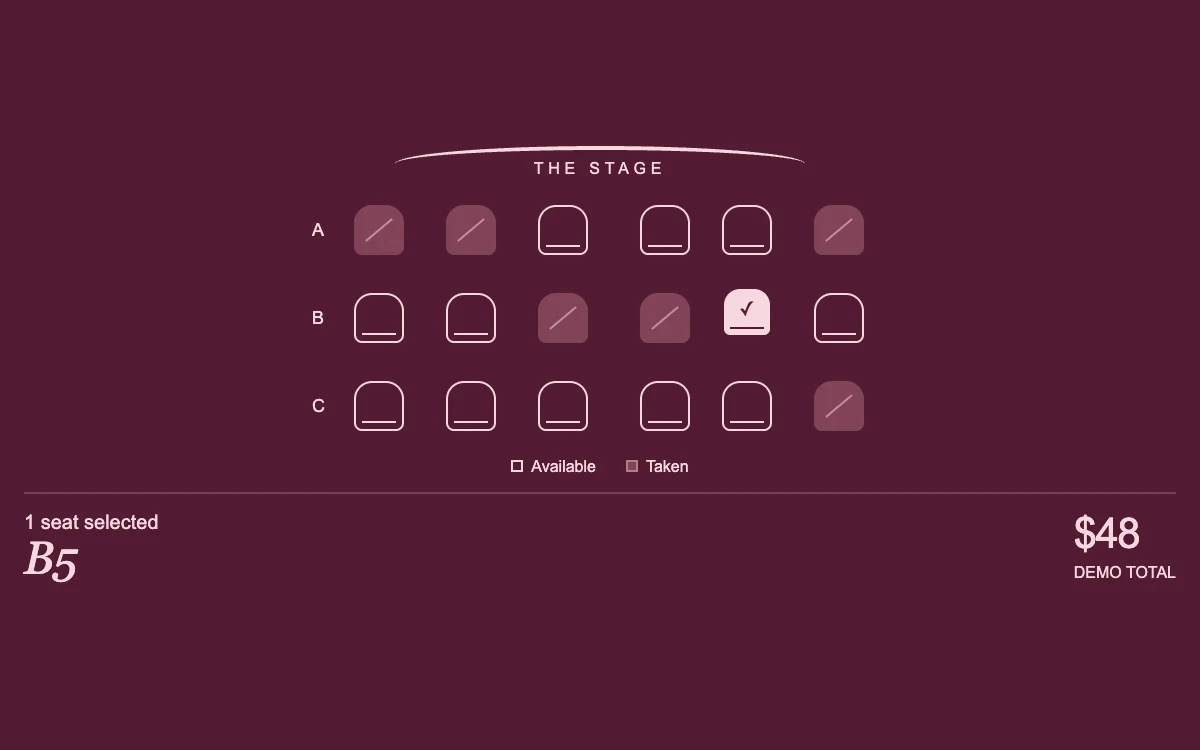
Choose up to two available seats
Subframe Original · MIT
Add to your project
Component source
Standalone React component. Styles are included.
React only. No additional packages.
Render the default export inside a container with a defined height. Its optional active prop stops movement when false. This example works with React 19; Next.js projects can use it as a client component.
View source code
/**
 * MIT License
 *
 * Copyright (c) 2026 Subframe
 *
 * Permission is hereby granted, free of charge, to any person obtaining a copy
 * of this software and associated documentation files (the "Software"), to deal
 * in the Software without restriction, including without limitation the rights
 * to use, copy, modify, merge, publish, distribute, sublicense, and/or sell
 * copies of the Software, and to permit persons to whom the Software is
 * furnished to do so, subject to the following conditions:
 *
 * The above copyright notice and this permission notice shall be included in all
 * copies or substantial portions of the Software.
 *
 * THE SOFTWARE IS PROVIDED "AS IS", WITHOUT WARRANTY OF ANY KIND, EXPRESS OR
 * IMPLIED, INCLUDING BUT NOT LIMITED TO THE WARRANTIES OF MERCHANTABILITY,
 * FITNESS FOR A PARTICULAR PURPOSE AND NONINFRINGEMENT. IN NO EVENT SHALL THE
 * AUTHORS OR COPYRIGHT HOLDERS BE LIABLE FOR ANY CLAIM, DAMAGES OR OTHER
 * LIABILITY, WHETHER IN AN ACTION OF CONTRACT, TORT OR OTHERWISE, ARISING FROM,
 * OUT OF OR IN CONNECTION WITH THE SOFTWARE OR THE USE OR OTHER DEALINGS IN THE
 * SOFTWARE.
 */

"use client"

import { useState } from "react"

const rows = ["A", "B", "C"]
const unavailable = ["A1", "A2", "A6", "B3", "B4", "C6"]

export default function SeatPicker({ active = true }: { active?: boolean }) {
  const [selected, setSelected] = useState<string[]>(["B5"])
  const [instant, setInstant] = useState(false)
  const [message, setMessage] = useState("")
  const toggle = (seat: string, keyboard: boolean) => {
    setInstant(keyboard)
    if (selected.includes(seat)) {
      setSelected(selected.filter((value) => value !== seat))
      setMessage("")
    } else if (selected.length < 2) {
      setSelected([...selected, seat])
      setMessage("")
    } else setMessage("Choose up to two seats. Deselect one to change your choice.")
  }
  return (
    <div className="sf-seats" data-active={active} data-instant={instant}>
      <style>{`
        .sf-seats{width:100%;height:100%;min-height:300px;container-type:inline-size;box-sizing:border-box;background:#521b32;color:#f7d8df;padding:16px 12px;display:flex;flex-direction:column;justify-content:center;font-family:Arial,sans-serif;overflow:hidden}.sf-seats *{box-sizing:border-box}.sf-seats-stage{position:relative;text-align:center;font:8px Arial,sans-serif;letter-spacing:.3em;margin:6px auto 2px;width:205px;height:18px;border-top:2px solid #f7d8df;border-radius:50%}.sf-seats-stage span{position:relative;top:5px}.sf-seats-rows{align-self:center;display:grid;gap:0;position:relative}.sf-seats-row{display:grid;grid-template-columns:12px repeat(6,44px);gap:2px;align-items:center}.sf-seats-row-label{font-size:9px}.sf-seats-seat{width:44px;height:44px;background:transparent;padding:8px 7px;border:0;cursor:pointer;position:relative;color:#f7d8df}.sf-seats-seat:nth-of-type(4){margin-left:5px}.sf-seats-shape{display:flex;width:25px;height:25px;border:1px solid currentColor;border-radius:9px 9px 4px 4px;align-items:center;justify-content:center;position:relative;transition:transform 180ms cubic-bezier(.19,1,.22,1),background-color 140ms ease;transform-origin:center bottom}.sf-seats-shape:after{content:"";position:absolute;left:3px;right:3px;bottom:3px;border-bottom:1px solid currentColor}.sf-seats-seat[aria-pressed=true] .sf-seats-shape{background:#f7d8df;color:#521b32;transform:translateY(-3px)}.sf-seats-seat:disabled{cursor:not-allowed;color:#c18f9e}.sf-seats-seat:disabled .sf-seats-shape{border-color:transparent;background:#824358}.sf-seats-seat:disabled .sf-seats-shape:after{transform:rotate(-40deg);bottom:11px}.sf-seats-shape span{font-size:10px;line-height:1;margin-top:-3px}.sf-seats-seat:focus-visible{outline:2px solid #f7d8df;outline-offset:0;border-radius:4px}.sf-seats-summary{margin-top:8px;padding-top:8px;border-top:1px solid #f7d8df35;display:flex;align-items:center;justify-content:space-between;gap:10px}.sf-seats-summary p{margin:0;font-size:10px;min-height:12px}.sf-seats-summary strong{font:italic 23px/1 Georgia,serif;letter-spacing:-.6px}.sf-seats-price{font-size:21px;font-weight:500;letter-spacing:-.8px}.sf-seats-price small{display:block;font-size:8px;letter-spacing:0;margin-top:3px}.sf-seats-error{height:11px;margin:6px 0 0;font-size:9px;line-height:1.1}.sf-seats-legend{display:flex;justify-content:center;gap:15px;margin:4px 0 0;font-size:8px}.sf-seats-legend i{display:inline-block;width:6px;height:6px;border:1px solid #f7d8df;margin-right:4px}.sf-seats-legend span:last-child i{background:#824358;border-color:#b47b8c}.sf-seats[data-active=false] *,.sf-seats[data-instant=true] *{transition:none!important}@media(hover:hover) and (pointer:fine){.sf-seats-seat:not(:disabled):hover .sf-seats-shape{transform:translateY(-3px)}}@media(prefers-reduced-motion:reduce){.sf-seats *{transition:none!important}.sf-seats-shape{transform:none!important}}
      `}</style>
      <div className="sf-seats-stage" aria-hidden="true">
        <span>THE STAGE</span>
      </div>
      <div className="sf-seats-rows" role="group" aria-label="Choose up to two theatre seats">
        {rows.map((row) => (
          <div className="sf-seats-row" key={row}>
            <span className="sf-seats-row-label" aria-hidden="true">
              {row}
            </span>
            {Array.from({ length: 6 }, (_, index) => {
              const seat = `${row}${index + 1}`
              const reserved = unavailable.includes(seat)
              return (
                <button
                  type="button"
                  className="sf-seats-seat"
                  key={seat}
                  disabled={reserved}
                  aria-label={`${seat}${reserved ? ", unavailable" : ", $48"}`}
                  aria-pressed={selected.includes(seat)}
                  onClick={(event) => toggle(seat, event.detail === 0)}
                >
                  <span className="sf-seats-shape">
                    <span>{selected.includes(seat) ? "✓" : ""}</span>
                  </span>
                </button>
              )
            })}
          </div>
        ))}
      </div>
      <div className="sf-seats-legend" aria-hidden="true">
        <span>
          <i />
          Available
        </span>
        <span>
          <i />
          Taken
        </span>
      </div>
      <div className="sf-seats-summary" aria-live="polite">
        <div>
          <p>
            {selected.length
              ? `${selected.length} seat${selected.length > 1 ? "s" : ""} selected`
              : "No seats selected"}
          </p>
          <strong>{selected.length ? selected.join(" + ") : "—"}</strong>
        </div>
        <div className="sf-seats-price">
          ${selected.length * 48}
          <small>DEMO TOTAL</small>
        </div>
      </div>
      <p className="sf-seats-error" role="status">
        {message}
      </p>
    </div>
  )
}
Where it works well
Make a small venue's availability and seat selection legible without burying the experience in checkout chrome.
Reduced motion
Selection changes color and check state without lift. Keyboard selections also update immediately.
Things to know
Local demonstration with fixed availability and a two-seat limit. Real booking requires server-side holds, live inventory, prices and checkout.