
Make space
Three oversized digital channels turn level, mute and solo into a graphic rhythm surface.
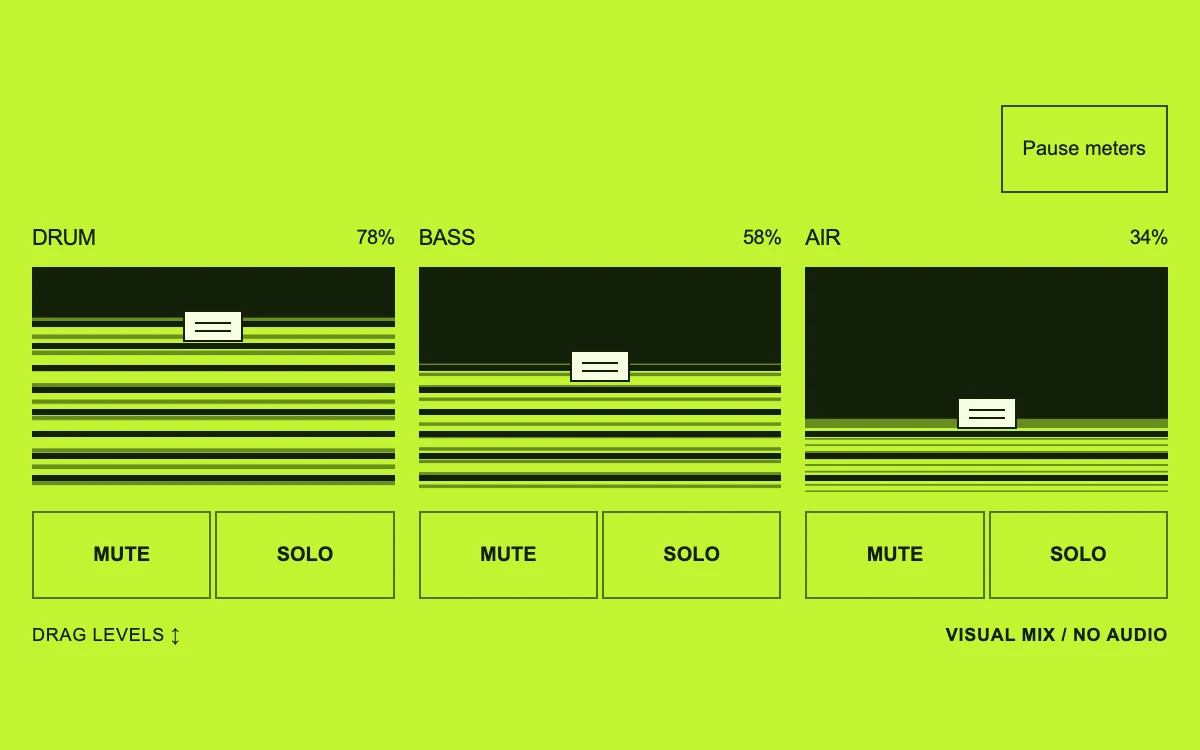
Drag levels, mute channels, or isolate a solo
Subframe Original · MIT
Add to your project
Component source
Standalone React component. Styles are included.
React only. No additional packages.
Render the default export inside a container with a defined height. Its optional active prop stops movement when false. This example works with React 19; Next.js projects can use it as a client component.
View source code
/**
 * MIT License
 *
 * Copyright (c) 2026 Subframe
 *
 * Permission is hereby granted, free of charge, to any person obtaining a copy
 * of this software and associated documentation files (the "Software"), to deal
 * in the Software without restriction, including without limitation the rights
 * to use, copy, modify, merge, publish, distribute, sublicense, and/or sell
 * copies of the Software, and to permit persons to whom the Software is
 * furnished to do so, subject to the following conditions:
 *
 * The above copyright notice and this permission notice shall be included in all
 * copies or substantial portions of the Software.
 *
 * THE SOFTWARE IS PROVIDED "AS IS", WITHOUT WARRANTY OF ANY KIND, EXPRESS OR
 * IMPLIED, INCLUDING BUT NOT LIMITED TO THE WARRANTIES OF MERCHANTABILITY,
 * FITNESS FOR A PARTICULAR PURPOSE AND NONINFRINGEMENT. IN NO EVENT SHALL THE
 * AUTHORS OR COPYRIGHT HOLDERS BE LIABLE FOR ANY CLAIM, DAMAGES OR OTHER
 * LIABILITY, WHETHER IN AN ACTION OF CONTRACT, TORT OR OTHERWISE, ARISING FROM,
 * OUT OF OR IN CONNECTION WITH THE SOFTWARE OR THE USE OR OTHER DEALINGS IN THE
 * SOFTWARE.
 */

"use client"

import { useState } from "react"

const channels = ["DRUM", "BASS", "AIR"]

export default function MixingDesk({ active = true }: { active?: boolean }) {
  const [levels, setLevels] = useState([78, 58, 34])
  const [muted, setMuted] = useState<boolean[]>([false, false, false])
  const [solo, setSolo] = useState<number | null>(null)
  const [meters, setMeters] = useState(true)
  return (
    <div className="sf-mix" data-active={active && meters}>
      <style>{`
        .sf-mix{width:100%;height:100%;min-height:300px;container-type:inline-size;box-sizing:border-box;padding:18px 16px;background:#c2f431;color:#14200a;font-family:Arial,sans-serif;overflow:hidden;display:flex;flex-direction:column;justify-content:center}.sf-mix *{box-sizing:border-box}.sf-mix-header{display:flex;justify-content:flex-end;align-items:flex-end;margin-bottom:16px}.sf-mix-header button{height:44px;border:1px solid #324d10;border-radius:0;background:transparent;color:#14200a;padding:0 10px;font:10px Arial,sans-serif;cursor:pointer}.sf-mix-channels{display:grid;grid-template-columns:repeat(3,minmax(0,1fr));gap:12px}.sf-mix-channel{min-width:0}.sf-mix-channel-label{display:flex;align-items:center;justify-content:space-between;margin-bottom:8px;font-size:11px;letter-spacing:-.3px}.sf-mix-channel-label strong{font-size:10px;font-variant-numeric:tabular-nums;font-weight:400}.sf-mix-fader{height:115px;position:relative;background:#14200a;overflow:hidden}.sf-mix-fill{position:absolute;inset:0;background:#678e20;transform-origin:bottom;pointer-events:none}.sf-mix-signal{position:absolute;inset:0;background:repeating-linear-gradient(0deg,#c2f431 0 8px,transparent 8px 11px);transform-origin:bottom;animation:sf-mix-level 750ms linear infinite alternate;animation-play-state:paused}.sf-mix[data-active=true] .sf-mix-signal{animation-play-state:running}.sf-mix-signal[data-silent=true]{visibility:hidden}.sf-mix-fader:after{content:"";position:absolute;left:0;right:0;top:0;bottom:0;background:repeating-linear-gradient(0deg,transparent 0 8px,#14200a 8px 11px);pointer-events:none}.sf-mix-handle{position:absolute;left:50%;width:30px;height:16px;margin-left:-15px;background:#f7ffe2;border:1px solid #14200a;pointer-events:none;z-index:2}.sf-mix-handle:after{content:"";position:absolute;left:5px;right:5px;top:5px;height:3px;border-block:1px solid #14200a}.sf-mix-range{position:absolute;inset:0;width:100%;height:100%;margin:0;opacity:0;writing-mode:vertical-lr;direction:rtl;cursor:ns-resize;z-index:3}.sf-mix-fader:has(input:focus-visible){outline:2px solid #14200a;outline-offset:3px}.sf-mix-switches{display:flex;gap:2px;margin-top:7px}.sf-mix-switches button{height:44px;flex:1;min-width:0;background:transparent;border:1px solid #50741a;color:#14200a;font:bold 10px Arial,sans-serif;cursor:pointer;position:relative}.sf-mix-switches button[aria-pressed=true]{background:#14200a;color:#c2f431}.sf-mix-switches button:focus-visible,.sf-mix-header button:focus-visible{outline:2px solid #14200a;outline-offset:3px}.sf-mix-foot{display:flex;justify-content:space-between;margin-top:13px;font-size:9px;letter-spacing:.04em}.sf-mix-foot span:last-child{font-weight:bold}.sf-mix[data-active=false] .sf-mix-signal{animation-play-state:paused}@keyframes sf-mix-level{0%{transform:scaleY(.6)}20%{transform:scaleY(.9)}45%{transform:scaleY(.69)}70%{transform:scaleY(1)}100%{transform:scaleY(.8)}}@media(prefers-reduced-motion:reduce){.sf-mix-signal{animation:none;transform:scaleY(.75)}}@container(max-width:360px){.sf-mix-channels{gap:8px}.sf-mix-header button{padding:0 8px}.sf-mix-fader{height:110px}}
      `}</style>
      <div className="sf-mix-header">
        <button type="button" aria-pressed={meters} onClick={() => setMeters(!meters)}>
          {meters ? "Pause meters" : "Play meters"}
        </button>
      </div>
      <div className="sf-mix-channels">
        {channels.map((channel, index) => {
          const silent = muted[index] || (solo !== null && solo !== index)
          return (
            <div className="sf-mix-channel" key={channel}>
              <div className="sf-mix-channel-label">
                <span>{channel}</span>
                <strong>{levels[index]}%</strong>
              </div>
              <div className="sf-mix-fader">
                <div className="sf-mix-fill" style={{ transform: `scaleY(${levels[index] / 100})` }}>
                  <div
                    className="sf-mix-signal"
                    data-silent={silent}
                    style={{ animationDelay: `${index * -220}ms`, animationDuration: `${750 + index * 110}ms` }}
                  />
                </div>
                <div
                  className="sf-mix-handle"
                  style={{ bottom: `calc(${levels[index]}% - ${levels[index] * 0.16}px)` }}
                />
                <input
                  className="sf-mix-range"
                  type="range"
                  aria-label={`${channel} volume`}
                  aria-valuetext={`${levels[index]} percent${silent ? ", silent" : ""}`}
                  min="0"
                  max="100"
                  step="1"
                  value={levels[index]}
                  onChange={(event) => {
                    const value = Number(event.target.value)
                    setLevels((previous) => previous.map((level, item) => (item === index ? value : level)))
                  }}
                />
              </div>
              <div className="sf-mix-switches">
                <button
                  type="button"
                  aria-label={`Mute ${channel}`}
                  aria-pressed={muted[index]}
                  onClick={() =>
                    setMuted((previous) => previous.map((value, item) => (item === index ? !value : value)))
                  }
                >
                  MUTE
                </button>
                <button
                  type="button"
                  aria-label={`Solo ${channel}`}
                  aria-pressed={solo === index}
                  onClick={() => setSolo(solo === index ? null : index)}
                >
                  SOLO
                </button>
              </div>
            </div>
          )
        })}
      </div>
      <div className="sf-mix-foot">
        <span>DRAG LEVELS ↕</span>
        <span>VISUAL MIX / NO AUDIO</span>
      </div>
    </div>
  )
}
Where it works well
Expose the relationship between independent channels and a final composition in an audio tool or a layered visual editor.
Reduced motion
Meter animation becomes a stable representative level while volume, mute and solo remain usable.
Things to know
Visual control demo with synthetic meters and no sound. Wire levels to actual gain and meter values to an analyser; percentages are not a calibrated decibel scale.