
Stereo field
A stereo vector plot connects phase and width controls to a continuous trace and correlation meter.
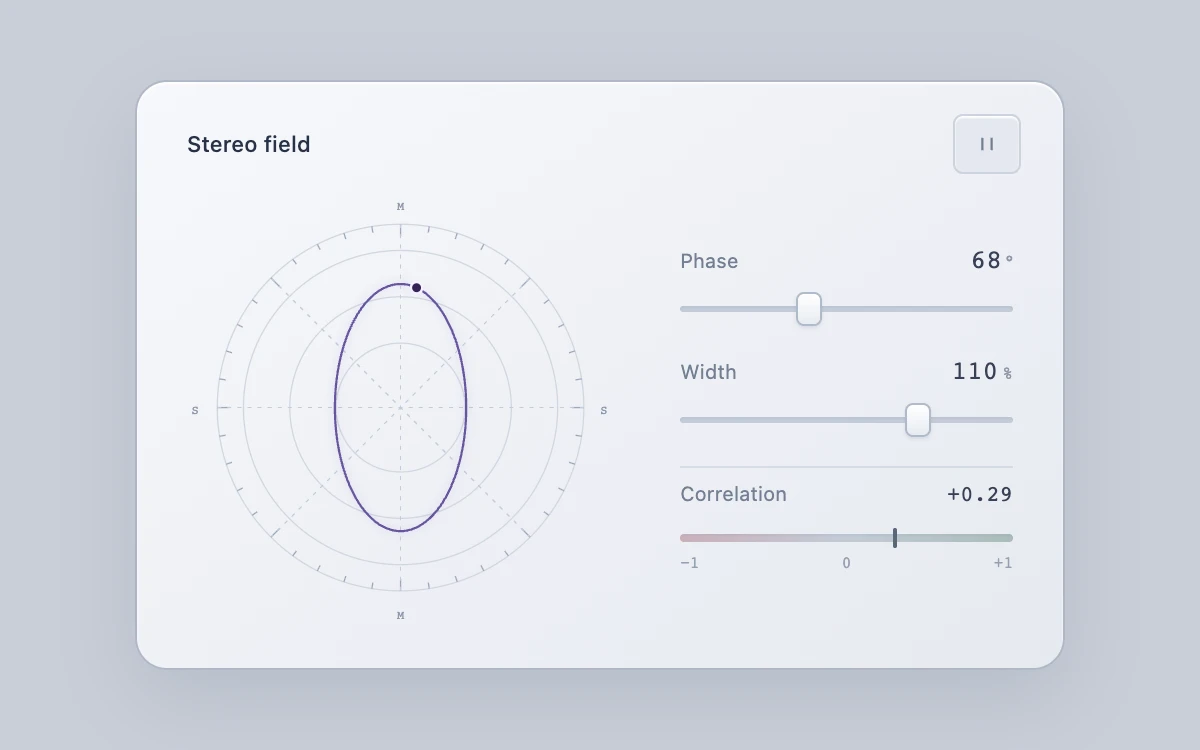
Adjust phase and width, inspect correlation, and pause or resume the trace.
Subframe Original · MIT
Add to your project
Component source
Standalone React component. Styles are included.
React only. No additional packages.
Render the default export inside a container with a defined height. Its optional active prop stops movement when false. This example works with React 19; Next.js projects can use it as a client component.
View source code
/**
 * MIT License
 * Copyright (c) 2026 Subframe
 *
 * Permission is hereby granted, free of charge, to any person obtaining a copy
 * of this software and associated documentation files (the "Software"), to deal
 * in the Software without restriction, including without limitation the rights
 * to use, copy, modify, merge, publish, distribute, sublicense, and/or sell
 * copies of the Software, and to permit persons to whom the Software is
 * furnished to do so, subject to the following conditions:
 *
 * The above copyright notice and this permission notice shall be included in all
 * copies or substantial portions of the Software.
 *
 * THE SOFTWARE IS PROVIDED "AS IS", WITHOUT WARRANTY OF ANY KIND, EXPRESS OR
 * IMPLIED, INCLUDING BUT NOT LIMITED TO THE WARRANTIES OF MERCHANTABILITY,
 * FITNESS FOR A PARTICULAR PURPOSE AND NONINFRINGEMENT. IN NO EVENT SHALL THE
 * AUTHORS OR COPYRIGHT HOLDERS BE LIABLE FOR ANY CLAIM, DAMAGES OR OTHER
 * LIABILITY, WHETHER IN AN ACTION OF CONTRACT, TORT OR OTHERWISE, ARISING FROM,
 * OUT OF OR IN CONNECTION WITH THE SOFTWARE OR THE USE OR OTHER DEALINGS IN THE
 * SOFTWARE.
 */
"use client"
import * as React from "react"

const TAU = Math.PI * 2
function signalPath(phase: number, width: number, time: number) {
  const offset = (phase / 180) * Math.PI
  const spread = width / 100
  const points: string[] = []
  for (let i = 0; i <= 256; i++) {
    const angle = (i / 256) * TAU * 2 + time
    const left = Math.sin(angle)
    const right = Math.sin(angle + offset)
    const mid = (left + right) / 2
    const side = ((left - right) / 2) * spread
    points.push(`${i ? "L" : "M"}${(110 + side * 53).toFixed(2)} ${(110 - mid * 74).toFixed(2)}`)
  }
  return points.join(" ")
}
function correlation(phase: number, width: number) {
  const angle = ((phase / 180) * Math.PI) / 2
  const mid = Math.cos(angle) ** 2
  const side = Math.sin(angle) ** 2 * (width / 100) ** 2
  return mid + side < 1e-10 ? 0 : (mid - side) / (mid + side)
}

export default function Example({ active = true }: { active?: boolean }) {
  const [phase, setPhase] = React.useState(68)
  const [width, setWidth] = React.useState(110)
  const [playing, setPlaying] = React.useState(true)
  const [reduced, setReduced] = React.useState(true)
  const [visible, setVisible] = React.useState(true)
  const root = React.useRef<HTMLDivElement>(null)
  const dot = React.useRef<SVGCircleElement>(null)
  const elapsed = React.useRef(0)
  const frame = React.useRef(0)
  const values = React.useRef({ phase, width })
  values.current = { phase, width }
  const value = correlation(phase, width)
  const running = active && playing && visible && !reduced
  React.useEffect(() => {
    const query = matchMedia("(prefers-reduced-motion: reduce)")
    let intersecting = true
    const update = () => {
      setReduced(query.matches)
      setVisible(!document.hidden && intersecting)
    }
    const observer = new IntersectionObserver(([entry]) => {
      intersecting = entry.isIntersecting
      update()
    })
    if (root.current) observer.observe(root.current)
    update()
    query.addEventListener("change", update)
    document.addEventListener("visibilitychange", update)
    return () => {
      query.removeEventListener("change", update)
      document.removeEventListener("visibilitychange", update)
      observer.disconnect()
    }
  }, [])
  React.useEffect(() => {
    if (!running) return
    let last = 0
    const tick = (now: number) => {
      const delta = last ? Math.min(now - last, 50) : 0
      last = now
      elapsed.current += (delta / 1000) * 1.65
      const angle = elapsed.current
      const left = Math.sin(angle)
      const right = Math.sin(angle + (values.current.phase / 180) * Math.PI)
      dot.current?.setAttribute("cx", String(110 + ((((left - right) / 2) * values.current.width) / 100) * 53))
      dot.current?.setAttribute("cy", String(110 - ((left + right) / 2) * 74))
      frame.current = requestAnimationFrame(tick)
    }
    frame.current = requestAnimationFrame(tick)
    return () => cancelAnimationFrame(frame.current)
  }, [running])
  React.useEffect(() => {
    const left = Math.sin(elapsed.current)
    const right = Math.sin(elapsed.current + (phase / 180) * Math.PI)
    dot.current?.setAttribute("cx", String(110 + ((((left - right) / 2) * width) / 100) * 53))
    dot.current?.setAttribute("cy", String(110 - ((left + right) / 2) * 74))
  }, [phase, width])
  return (
    <div className="sf-stereo-field" ref={root}>
      <section className="instrument" aria-label="Stereo phase instrument">
        <header>
          <span>Stereo field</span>
          <button
            disabled={!active || reduced}
            aria-label={playing ? "Pause trace" : "Play trace"}
            aria-pressed={playing && !reduced}
            onClick={() => setPlaying(!playing)}
          >
            <svg viewBox="0 0 14 14" aria-hidden="true">
              {playing && !reduced ? <path d="M4 3v8M10 3v8" /> : <path d="m4 2 7 5-7 5Z" />}
            </svg>
          </button>
        </header>
        <div className="instrument-body">
          <div className="scope">
            <svg
              viewBox="0 0 220 220"
              role="img"
              aria-label={`Stereo vector plot, ${phase} degrees phase, ${width} percent width`}
            >
              {[32, 55, 78, 91].map((radius) => (
                <circle key={radius} cx="110" cy="110" r={radius} className="scope-ring" />
              ))}
              {Array.from({ length: 40 }, (_, i) => {
                const a = (i / 40) * TAU
                return (
                  <path
                    key={i}
                    d={`M${110 + Math.cos(a) * 91} ${110 + Math.sin(a) * 91}L${
                      110 + Math.cos(a) * (i % 5 === 0 ? 85 : 88)
                    } ${110 + Math.sin(a) * (i % 5 === 0 ? 85 : 88)}`}
                    className="tick"
                  />
                )
              })}
              <path className="axis" d="M110 19v182M19 110h182M46 46l128 128M174 46 46 174" />
              <text x="110" y="12">
                M
              </text>
              <text x="110" y="215">
                M
              </text>
              <text x="8" y="113">
                S
              </text>
              <text x="211" y="113">
                S
              </text>
              <path className="signal-shadow" d={signalPath(phase, width, 0)} />
              <path className="signal" d={signalPath(phase, width, 0)} />
              <circle className="trace-point" ref={dot} cx="110" cy="110" r="2.8" aria-hidden="true" />
            </svg>
          </div>
          <div className="parameters">
            <label>
              <span>
                Phase
                <output>
                  {phase}
                  <small>°</small>
                </output>
              </span>
              <input
                type="range"
                min="0"
                max="180"
                step="1"
                value={phase}
                disabled={!active}
                onChange={(event) => setPhase(Number(event.target.value))}
              />
            </label>
            <label>
              <span>
                Width
                <output>
                  {width}
                  <small>%</small>
                </output>
              </span>
              <input
                type="range"
                min="0"
                max="150"
                step="1"
                value={width}
                disabled={!active}
                onChange={(event) => setWidth(Number(event.target.value))}
              />
            </label>
            <div className="correlation">
              <span>
                Correlation
                <output>
                  {value >= 0 ? "+" : ""}
                  {value.toFixed(2)}
                </output>
              </span>
              <div className="meter" aria-hidden="true">
                <i style={{ left: `${((value + 1) / 2) * 100}%` }} />
              </div>
              <div className="scale" aria-hidden="true">
                <span>−1</span>
                <span>0</span>
                <span>+1</span>
              </div>
            </div>
          </div>
        </div>
      </section>
      <style>{`
.sf-stereo-field{width:100%;height:100%;display:grid;place-items:center;padding:24px;box-sizing:border-box;background:#c9ced8;color:#283247;font:12px/1.4 -apple-system,BlinkMacSystemFont,"Segoe UI",sans-serif;overflow:hidden;container-type:inline-size}.sf-stereo-field *{box-sizing:border-box}.sf-stereo-field button{font:inherit;cursor:pointer;touch-action:manipulation}.sf-stereo-field button:disabled{cursor:default;opacity:.5}.sf-stereo-field :focus-visible{outline:2px solid #5c52c7;outline-offset:4px}.sf-stereo-field .instrument{width:min(100%,465px);padding:16px 21px 19px;border:1px solid #b0b8c6;border-radius:16px;background:linear-gradient(145deg,#f7f8fb,#e6e9f0);box-shadow:0 14px 40px #39495f23,0 1px 1px #fff inset}.sf-stereo-field header{display:flex;align-items:center;justify-content:space-between;font-size:11px;font-weight:500;padding-left:4px}.sf-stereo-field header button{width:34px;height:30px;background:#e4e8ef;border:1px solid #ccd3de;border-radius:5px;box-shadow:0 1px 1px #fff inset;color:#768095;display:grid;place-items:center}.sf-stereo-field header svg{width:11px;height:11px;fill:none;stroke:currentColor;stroke-width:1.4;stroke-linejoin:round}.sf-stereo-field .instrument-body{display:grid;grid-template-columns:minmax(0,1.3fr) minmax(0,1fr);align-items:center;gap:29px;margin-top:6px}.sf-stereo-field .scope{aspect-ratio:1;position:relative}.sf-stereo-field .scope svg{width:100%;height:100%;display:block;overflow:visible}.sf-stereo-field .scope-ring{fill:none;stroke:#d1d7e1;stroke-width:.65}.sf-stereo-field .scope-ring:last-of-type{fill:#fff4;stroke:#c0c8d6;stroke-width:.8}.sf-stereo-field .tick{stroke:#9ca8bb;stroke-width:.65}.sf-stereo-field .axis{fill:none;stroke:#c3cbd8;stroke-width:.55;stroke-dasharray:2 3}.sf-stereo-field .scope text{font:6px ui-monospace,monospace;fill:#8b96a9;text-anchor:middle}.sf-stereo-field .signal-shadow{fill:none;stroke:#6f5bad;stroke-width:3;opacity:.09;filter:blur(2px)}.sf-stereo-field .signal{fill:none;stroke:#68559f;stroke-width:1.1;stroke-linecap:round;stroke-linejoin:round}.sf-stereo-field .trace-point{fill:#342256;stroke:#f5f2ff;stroke-width:1.2}.sf-stereo-field .parameters{display:flex;flex-direction:column;gap:12px;padding-right:4px}.sf-stereo-field label{display:block}.sf-stereo-field label>span,.sf-stereo-field .correlation>span{display:flex;justify-content:space-between;align-items:baseline;font-size:10px;color:#737f92}.sf-stereo-field output{font:13px ui-monospace,monospace;font-variant-numeric:tabular-nums;color:#374055}.sf-stereo-field output small{font-size:9px;color:#8c96a7;margin-left:2px}.sf-stereo-field input[type=range]{display:block;width:100%;height:32px;min-width:0;margin:1px 0 -5px;background:transparent;appearance:none;cursor:ew-resize;touch-action:pan-y;accent-color:#69788e}.sf-stereo-field input[type=range]::-webkit-slider-runnable-track{height:3px;background:#c3ccd9;border-radius:2px;box-shadow:0 1px 1px #8490a522 inset}.sf-stereo-field input[type=range]::-webkit-slider-thumb{appearance:none;width:13px;height:17px;margin-top:-7px;background:linear-gradient(#fff,#e7ebf1);border:1px solid #afbaca;border-radius:4px;box-shadow:0 1px 2px #53657e25}.sf-stereo-field input[type=range]::-moz-range-track{height:3px;background:#c3ccd9;border-radius:2px}.sf-stereo-field input[type=range]::-moz-range-thumb{width:12px;height:16px;background:#f7f9fc;border:1px solid #afbaca;border-radius:4px}.sf-stereo-field .correlation{padding-top:6px;border-top:1px solid #d5dce5}.sf-stereo-field .correlation output{font-size:11px}.sf-stereo-field .meter{position:relative;height:4px;border-radius:2px;margin-top:13px;background:linear-gradient(90deg,#cab0b9,#c3cad6 48%,#c3cad6 52%,#a9bcb9);box-shadow:0 1px 1px #8190a622 inset}.sf-stereo-field .meter i{position:absolute;width:2px;height:10px;top:-3px;background:#586879;transform:translateX(-1px);border-radius:1px}.sf-stereo-field .scale{display:flex;justify-content:space-between;margin-top:6px;font:8px ui-monospace,monospace;color:#95a0b1}.sf-stereo-field header button:active{transform:scale(.97)}@container(max-width:380px){.sf-stereo-field .instrument{padding:14px 15px 18px}.sf-stereo-field .instrument-body{gap:17px}.sf-stereo-field .parameters{gap:8px}.sf-stereo-field output{font-size:11px}.sf-stereo-field label>span,.sf-stereo-field .correlation>span{font-size:9px}}
`}</style>
    </div>
  )
}
Where it works well
Make mid/side stereo relationships visible in an audio control or signal-inspection tool.
Reduced motion
The phase relationship remains visible as a static vector plot; controls still update the shape and correlation immediately.
Things to know
Synthetic two-channel sine signal only, with no audio capture or playback. Correlation describes the generated signal, not a connected audio source; a silent mid/side result reads zero.