
Easing workbench
Two editable curve handles connect time to a moving white marker on a cobalt timing instrument.
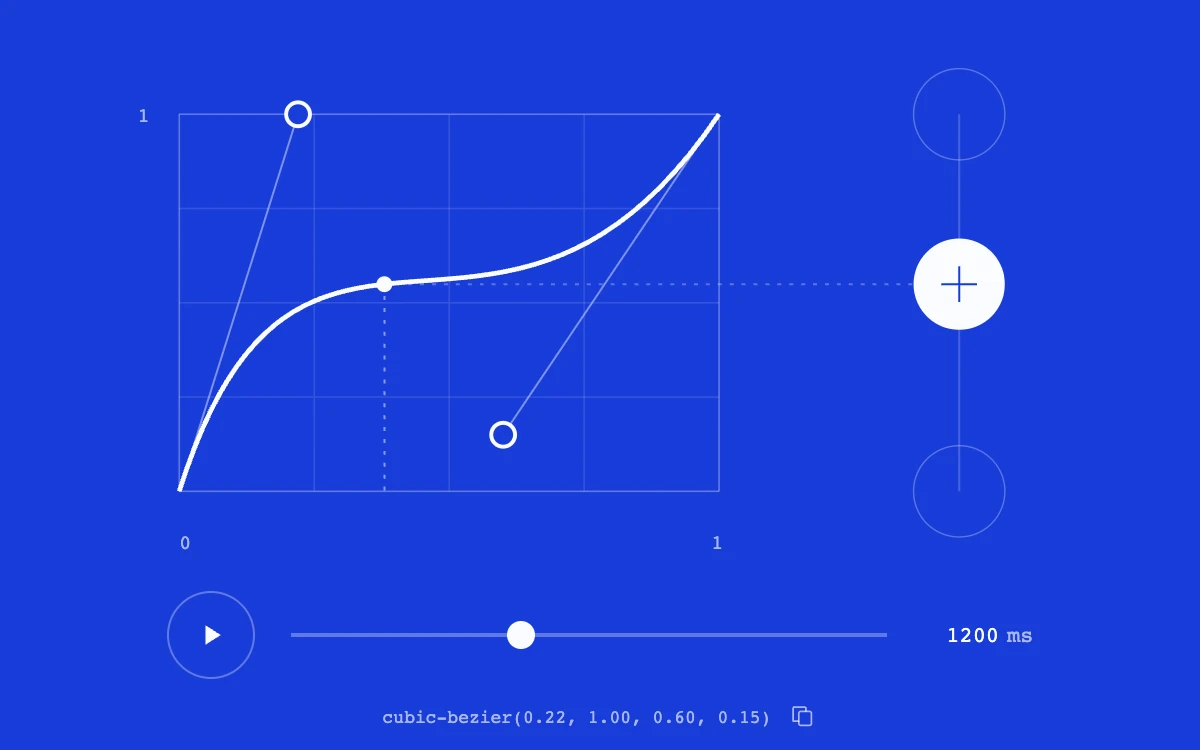
Drag the handles, scrub time, play the motion, or copy the CSS curve
Subframe Original · MIT
Add to your project
Component source
Standalone React component. Styles are included.
React only. No additional packages.
Render the default export inside a container with a defined height. Its optional active prop stops movement when false. This example works with React 19; Next.js projects can use it as a client component.
View source code
/**
 * MIT License
 * Copyright (c) 2026 Subframe
 *
 * Permission is hereby granted, free of charge, to any person obtaining a copy
 * of this software and associated documentation files (the "Software"), to deal
 * in the Software without restriction, including without limitation the rights
 * to use, copy, modify, merge, publish, distribute, sublicense, and/or sell
 * copies of the Software, and to permit persons to whom the Software is
 * furnished to do so, subject to the following conditions:
 *
 * The above copyright notice and this permission notice shall be included in all
 * copies or substantial portions of the Software.
 *
 * THE SOFTWARE IS PROVIDED "AS IS", WITHOUT WARRANTY OF ANY KIND, EXPRESS OR
 * IMPLIED, INCLUDING BUT NOT LIMITED TO THE WARRANTIES OF MERCHANTABILITY,
 * FITNESS FOR A PARTICULAR PURPOSE AND NONINFRINGEMENT. IN NO EVENT SHALL THE
 * AUTHORS OR COPYRIGHT HOLDERS BE LIABLE FOR ANY CLAIM, DAMAGES OR OTHER
 * LIABILITY, WHETHER IN AN ACTION OF CONTRACT, TORT OR OTHERWISE, ARISING FROM,
 * OUT OF OR IN CONNECTION WITH THE SOFTWARE OR THE USE OR OTHER DEALINGS IN THE
 * SOFTWARE.
 */
"use client"

import * as React from "react"

type Point = { x: number; y: number }
const START: [Point, Point] = [
  { x: 0.22, y: 1 },
  { x: 0.6, y: 0.15 },
]
const clamp = (value: number) => Math.max(0, Math.min(1, value))
const coordinate = (t: number, a: number, b: number) =>
  3 * (1 - t) * (1 - t) * t * a + 3 * (1 - t) * t * t * b + t * t * t
function valueAtTime(time: number, points: [Point, Point]) {
  if (time <= 0) return 0
  if (time >= 1) return 1
  // Time is the curve's x coordinate, not its polynomial parameter.
  let lower = 0,
    upper = 1
  for (let index = 0; index < 22; index++) {
    const middle = (lower + upper) / 2
    if (coordinate(middle, points[0].x, points[1].x) < time) lower = middle
    else upper = middle
  }
  return coordinate((lower + upper) / 2, points[0].y, points[1].y)
}
const screenPoint = (point: Point) => ({ x: 48 + point.x * 272, y: 238 - point.y * 190 })

export default function Example({ active = true }: { active?: boolean }) {
  const [points, setPoints] = React.useState<[Point, Point]>(START)
  const [progress, setProgress] = React.useState(0.38)
  const [playing, setPlaying] = React.useState(false)
  const [duration, setDuration] = React.useState(1200)
  const [durationDraft, setDurationDraft] = React.useState("1200")
  const [reduced, setReduced] = React.useState(true)
  const [visible, setVisible] = React.useState(true)
  const [copied, setCopied] = React.useState(false)
  const progressRef = React.useRef(0.38)
  const graph = React.useRef<SVGSVGElement>(null)
  const drag = React.useRef<{ id: number; index: number; before: [Point, Point] } | null>(null)
  const copyTimer = React.useRef<ReturnType<typeof setTimeout> | null>(null)
  const mounted = React.useRef(false)
  const hintId = React.useId()

  React.useEffect(() => {
    mounted.current = true
    const mq = matchMedia("(prefers-reduced-motion: reduce)")
    const motion = () => {
      setReduced(mq.matches)
      if (mq.matches) setPlaying(false)
    }
    const visibility = () => setVisible(!document.hidden)
    motion()
    visibility()
    mq.addEventListener("change", motion)
    document.addEventListener("visibilitychange", visibility)
    return () => {
      mounted.current = false
      mq.removeEventListener("change", motion)
      document.removeEventListener("visibilitychange", visibility)
      if (copyTimer.current) clearTimeout(copyTimer.current)
    }
  }, [])
  React.useEffect(() => {
    if (active || !drag.current) return
    const current = drag.current
    drag.current = null
    setPoints(current.before)
    if (graph.current?.hasPointerCapture(current.id)) graph.current.releasePointerCapture(current.id)
  }, [active])
  React.useEffect(() => {
    if (!active || !visible || !playing || reduced) return
    let frame = 0,
      previous = 0
    const tick = (now: number) => {
      if (previous) progressRef.current = Math.min(1, progressRef.current + Math.min(now - previous, 80) / duration)
      previous = now
      setProgress(progressRef.current)
      if (progressRef.current >= 1) {
        setPlaying(false)
        return
      }
      frame = requestAnimationFrame(tick)
    }
    frame = requestAnimationFrame(tick)
    return () => cancelAnimationFrame(frame)
  }, [active, visible, playing, reduced, duration])

  function seek(time: number) {
    progressRef.current = clamp(time)
    setProgress(progressRef.current)
  }
  function movePoint(index: number, point: Point) {
    setPoints(
      (current) =>
        current.map((value, i) =>
          i === index
            ? { x: Math.round(clamp(point.x) * 100) / 100, y: Math.round(clamp(point.y) * 100) / 100 }
            : value,
        ) as [Point, Point],
    )
  }
  function pointer(event: React.PointerEvent<SVGSVGElement>) {
    if (drag.current?.id !== event.pointerId || !graph.current) return
    const matrix = graph.current.getScreenCTM()
    if (!matrix) return
    const point = graph.current.createSVGPoint()
    point.x = event.clientX
    point.y = event.clientY
    const local = point.matrixTransform(matrix.inverse())
    movePoint(drag.current.index, { x: (local.x - 48) / 272, y: (238 - local.y) / 190 })
  }
  const curve = `cubic-bezier(${points.map((point) => `${point.x.toFixed(2)}, ${point.y.toFixed(2)}`).join(", ")})`
  const first = screenPoint(points[0]),
    second = screenPoint(points[1]),
    eased = valueAtTime(progress, points)
  const bead = screenPoint({ x: progress, y: eased })

  return (
    <div className="sf-easing-workbench">
      <div className="easing-instrument">
        <svg
          ref={graph}
          viewBox="0 0 520 288"
          className="easing-graph"
          aria-label="Cubic easing editor"
          onPointerMove={pointer}
          onPointerUp={() => {
            drag.current = null
          }}
          onPointerCancel={() => {
            if (drag.current) setPoints(drag.current.before)
            drag.current = null
          }}
          onLostPointerCapture={() => {
            if (drag.current) setPoints(drag.current.before)
            drag.current = null
          }}
        >
          {[0, 0.25, 0.5, 0.75, 1].map((tick) => (
            <g key={tick} stroke="currentColor" opacity={tick === 0 || tick === 1 ? 0.32 : 0.12} strokeWidth=".8">
              <line x1={48 + tick * 272} x2={48 + tick * 272} y1="48" y2="238" />
              <line x1="48" x2="320" y1={238 - tick * 190} y2={238 - tick * 190} />
            </g>
          ))}
          <text x="48" y="267" fontSize="10" fill="currentColor" opacity=".65">
            0
          </text>
          <text x="316" y="267" fontSize="10" fill="currentColor" opacity=".65">
            1
          </text>
          <text x="27" y="52" fontSize="10" fill="currentColor" opacity=".65">
            1
          </text>
          <line x1="48" y1="238" x2={first.x} y2={first.y} stroke="currentColor" opacity=".45" strokeWidth="1" />
          <line x1="320" y1="48" x2={second.x} y2={second.y} stroke="currentColor" opacity=".45" strokeWidth="1" />
          <path
            d={`M48 238 C${first.x} ${first.y} ${second.x} ${second.y} 320 48`}
            fill="none"
            stroke="currentColor"
            strokeWidth="2.4"
          />
          <line x1={bead.x} x2={bead.x} y1={bead.y} y2="238" stroke="currentColor" opacity=".5" strokeDasharray="2 4" />
          <line x1={bead.x} x2="441" y1={bead.y} y2={bead.y} stroke="currentColor" opacity=".3" strokeDasharray="2 4" />
          {[first, second].map((point, index) => (
            <g
              key={index}
              role="button"
              tabIndex={0}
              className="easing-handle"
              aria-label={`Control point ${index + 1}: ${points[index].x.toFixed(2)}, ${points[index].y.toFixed(2)}`}
              aria-describedby={hintId}
              onPointerDown={(event) => {
                if (event.button !== 0) return
                event.preventDefault()
                event.currentTarget.focus()
                setPlaying(false)
                drag.current = {
                  id: event.pointerId,
                  index,
                  before: points.map((point) => ({ ...point })) as [Point, Point],
                }
                graph.current?.setPointerCapture(event.pointerId)
              }}
              onKeyDown={(event) => {
                if (event.key === "Escape" && drag.current) {
                  const current = drag.current
                  setPoints(current.before)
                  drag.current = null
                  if (graph.current?.hasPointerCapture(current.id)) graph.current.releasePointerCapture(current.id)
                  return
                }
                if (!["ArrowUp", "ArrowDown", "ArrowLeft", "ArrowRight", "Home"].includes(event.key)) return
                event.preventDefault()
                setPlaying(false)
                const step = event.shiftKey ? 0.01 : 0.05
                movePoint(
                  index,
                  event.key === "Home"
                    ? START[index]
                    : {
                        x:
                          points[index].x + (event.key === "ArrowRight" ? step : event.key === "ArrowLeft" ? -step : 0),
                        y: points[index].y + (event.key === "ArrowUp" ? step : event.key === "ArrowDown" ? -step : 0),
                      },
                )
              }}
            >
              <circle cx={point.x} cy={point.y} r="22" fill="transparent" />
              <circle
                className="easing-handle-dot"
                cx={point.x}
                cy={point.y}
                r="6"
                fill="#183cd8"
                stroke="currentColor"
                strokeWidth="2"
              />
            </g>
          ))}
          <circle cx={bead.x} cy={bead.y} r="4" fill="currentColor" pointerEvents="none" />
          <line x1="441" x2="441" y1="48" y2="238" stroke="currentColor" opacity=".2" />
          <circle cx="441" cy="48" r="23" fill="none" stroke="currentColor" strokeWidth=".7" opacity=".3" />
          <circle cx="441" cy="238" r="23" fill="none" stroke="currentColor" strokeWidth=".7" opacity=".3" />
          <circle cx="441" cy={bead.y} r="23" fill="#f9fbff" />
          <path d={`M432 ${bead.y}h18M441 ${bead.y - 9}v18`} stroke="#183cd8" strokeWidth="1" />
        </svg>
        <div className="easing-transport">
          <button
            className="easing-play"
            aria-label={playing ? "Pause preview" : reduced ? "Advance preview" : "Play preview"}
            onClick={() => {
              if (reduced) {
                seek(progress >= 1 ? 0 : progress + 0.25)
                return
              }
              if (playing) setPlaying(false)
              else {
                seek(0)
                setPlaying(true)
              }
            }}
          >
            <svg viewBox="0 0 20 20" aria-hidden="true">
              {playing ? <path d="M5 4h3v12H5zM12 4h3v12h-3z" /> : <path d="m6 3 11 7-11 7z" />}
            </svg>
          </button>
          <input
            type="range"
            min="0"
            max="1"
            step=".001"
            value={progress}
            aria-label="Preview time"
            aria-valuetext={`${Math.round(progress * 100)} percent`}
            onChange={(event) => {
              setPlaying(false)
              seek(Number(event.target.value))
            }}
          />
          <label className="easing-duration">
            <input
              type="number"
              min="200"
              max="4000"
              step="100"
              value={durationDraft}
              aria-label="Duration in milliseconds"
              onChange={(event) => {
                setDurationDraft(event.target.value)
                const next = Number(event.target.value)
                if (next >= 200 && next <= 4000) setDuration(next)
              }}
              onBlur={() => {
                const next = Math.max(200, Math.min(4000, Number(durationDraft) || duration))
                setDuration(next)
                setDurationDraft(String(next))
              }}
              onKeyDown={(event) => {
                if (event.key === "Enter") event.currentTarget.blur()
              }}
            />
            <span>ms</span>
          </label>
        </div>
        <button
          className="easing-code"
          aria-label="Copy cubic-bezier CSS value"
          onClick={async () => {
            try {
              await navigator.clipboard.writeText(curve)
              if (!mounted.current) return
              setCopied(true)
              if (copyTimer.current) clearTimeout(copyTimer.current)
              copyTimer.current = setTimeout(() => setCopied(false), 1600)
            } catch {
              setCopied(false)
            }
          }}
        >
          <span>{curve}</span>
          <svg viewBox="0 0 20 20" aria-hidden="true">
            {copied ? (
              <path d="m4 10 4 4 8-8" />
            ) : (
              <>
                <rect x="7" y="6" width="9" height="10" rx="1.5" />
                <path d="M12 6V3H3v10h4" />
              </>
            )}
          </svg>
        </button>
        <span className="easing-sr" id={hintId}>
          Drag either handle, or use arrow keys to change horizontal time and vertical progress. Shift makes smaller
          changes. Home resets that handle.
        </span>
        <span className="easing-sr" aria-live="polite">
          {copied ? "CSS timing curve copied" : ""}
        </span>
      </div>
      <style>{`
.sf-easing-workbench{height:100%;width:100%;min-height:0;display:grid;place-items:center;overflow:hidden;background:#183cd8;color:#f9fbff;font-family:monospace;container-type:size}.sf-easing-workbench *{box-sizing:border-box}.sf-easing-workbench .easing-instrument{width:min(86cqw,138cqh)}.sf-easing-workbench .easing-graph{display:block;width:100%;overflow:visible;touch-action:none;user-select:none}.sf-easing-workbench .easing-handle{cursor:grab;outline:none}.sf-easing-workbench .easing-handle:active{cursor:grabbing}.sf-easing-workbench .easing-handle:hover .easing-handle-dot,.sf-easing-workbench .easing-handle:focus-visible .easing-handle-dot{stroke-width:4}.sf-easing-workbench .easing-transport{display:flex;align-items:center;gap:16px;padding:0 8%}.sf-easing-workbench .easing-play{background:transparent;color:inherit;border:1px solid #ffffff50;border-radius:50%;width:44px;height:44px;display:grid;place-items:center;flex-shrink:0;cursor:pointer}.sf-easing-workbench .easing-play:hover{background:#ffffff16}.sf-easing-workbench .easing-play svg{width:14px;fill:currentColor}.sf-easing-workbench input[type=range]{flex:1;min-width:0;appearance:none;background:transparent;height:36px;cursor:ew-resize}.sf-easing-workbench input[type=range]::-webkit-slider-runnable-track{height:2px;background:#ffffff50}.sf-easing-workbench input[type=range]::-webkit-slider-thumb{appearance:none;width:14px;height:14px;margin-top:-6px;border-radius:50%;background:#f9fbff;border:0}.sf-easing-workbench input[type=range]::-moz-range-track{height:2px;background:#ffffff50}.sf-easing-workbench input[type=range]::-moz-range-thumb{width:14px;height:14px;border-radius:50%;background:#f9fbff;border:0}.sf-easing-workbench .easing-duration{display:flex;gap:4px;align-items:center;font-size:11px;color:#ffffffa0}.sf-easing-workbench .easing-duration input{background:none;border:0;color:#f9fbff;width:38px;text-align:right;font:inherit;appearance:textfield;padding:5px 0}.sf-easing-workbench input::-webkit-inner-spin-button{appearance:none}.sf-easing-workbench .easing-code{display:flex;align-items:center;justify-content:center;gap:9px;width:100%;background:none;border:0;color:#ffffffa0;font:clamp(8px,1.5cqw,11px) monospace;padding:12px 0 0;cursor:pointer}.sf-easing-workbench .easing-code:hover{color:#fff}.sf-easing-workbench .easing-code svg{width:14px;height:14px;fill:none;stroke:currentColor;stroke-linecap:round;stroke-linejoin:round;stroke-width:1.2}.sf-easing-workbench button:focus-visible,.sf-easing-workbench input:focus-visible{outline:2px solid white;outline-offset:4px}.sf-easing-workbench .easing-sr{position:absolute;width:1px;height:1px;clip-path:inset(50%);overflow:hidden;white-space:nowrap}
`}</style>
    </div>
  )
}
Where it works well
Authoring and inspecting CSS timing curves with a synchronized, seekable motion preview.
Reduced motion
Playback becomes explicit quarter-step advancement; manual scrubbing and curve editing remain available.
Things to know
Both control-point coordinates are bounded to 0–1. It covers CSS cubic timing curves without overshoot; not a spring simulator.