
Letter arrival editor
Magnetic keyframes set when three original letterforms arrive, with a scrubber and a live preview of the edited timing.
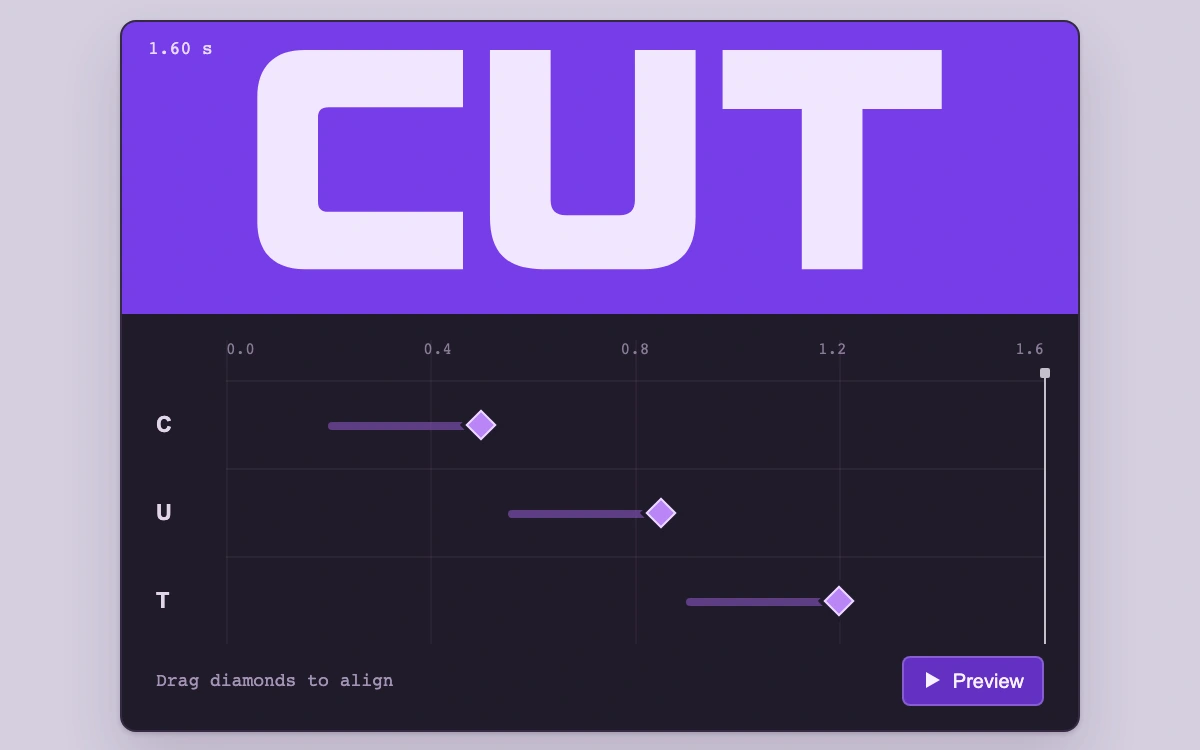
Align the arrival diamonds, scrub the ruler, then preview the animation
Subframe Original · MIT
Add to your project
Component source
Standalone React component. Styles are included.
React only. No additional packages.
Render the default export inside a container with a defined height. Its optional active prop stops movement when false. This example works with React 19; Next.js projects can use it as a client component.
View source code
/**
 * MIT License
 *
 * Copyright (c) 2026 Subframe
 *
 * Permission is hereby granted, free of charge, to any person obtaining a copy
 * of this software and associated documentation files (the "Software"), to deal
 * in the Software without restriction, including without limitation the rights
 * to use, copy, modify, merge, publish, distribute, sublicense, and/or sell
 * copies of the Software, and to permit persons to whom the Software is
 * furnished to do so, subject to the following conditions:
 *
 * The above copyright notice and this permission notice shall be included in all
 * copies or substantial portions of the Software.
 *
 * THE SOFTWARE IS PROVIDED "AS IS", WITHOUT WARRANTY OF ANY KIND, EXPRESS OR
 * IMPLIED, INCLUDING BUT NOT LIMITED TO THE WARRANTIES OF MERCHANTABILITY,
 * FITNESS FOR A PARTICULAR PURPOSE AND NONINFRINGEMENT. IN NO EVENT SHALL THE
 * AUTHORS OR COPYRIGHT HOLDERS BE LIABLE FOR ANY CLAIM, DAMAGES OR OTHER
 * LIABILITY, WHETHER IN AN ACTION OF CONTRACT, TORT OR OTHERWISE, ARISING FROM,
 * OUT OF OR IN CONNECTION WITH THE SOFTWARE OR THE USE OR OTHER DEALINGS IN THE
 * SOFTWARE.
 */

"use client"

import { useEffect, useRef, useState } from "react"

const END = 1.6
const letters = ["C", "U", "T"]
const outlines = [
  "M122 0H28C10 0 0 10 0 28v74c0 18 10 28 28 28h94V96H42c-4 0-6-2-6-6V40c0-4 2-6 6-6h80Z",
  "M0 0h36v89c0 6 3 9 9 9h32c6 0 9-3 9-9V0h36v99c0 21-10 31-31 31H31C10 130 0 120 0 99Z",
  "M0 0h130v35H83v95H47V35H0Z",
]
const clamp = (n: number, lo: number, hi: number) => Math.max(lo, Math.min(hi, n))
export default function KeyframeSnap({ active = true }: { active?: boolean }) {
  const [frames, setFrames] = useState([0.5, 0.85, 1.2])
  const [time, setTime] = useState(END)
  const [playing, setPlaying] = useState(false)
  const [snap, setSnap] = useState<number | null>(null)
  const [reduced, setReduced] = useState(false)
  const area = useRef<HTMLDivElement>(null)
  const drag = useRef<{ pointerId: number; index: number; x: number; value: number; width: number } | null>(null)
  const timeRef = useRef(time)
  timeRef.current = time
  useEffect(() => {
    const m = matchMedia("(prefers-reduced-motion: reduce)")
    const update = () => {
      setReduced(m.matches)
      if (m.matches) setPlaying(false)
    }
    update()
    m.addEventListener("change", update)
    return () => m.removeEventListener("change", update)
  }, [])
  useEffect(() => {
    if (!active || !playing || reduced) return
    let frame = 0
    const origin = performance.now() - timeRef.current * 1000
    const tick = (now: number) => {
      const t = Math.min(END, (now - origin) / 1000)
      setTime(t)
      if (t < END) frame = requestAnimationFrame(tick)
      else setPlaying(false)
    }
    frame = requestAnimationFrame(tick)
    return () => cancelAnimationFrame(frame)
  }, [active, playing, reduced])
  const update = (index: number, value: number, magnetic: boolean) => {
    let next = clamp(value, 0.3, 1.4)
    const nearest = magnetic
      ? frames
          .filter((_, i) => i !== index)
          .sort((a, b) => Math.abs(a - next) - Math.abs(b - next))
          .find((v) => Math.abs(v - next) < 0.045)
      : undefined
    if (nearest !== undefined) next = nearest
    next = Math.round(next * 100) / 100
    setSnap(nearest ?? null)
    setPlaying(false)
    setFrames((v) => v.map((n, i) => (i === index ? next : n)))
    setTime(next)
  }
  const stopDrag = (pointerId: number) => {
    if (drag.current?.pointerId !== pointerId) return
    drag.current = null
    setSnap(null)
  }
  return (
    <div className="sf-ks2" data-active={active}>
      <style>{`
.sf-ks2{height:100%;min-height:300px;display:grid;place-items:center;background:#d5cfdf;font-family:Arial,sans-serif;color:#c1baca}.sf-ks2 *{box-sizing:border-box}.sf-ks2-panel{width:min(480px,92%);overflow:hidden;border-radius:8px;background:#211b2b;border:1px solid #352a43;box-shadow:0 15px 30px #34224528,0 1px 2px #34224530}.sf-ks2-art{height:146px;position:relative;background:#773cea;overflow:hidden;display:grid;place-items:center}.sf-ks2-art>svg{width:84%;height:118px;overflow:hidden}.sf-ks2-time{position:absolute;top:8px;left:13px;font:9px ui-monospace,monospace;color:#e9d9ff}.sf-ks2-preview{display:flex;align-items:center;gap:5px;border:1px solid #ffffff38;background:#6430c4;color:#f7f0ff;border-radius:4px;height:25px;padding:0 9px;cursor:pointer;font:10px Arial}@media(hover:hover){.sf-ks2-preview:hover{background:#5925b5}}.sf-ks2-controls{padding:13px 17px 12px}.sf-ks2-editor{display:grid;grid-template-columns:23px 1fr;gap:12px}.sf-ks2-labels{padding-top:20px}.sf-ks2-labels span{display:flex;align-items:center;height:44px;font-size:11px;font-weight:700;color:#e0d5ea}.sf-ks2-timeline{position:relative;background:repeating-linear-gradient(90deg,#ffffff09 0 1px,transparent 1px 25%);touch-action:none}.sf-ks2-ruler{height:20px;display:flex;justify-content:space-between;font:8px ui-monospace,monospace;color:#887b96}.sf-ks2-row{position:relative;height:44px;border-top:1px solid #ffffff0b}.sf-ks2-duration{height:4px;position:absolute;top:20px;border-radius:2px;background:#8050b4;opacity:.65}.sf-ks2-node{position:absolute;top:0;width:44px;height:44px;background:none;border:0;transform:translateX(-50%);cursor:ew-resize;touch-action:none;display:grid;place-items:center;z-index:2;padding:0}.sf-ks2-node:after{content:"";height:9px;width:9px;border:1.5px solid #ead7ff;background:#b985f7;transform:rotate(45deg);box-shadow:0 0 0 2px #211b2b}.sf-ks2-node:active:after{background:white}.sf-ks2-guide{position:absolute;top:16px;bottom:0;border-left:1px dashed #d3b3ff;pointer-events:none;z-index:1}.sf-ks2-playhead{position:absolute;top:17px;bottom:0;border-left:1px solid #faf6ff;pointer-events:none;z-index:3;opacity:.75}.sf-ks2-playhead:before{content:"";position:absolute;left:-3px;top:-3px;width:5px;height:5px;background:#faf6ff;border-radius:1px}.sf-ks2-scrub{position:absolute;left:-4px;top:-5px;width:calc(100% + 8px);height:24px;margin:0;opacity:0;cursor:ew-resize;z-index:4}.sf-ks2-scrub:focus-visible{opacity:.18}.sf-ks2 button:focus-visible{outline:2px solid #ead7ff;outline-offset:1px;border-radius:3px}.sf-ks2-foot{display:flex;justify-content:space-between;align-items:center;margin-top:6px;color:#a394b5;font:9px ui-monospace,monospace}.sf-ks2-foot span:last-child{color:#806f94}
`}</style>
      <div className="sf-ks2-panel">
        <div className="sf-ks2-art">
          <output className="sf-ks2-time">{time.toFixed(2)} s</output>
          <svg viewBox="0 0 406 140" role="img" aria-label="CUT letterform arrival preview">
            {outlines.map((d, i) => {
              const t = clamp((time - (frames[i] - 0.3)) / 0.3, 0, 1),
                eased = 1 - Math.pow(1 - t, 3)
              return (
                <g
                  key={i}
                  style={{
                    transform: `translate(${i * 138}px, ${reduced ? 0 : (1 - eased) * 148}px)`,
                    opacity: reduced ? (t >= 1 ? 1 : 0) : 1,
                  }}
                >
                  <path d={d} fill="#f1e6ff" />
                </g>
              )
            })}
          </svg>
        </div>
        <div className="sf-ks2-controls">
          <div className="sf-ks2-editor">
            <div className="sf-ks2-labels">
              {letters.map((l) => (
                <span key={l}>{l}</span>
              ))}
            </div>
            <div className="sf-ks2-timeline" ref={area}>
              <div className="sf-ks2-ruler" aria-hidden="true">
                {[0, 0.4, 0.8, 1.2, 1.6].map((n) => (
                  <span key={n}>{n.toFixed(1)}</span>
                ))}
              </div>
              <input
                className="sf-ks2-scrub"
                type="range"
                min="0"
                max={END}
                step=".01"
                value={time}
                aria-label="Animation playhead"
                aria-valuetext={`${time.toFixed(2)} seconds`}
                onChange={(e) => {
                  setPlaying(false)
                  setTime(Number(e.target.value))
                }}
              />
              {frames.map((f, i) => (
                <div className="sf-ks2-row" key={i}>
                  <div
                    className="sf-ks2-duration"
                    style={{ left: `${((f - 0.3) / END) * 100}%`, width: `${(0.3 / END) * 100}%` }}
                  />
                  <button
                    type="button"
                    role="slider"
                    className="sf-ks2-node"
                    aria-label={`${letters[i]} arrival`}
                    aria-valuemin={0.3}
                    aria-valuemax={1.4}
                    aria-valuenow={f}
                    aria-valuetext={`${f.toFixed(2)} seconds. Drag to align; hold Alt to bypass snapping.`}
                    style={{ left: `${(f / END) * 100}%` }}
                    onPointerDown={(e) => {
                      if (e.button !== 0 || drag.current) return
                      drag.current = {
                        pointerId: e.pointerId,
                        index: i,
                        x: e.clientX,
                        value: f,
                        width: area.current!.getBoundingClientRect().width,
                      }
                      setPlaying(false)
                      e.currentTarget.setPointerCapture(e.pointerId)
                    }}
                    onPointerMove={(e) => {
                      const d = drag.current
                      if (d?.index === i && d.pointerId === e.pointerId)
                        update(i, d.value + ((e.clientX - d.x) / d.width) * END, !e.altKey)
                    }}
                    onPointerUp={(e) => stopDrag(e.pointerId)}
                    onPointerCancel={(e) => stopDrag(e.pointerId)}
                    onLostPointerCapture={(e) => stopDrag(e.pointerId)}
                    onKeyDown={(e) => {
                      if (!["ArrowLeft", "ArrowRight", "Home", "End"].includes(e.key)) return
                      e.preventDefault()
                      update(
                        i,
                        e.key === "Home"
                          ? 0.3
                          : e.key === "End"
                          ? 1.4
                          : f + (e.key === "ArrowRight" ? 1 : -1) * (e.shiftKey ? 0.1 : 0.01),
                        false,
                      )
                    }}
                  />
                </div>
              ))}
              <div className="sf-ks2-playhead" style={{ left: `${(time / END) * 100}%` }} />
              {snap !== null && <div className="sf-ks2-guide" style={{ left: `${(snap / END) * 100}%` }} />}
            </div>
          </div>
          <div className="sf-ks2-foot">
            <span>{snap !== null ? "Aligned" : "Drag diamonds to align"}</span>
            <button
              type="button"
              className="sf-ks2-preview"
              onClick={() => {
                if (playing) {
                  setPlaying(false)
                  return
                }
                if (reduced) {
                  setTime(END)
                  return
                }
                setTime(0)
                timeRef.current = 0
                setPlaying(true)
              }}
              aria-label={reduced ? "Show end frame" : playing ? "Pause animation" : "Preview animation"}
            >
              <svg width="10" height="10" viewBox="0 0 10 10" fill="currentColor" aria-hidden="true">
                {playing ? <path d="M2 1h2v8H2zm4 0h2v8H6z" /> : <path d="m2 1 7 4-7 4Z" />}
              </svg>
              {reduced ? "End frame" : playing ? "Pause" : "Preview"}
            </button>
          </div>
        </div>
      </div>
    </div>
  )
}
Where it works well
Synchronizing independent text or graphic entrances with an immediately inspectable animation consequence.
Reduced motion
Scrubbing shows discrete arrived/not-arrived letter states without translation; Preview becomes an End frame action. A live preference change cancels playback.
Things to know
Three authored letterform arrivals in a 1.6-second local composition. Each entrance lasts 300 ms and ends at its diamond; no general animation engine or export. Host pause freezes and resumes the current time.