
The night line
A mechanical destination board turns a practical selection into a small moment of departure.
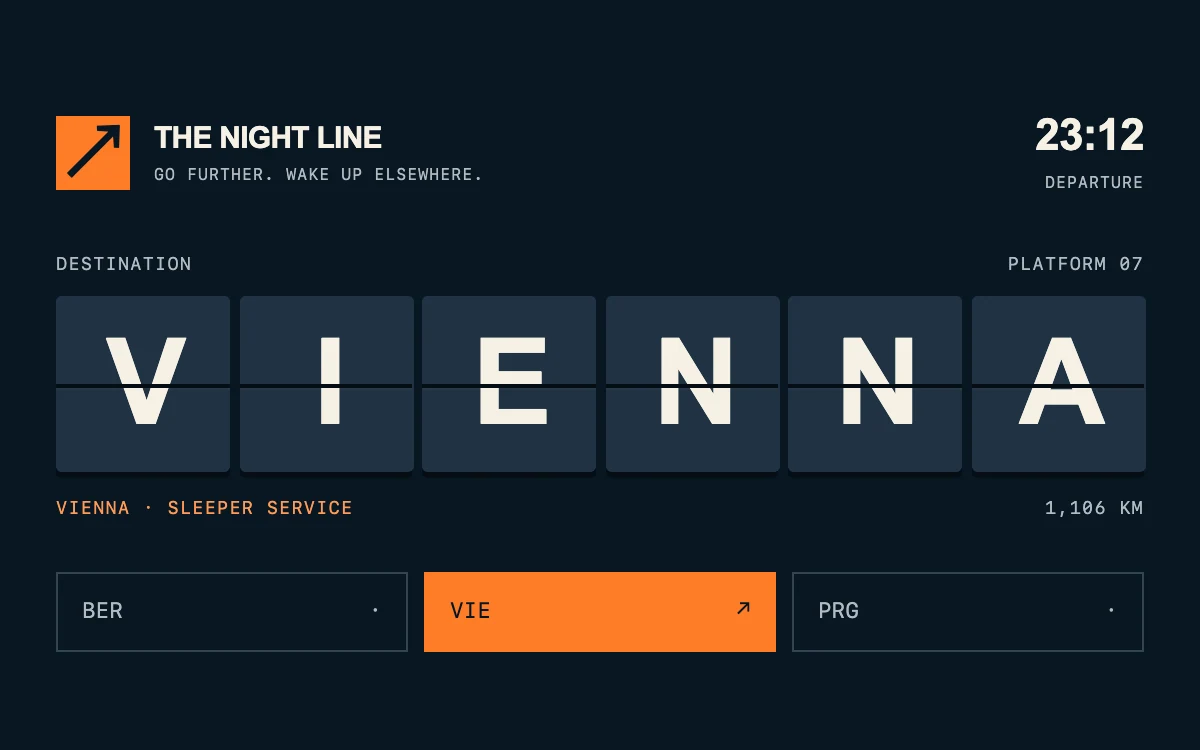
Choose a destination
Subframe Original · MIT
Add to your project
Component source
Standalone React component. Styles are included.
React only. No additional packages.
Render the default export inside a container with a defined height. Its optional active prop stops movement when false. This example works with React 19; Next.js projects can use it as a client component.
View source code
/**
 * MIT License
 *
 * Copyright (c) 2026 Subframe
 *
 * Permission is hereby granted, free of charge, to any person obtaining a copy
 * of this software and associated documentation files (the "Software"), to deal
 * in the Software without restriction, including without limitation the rights
 * to use, copy, modify, merge, publish, distribute, sublicense, and/or sell
 * copies of the Software, and to permit persons to whom the Software is
 * furnished to do so, subject to the following conditions:
 *
 * The above copyright notice and this permission notice shall be included in all
 * copies or substantial portions of the Software.
 *
 * THE SOFTWARE IS PROVIDED "AS IS", WITHOUT WARRANTY OF ANY KIND, EXPRESS OR
 * IMPLIED, INCLUDING BUT NOT LIMITED TO THE WARRANTIES OF MERCHANTABILITY,
 * FITNESS FOR A PARTICULAR PURPOSE AND NONINFRINGEMENT. IN NO EVENT SHALL THE
 * AUTHORS OR COPYRIGHT HOLDERS BE LIABLE FOR ANY CLAIM, DAMAGES OR OTHER
 * LIABILITY, WHETHER IN AN ACTION OF CONTRACT, TORT OR OTHERWISE, ARISING FROM,
 * OUT OF OR IN CONNECTION WITH THE SOFTWARE OR THE USE OR OTHER DEALINGS IN THE
 * SOFTWARE.
 */

"use client"

import { useEffect, useState } from "react"

function useReducedMotion() {
  const [reduced, setReduced] = useState(true)
  useEffect(() => {
    const query = window.matchMedia("(prefers-reduced-motion: reduce)")
    const update = () => setReduced(query.matches)
    update()
    query.addEventListener("change", update)
    return () => query.removeEventListener("change", update)
  }, [])
  return reduced
}

const services = [
  { city: "BERLIN", code: "BER", time: "22:48", platform: "04", note: "NIGHT SERVICE", distance: "878 KM" },
  { city: "VIENNA", code: "VIE", time: "23:12", platform: "07", note: "SLEEPER SERVICE", distance: "1,106 KM" },
  { city: "PRAGUE", code: "PRG", time: "23:40", platform: "02", note: "NIGHT SERVICE", distance: "973 KM" },
]

export default function DepartureBoard({ active = true }: { active?: boolean }) {
  const reduced = useReducedMotion()
  const [selection, setSelection] = useState({ index: 0, previous: 0, sequence: 0, animate: false })
  const service = services[selection.index]
  const previous = services[selection.previous]
  const animate = selection.animate && !reduced
  return (
    <section className="sf-departures" data-active={active} data-animate={animate}>
      <header className="sf-departures-header">
        <span className="sf-departures-mark" aria-hidden="true">
          ↗
        </span>
        <div>
          THE NIGHT LINE<small>GO FURTHER. WAKE UP ELSEWHERE.</small>
        </div>
        <span className="sf-departures-time">
          {service.time}
          <small>DEPARTURE</small>
        </span>
      </header>
      <div className="sf-departures-caption">
        <span>DESTINATION</span>
        <span>PLATFORM {service.platform}</span>
      </div>
      <div className="sf-departures-display" key={selection.sequence} aria-hidden="true">
        {service.city.split("").map((character, index) => (
          <span className="sf-departures-cell" key={index} style={{ animationDelay: `${index * 45}ms` }}>
            <span className="sf-departures-static">{character}</span>
            {animate && (
              <span className="sf-departures-leaf" style={{ animationDelay: `${index * 45}ms` }}>
                <span className="sf-departures-front">{previous.city[index]}</span>
                <span className="sf-departures-back">{character}</span>
              </span>
            )}
            <span className="sf-departures-seam" />
          </span>
        ))}
      </div>
      <div className="sf-departures-meta" aria-live="polite">
        <span>
          {service.city} · {service.note}
        </span>
        <span>{service.distance}</span>
      </div>
      <nav aria-label="Choose a departure" className="sf-departures-controls">
        {services.map((item, index) => (
          <button
            type="button"
            key={item.code}
            aria-pressed={index === selection.index}
            onClick={(event) =>
              setSelection((current) => ({
                index,
                previous: current.index,
                sequence: current.sequence + 1,
                animate: active && event.detail > 0 && index !== current.index,
              }))
            }
          >
            {item.code}
            <span aria-hidden="true">{index === selection.index ? "↗" : "·"}</span>
          </button>
        ))}
      </nav>
      <style>{`
        .sf-departures{width:100%;height:100%;min-height:300px;box-sizing:border-box;overflow:hidden;background:#091622;color:#f5f1e5;padding:28px 28px 22px;font-family:Arial,Helvetica,sans-serif;display:flex;flex-direction:column;justify-content:center;container-type:inline-size}.sf-departures *{box-sizing:border-box}
        .sf-departures-header{display:flex;align-items:center;gap:12px;font-size:15px;font-weight:750;letter-spacing:-.025em}.sf-departures-header small{display:block;font:8px/1.5 ui-monospace,SFMono-Regular,monospace;letter-spacing:.07em;margin-top:4px;color:#b1bbc1}.sf-departures-mark{background:#ff7d28;color:#091622;width:37px;height:37px;display:grid;place-items:center;font-size:34px;line-height:1}.sf-departures-time{margin-left:auto;text-align:right;font-size:22px;font-variant-numeric:tabular-nums}
        .sf-departures-caption,.sf-departures-meta{display:flex;justify-content:space-between;font:9px/1.4 ui-monospace,SFMono-Regular,monospace;letter-spacing:.07em}.sf-departures-caption{margin:29px 0 9px;color:#b1bbc1}.sf-departures-meta{margin-top:12px;color:#b1bbc1;gap:10px}.sf-departures-meta span:first-child{color:#ff9a56}
        .sf-departures-display{display:grid;grid-template-columns:repeat(6,minmax(0,1fr));gap:5px}.sf-departures-cell{position:relative;isolation:isolate;height:88px;perspective:500px;background:#162838;border-radius:3px;box-shadow:inset 0 1px 0 #ffffff12,0 3px 0 #050d14;font-size:clamp(32px,11cqw,66px);line-height:88px;text-align:center;font-weight:750;letter-spacing:-.06em}.sf-departures-static{display:block;background:linear-gradient(180deg,#ffffff04 0 50%,#00000012 50%)}
        .sf-departures-leaf{position:absolute;inset:0;transform-style:preserve-3d;animation:sf-departures-turn 440ms cubic-bezier(.4,0,.2,1) both;transform-origin:center}.sf-departures-front,.sf-departures-back{position:absolute;inset:0;backface-visibility:hidden;background:#162838;border-radius:3px}.sf-departures-back{transform:rotateX(180deg);background:#203243}.sf-departures-seam{position:absolute;top:50%;height:2px;left:0;right:0;background:#050d14;z-index:3;box-shadow:0 1px 0 #ffffff08;pointer-events:none}
        .sf-departures-controls{display:flex;gap:8px;margin-top:25px}.sf-departures button{background:none;color:#b1bbc1;border:1px solid #344553;min-height:40px;flex:1;display:flex;justify-content:space-between;align-items:center;padding:0 12px;cursor:pointer;font:11px ui-monospace,SFMono-Regular,monospace}.sf-departures button[aria-pressed=true]{background:#ff7d28;border-color:#ff7d28;color:#071522}.sf-departures button:focus-visible{outline:2px solid #f5f1e5;outline-offset:3px}.sf-departures button:active{opacity:.75}.sf-departures[data-active=false] *{animation-play-state:paused!important}
        @keyframes sf-departures-turn{from{transform:rotateX(0)}to{transform:rotateX(-180deg)}}
        @container(max-width:350px){.sf-departures-cell{height:70px;line-height:70px}.sf-departures-header{font-size:12px}.sf-departures-header small{font-size:7px}.sf-departures-caption{margin-top:24px}.sf-departures-meta{font-size:8px}.sf-departures-controls{margin-top:22px}}
        @media(prefers-reduced-motion:reduce){.sf-departures-leaf{display:none}.sf-departures *{animation:none!important}}
      `}</style>
    </section>
  )
}
Where it works well
Give travel, event schedules or destination choices a tactile identity while keeping the selected information readable.
Reduced motion
The destination updates immediately without rotation. Keyboard selections are also immediate.
Things to know
A stylized single hinged tile turn, not an alphabet-by-alphabet physical simulation. Departure times and distances are fictional demonstration content.