
Chart range brush
Independent endpoints select listening days on one fixed-scale minimap.
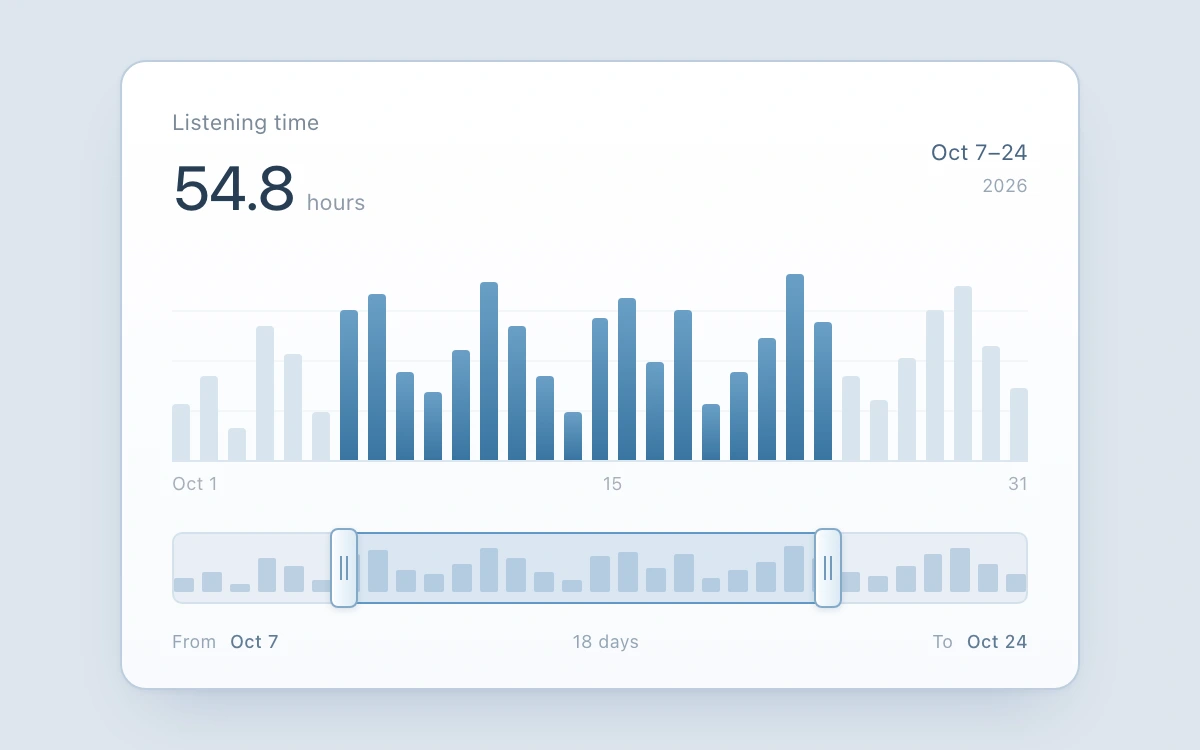
Drag either minimap handle, or use arrow keys, Home/End and PageUp/PageDown. Escape cancels the drag.
Subframe Original · MIT
Add to your project
Component source
Standalone React component. Styles are included.
React only. No additional packages.
Render the default export inside a container with a defined height. Its optional active prop stops movement when false. This example works with React 19; Next.js projects can use it as a client component.
View source code
/**
 * MIT License
 * Copyright (c) 2026 Subframe
 *
 * Permission is hereby granted, free of charge, to any person obtaining a copy
 * of this software and associated documentation files (the "Software"), to deal
 * in the Software without restriction, including without limitation the rights
 * to use, copy, modify, merge, publish, distribute, sublicense, and/or sell
 * copies of the Software, and to permit persons to whom the Software is
 * furnished to do so, subject to the following conditions:
 *
 * The above copyright notice and this permission notice shall be included in all
 * copies or substantial portions of the Software.
 *
 * THE SOFTWARE IS PROVIDED "AS IS", WITHOUT WARRANTY OF ANY KIND, EXPRESS OR
 * IMPLIED, INCLUDING BUT NOT LIMITED TO THE WARRANTIES OF MERCHANTABILITY,
 * FITNESS FOR A PARTICULAR PURPOSE AND NONINFRINGEMENT. IN NO EVENT SHALL THE
 * AUTHORS OR COPYRIGHT HOLDERS BE LIABLE FOR ANY CLAIM, DAMAGES OR OTHER
 * LIABILITY, WHETHER IN AN ACTION OF CONTRACT, TORT OR OTHERWISE, ARISING FROM,
 * OUT OF OR IN CONNECTION WITH THE SOFTWARE OR THE USE OR OTHER DEALINGS IN THE
 * SOFTWARE.
 */
"use client"
import * as React from "react"
const HOURS = [
  1.4, 2.1, 0.8, 3.4, 2.7, 1.2, 3.8, 4.2, 2.2, 1.7, 2.8, 4.5, 3.4, 2.1, 1.2, 3.6, 4.1, 2.5, 3.8, 1.4, 2.2, 3.1, 4.7,
  3.5, 2.1, 1.5, 2.6, 3.8, 4.4, 2.9, 1.8,
]
type End = "start" | "end"
export default function Example({ active = true }: { active?: boolean }) {
  const [range, setRange] = React.useState<[number, number]>([6, 23]),
    [keyboard, setKeyboard] = React.useState(false)
  const current = React.useRef(range),
    track = React.useRef<HTMLDivElement>(null)
  const gesture = React.useRef<{
    end: End
    pointer: number
    origin: [number, number]
    grab: number
    node: HTMLButtonElement
  } | null>(null)
  const update = (end: End, value: number) => {
    const [a, b] = current.current
    const next: [number, number] =
      end === "start" ? [Math.max(0, Math.min(b - 1, value)), b] : [a, Math.min(30, Math.max(a + 1, value))]
    current.current = next
    setRange(next)
  }
  const finish = React.useCallback((cancel: boolean) => {
    const g = gesture.current
    if (!g) return
    gesture.current = null
    if (cancel) {
      current.current = g.origin
      setRange(g.origin)
    }
    if (g.node.hasPointerCapture(g.pointer)) g.node.releasePointerCapture(g.pointer)
  }, [])
  React.useEffect(() => {
    if (!active) finish(true)
  }, [active, finish])
  React.useEffect(() => {
    const blur = () => finish(true)
    window.addEventListener("blur", blur)
    return () => window.removeEventListener("blur", blur)
  }, [finish])
  const [start, end] = range,
    total = HOURS.slice(start, end + 1).reduce((a, b) => a + b, 0)
  return (
    <section
      className="sf-chart-range-brush"
      data-still={!active || keyboard}
      onPointerDownCapture={() => setKeyboard(false)}
      onKeyDownCapture={(e) => {
        setKeyboard(true)
        if (e.key === "Escape") {
          e.preventDefault()
          finish(true)
        }
      }}
      aria-label="Listening history date range"
    >
      <div className="brush-chart">
        <header>
          <div>
            <span>Listening time</span>
            <strong>
              {total.toFixed(1)}
              <small>hours</small>
            </strong>
          </div>
          <span className="dates">
            Oct {start + 1}–{end + 1}
            <small>2026</small>
          </span>
        </header>
        <div className="bars" aria-hidden>
          {HOURS.map((hours, i) => (
            <i key={i} data-selected={i >= start && i <= end} style={{ height: (hours / 5) * 100 + "%" }} />
          ))}
        </div>
        <div className="axis" aria-hidden>
          <span>Oct 1</span>
          <span>15</span>
          <span>31</span>
        </div>
        <div className="brush" ref={track}>
          <div className="mini-bars" aria-hidden>
            {HOURS.map((hours, i) => (
              <i key={i} style={{ height: (hours / 5) * 100 + "%" }} />
            ))}
          </div>
          <div
            className="selected"
            aria-hidden
            style={{ left: `${(start / 30) * 100}%`, width: `${((end - start) / 30) * 100}%` }}
          />
          {(["start", "end"] as End[]).map((which) => (
            <button
              type="button"
              key={which}
              disabled={!active}
              className="handle"
              data-end={which}
              role="slider"
              aria-label={which === "start" ? "Range start day" : "Range end day"}
              aria-valuemin={which === "start" ? 1 : start + 2}
              aria-valuemax={which === "start" ? end : 31}
              aria-valuenow={(which === "start" ? start : end) + 1}
              aria-valuetext={`October ${(which === "start" ? start : end) + 1}, 2026`}
              style={{ left: `${((which === "start" ? start : end) / 30) * 100}%` }}
              onKeyDown={(e) => {
                const v = which === "start" ? start : end
                let next = v
                if (e.key === "Home") next = which === "start" ? 0 : start + 1
                else if (e.key === "End") next = which === "start" ? end - 1 : 30
                else if (["ArrowLeft", "ArrowDown"].includes(e.key)) next = v - 1
                else if (["ArrowRight", "ArrowUp"].includes(e.key)) next = v + 1
                else if (e.key === "PageUp") next = v + 7
                else if (e.key === "PageDown") next = v - 7
                else return
                e.preventDefault()
                update(which, next)
              }}
              onPointerDown={(e) => {
                if (!active || gesture.current || e.button !== 0 || !track.current) return
                e.preventDefault()
                const r = track.current.getBoundingClientRect(),
                  v = which === "start" ? start : end
                gesture.current = {
                  end: which,
                  pointer: e.pointerId,
                  origin: [...current.current],
                  grab: ((e.clientX - r.left) / r.width) * 30 - v,
                  node: e.currentTarget,
                }
                e.currentTarget.setPointerCapture(e.pointerId)
                e.currentTarget.focus({ preventScroll: true })
              }}
              onPointerMove={(e) => {
                const g = gesture.current
                if (!g || g.pointer !== e.pointerId || !track.current) return
                const r = track.current.getBoundingClientRect()
                update(g.end, Math.round(((e.clientX - r.left) / r.width) * 30 - g.grab))
              }}
              onPointerUp={(e) => {
                if (e.pointerId === gesture.current?.pointer) finish(false)
              }}
              onPointerCancel={(e) => {
                if (e.pointerId === gesture.current?.pointer) finish(true)
              }}
              onLostPointerCapture={(e) => {
                if (e.pointerId === gesture.current?.pointer) finish(true)
              }}
            >
              <span />
              <span />
            </button>
          ))}
        </div>
        <footer>
          <span>
            From <b>Oct {start + 1}</b>
          </span>
          <span>{end - start + 1} days</span>
          <span>
            To <b>Oct {end + 1}</b>
          </span>
        </footer>
        <div className="sr" role="status">
          October {start + 1} through {end + 1}: {total.toFixed(1)} listening hours.
        </div>
      </div>
      <style>{`
.sf-chart-range-brush{width:100%;height:100%;display:grid;place-items:center;background:#dde5ee;color:#273d54;font:12px/1.4 -apple-system,BlinkMacSystemFont,"Segoe UI",sans-serif;overflow:hidden;-webkit-font-smoothing:antialiased}.sf-chart-range-brush *{box-sizing:border-box}.sf-chart-range-brush button{font:inherit;cursor:ew-resize;color:inherit;touch-action:none}.sf-chart-range-brush button:disabled{cursor:default}.sf-chart-range-brush :focus-visible{outline:2px solid #316dab;outline-offset:2px;border-radius:5px}.sf-chart-range-brush .brush-chart{width:480px;padding:22px 25px 17px;background:linear-gradient(#fff,#f9fbfe);border:1px solid #bdcddd;border-radius:13px;box-shadow:0 17px 32px -17px #2c4e7940,0 1px 3px #2143650c}.sf-chart-range-brush header{display:flex;justify-content:space-between;align-items:center}.sf-chart-range-brush header div>span{color:#7c8a99;font-size:11px}.sf-chart-range-brush header strong{display:flex;align-items:baseline;font-size:31px;font-weight:450;letter-spacing:-1px;margin-top:2px;font-variant-numeric:tabular-nums}.sf-chart-range-brush header strong small{font-size:11px;color:#8e9aa7;margin-left:6px;font-weight:400;letter-spacing:0}.sf-chart-range-brush .dates{text-align:right;font-size:11px;color:#4b6682}.sf-chart-range-brush .dates small{display:block;font-size:9px;color:#99a6b4;margin-top:3px}.sf-chart-range-brush .bars{height:100px;display:flex;align-items:flex-end;gap:5px;margin-top:16px;border-bottom:1px solid #dce5ef;background:repeating-linear-gradient(to top,transparent 0,transparent 24px,#e7edf46e 24px,#e7edf46e 25px)}.sf-chart-range-brush .bars i{flex:1;min-width:0;background:#d9e4ee;border-radius:2px 2px 0 0;transition:background 110ms}.sf-chart-range-brush .bars i[data-selected=true]{background:linear-gradient(#6a9fc6,#3975a1)}.sf-chart-range-brush .axis{display:flex;justify-content:space-between;color:#a5afba;font-size:9px;margin-top:5px}.sf-chart-range-brush .brush{height:36px;position:relative;margin:17px 0 0;background:#e8eff6;border:1px solid #d5e1ed;border-radius:5px;touch-action:none}.sf-chart-range-brush .mini-bars{position:absolute;inset:5px 0;display:flex;align-items:flex-end;gap:4px}.sf-chart-range-brush .mini-bars i{flex:1;min-width:0;background:#bbcfe1;border-radius:1px}.sf-chart-range-brush .selected{position:absolute;top:-1px;bottom:-1px;border-top:1px solid #6298c7;border-bottom:1px solid #6298c7;background:#8fbbdd26;pointer-events:none}.sf-chart-range-brush .handle{position:absolute;top:-6px;bottom:-6px;width:24px;transform:translateX(-50%);display:flex;align-items:center;justify-content:center;gap:2px;background:none;border:0;padding:0;z-index:2}.sf-chart-range-brush .handle:before{content:"";position:absolute;top:3px;bottom:3px;width:12px;border-radius:4px;background:linear-gradient(90deg,#fafdff,#dbeaf5);border:1px solid #83a9c8;box-shadow:0 1px 3px #2b527428,inset 1px 0 #fff;z-index:-1}.sf-chart-range-brush .handle span{height:12px;width:1px;background:#729abb}.sf-chart-range-brush .handle:active:before{background:#c5ddec}.sf-chart-range-brush footer{display:flex;align-items:center;justify-content:space-between;margin-top:13px;font-size:9px;color:#95a5b5}.sf-chart-range-brush footer b{font-weight:500;color:#617b94;margin-left:4px;font-variant-numeric:tabular-nums}.sf-chart-range-brush .sr{position:absolute;width:1px;height:1px;clip-path:inset(50%);overflow:hidden}.sf-chart-range-brush[data-still=true] *{transition:none!important}@media(prefers-reduced-motion:reduce){.sf-chart-range-brush *{transition:none!important}}`}</style>
    </section>
  )
}
Where it works well
Inspect a date interval without shifting the opposite endpoint or losing the full series.
Reduced motion
Finite transitions become immediate under reduced motion and keyboard input. Host pause disables controls; any owned drag is cancelled.
Things to know
Illustrative 31-day series. Minimum interval spans two inclusive days; endpoints cannot cross. No window panning, zoom or real listening data.