
Percussion navigator
A detailed percussion waveform stays connected to a draggable overview as you pan and magnify its transients.
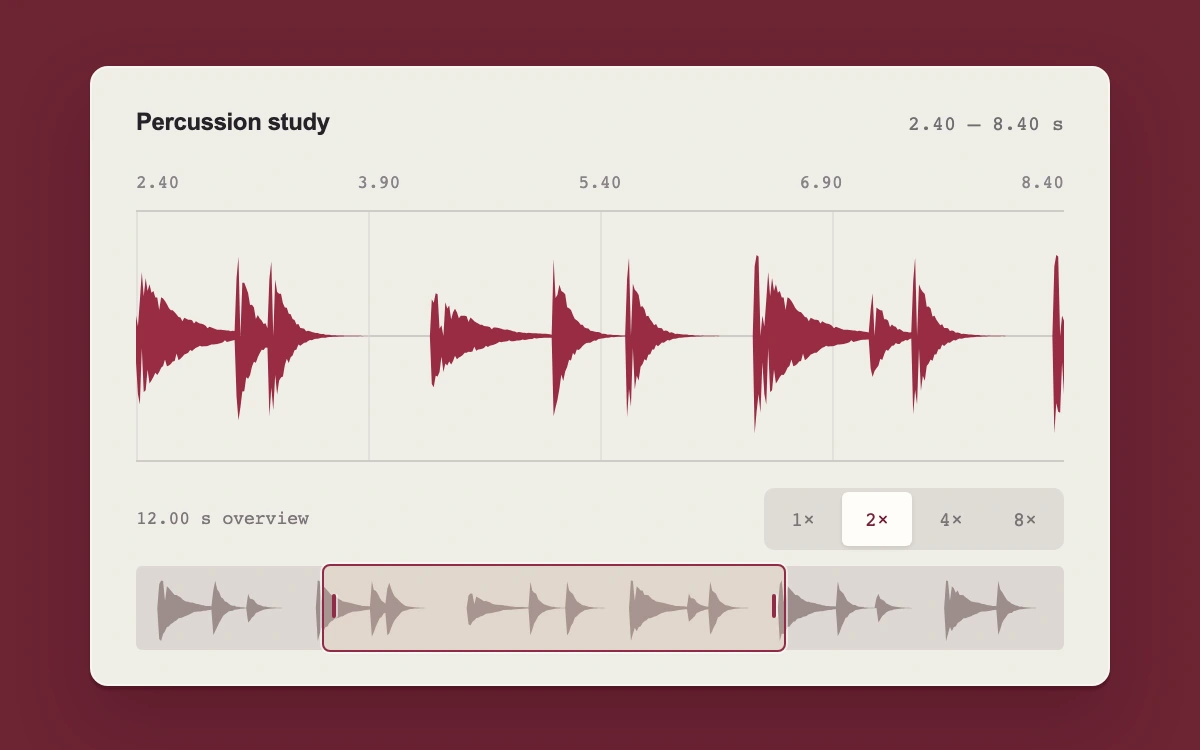
Drag the overview window or choose 1×, 2×, 4×, or 8× magnification
Subframe Original · MIT
Add to your project
Component source
Standalone React component. Styles are included.
React only. No additional packages.
Render the default export inside a container with a defined height. Its optional active prop stops movement when false. This example works with React 19; Next.js projects can use it as a client component.
View source code
/**
 * MIT License
 *
 * Copyright (c) 2026 Subframe
 *
 * Permission is hereby granted, free of charge, to any person obtaining a copy
 * of this software and associated documentation files (the "Software"), to deal
 * in the Software without restriction, including without limitation the rights
 * to use, copy, modify, merge, publish, distribute, sublicense, and/or sell
 * copies of the Software, and to permit persons to whom the Software is
 * furnished to do so, subject to the following conditions:
 *
 * The above copyright notice and this permission notice shall be included in all
 * copies or substantial portions of the Software.
 *
 * THE SOFTWARE IS PROVIDED "AS IS", WITHOUT WARRANTY OF ANY KIND, EXPRESS OR
 * IMPLIED, INCLUDING BUT NOT LIMITED TO THE WARRANTIES OF MERCHANTABILITY,
 * FITNESS FOR A PARTICULAR PURPOSE AND NONINFRINGEMENT. IN NO EVENT SHALL THE
 * AUTHORS OR COPYRIGHT HOLDERS BE LIABLE FOR ANY CLAIM, DAMAGES OR OTHER
 * LIABILITY, WHETHER IN AN ACTION OF CONTRACT, TORT OR OTHERWISE, ARISING FROM,
 * OUT OF OR IN CONNECTION WITH THE SOFTWARE OR THE USE OR OTHER DEALINGS IN THE
 * SOFTWARE.
 */

"use client"

import { useMemo, useRef, useState } from "react"

const DURATION = 12
const SAMPLE_RATE = 2000
const beats = [0.32, 1.02, 1.46, 2.35, 3.06, 3.27, 4.32, 5.1, 5.58, 6.4, 7.16, 7.43, 8.34, 9.08, 9.6, 10.48, 11.15]
// A deterministic percussion signal. Both views read these same samples.
const samples = Float32Array.from({ length: DURATION * SAMPLE_RATE }, (_, i) => {
  const t = i / SAMPLE_RATE
  return beats.reduce((v, beat, n) => {
    const age = t - beat
    if (age < 0 || age > 1.1) return v
    const decay = n % 3 === 0 ? 0.23 : 0.09
    const tone = Math.sin(age * (n % 3 === 0 ? 420 : 970) + 70 * Math.exp(-age * 25))
    const texture = Math.sin(age * 5641) * Math.sin(age * 3543)
    return v + Math.exp(-age / decay) * (tone * 0.72 + texture * 0.28) * (n % 4 === 2 ? 0.5 : 0.95)
  }, 0)
})
function signalPath(start: number, span: number, width: number, height: number) {
  const top: string[] = [],
    bottom: string[] = []
  for (let x = 0; x <= width; x++) {
    const a = Math.floor((start + (x / width) * span) * SAMPLE_RATE)
    const b = Math.min(samples.length, Math.ceil((start + ((x + 1) / width) * span) * SAMPLE_RATE))
    let lo = 0,
      hi = 0
    for (let i = a; i < b; i++) {
      lo = Math.min(lo, samples[i])
      hi = Math.max(hi, samples[i])
    }
    top.push(`${x},${(height / 2 - hi * height * 0.43).toFixed(2)}`)
    bottom.push(`${x},${(height / 2 - lo * height * 0.43).toFixed(2)}`)
  }
  return `M${top.join("L")}L${bottom.reverse().join("L")}Z`
}
const overview = signalPath(0, DURATION, 480, 42)
const clamp = (n: number, lo: number, hi: number) => Math.max(lo, Math.min(hi, n))
export default function RangeZoom({ active = true }: { active?: boolean }) {
  const [view, setView] = useState({ start: 2.4, span: 6 })
  const track = useRef<HTMLDivElement>(null)
  const drag = useRef<{ pointerId: number; x: number; start: number; width: number } | null>(null)
  const path = useMemo(() => signalPath(view.start, view.span, 480, 126), [view])
  const zoom = (span: number) =>
    setView((v) => ({ span, start: clamp(v.start + (v.span - span) / 2, 0, DURATION - span) }))
  return (
    <div className="sf-rz2" data-active={active}>
      <style>{`
.sf-rz2{height:100%;min-height:300px;display:grid;place-items:center;background:#6d2434;color:#262329;font:12px Arial,sans-serif}.sf-rz2 *{box-sizing:border-box}.sf-rz2-panel{width:min(510px,92%);background:#f0eee8;border:1px solid #f8f6ef;border-radius:9px;padding:20px 22px 17px;box-shadow:0 2px 1px #39071755,0 18px 36px #350a1b44}.sf-rz2-head{display:flex;align-items:center;justify-content:space-between;margin-bottom:18px}.sf-rz2-title{display:flex;align-items:center;gap:8px;font-weight:600;letter-spacing:-.2px}.sf-rz2-title svg{color:#a03c4e}.sf-rz2-head output{font:10px ui-monospace,monospace;color:#716d70;white-space:nowrap}.sf-rz2-ruler{display:flex;justify-content:space-between;font:9px ui-monospace,monospace;color:#898287;padding-bottom:9px}.sf-rz2-wave{position:relative;height:126px;border-top:1px solid #cfcac7;border-bottom:1px solid #cfcac7;background:repeating-linear-gradient(90deg,#d8d3ce88 0 1px,transparent 1px 25%),linear-gradient(transparent calc(50% - .5px),#cfcac7 calc(50% - .5px),#cfcac7 calc(50% + .5px),transparent calc(50% + .5px))}.sf-rz2-wave svg{display:block;width:100%;height:100%;fill:#982c43}.sf-rz2-bottom{display:flex;justify-content:space-between;align-items:center;margin:13px 0 8px}.sf-rz2-bottom span{font:9px ui-monospace,monospace;color:#7d7579}.sf-rz2-zooms{display:flex;gap:2px;padding:2px;background:#dfdcd6;border-radius:5px}.sf-rz2-zooms button{border:0;border-radius:3px;color:#7c7377;min-width:35px;height:27px;background:transparent;cursor:pointer;font:10px ui-monospace,monospace}.sf-rz2-zooms button[aria-pressed=true]{color:#732139;background:#fffdf8;box-shadow:0 1px 2px #6e596128}.sf-rz2-mini{height:42px;position:relative;border-radius:3px;background:#ddd8d2;touch-action:none}.sf-rz2-mini>svg{width:100%;height:100%;display:block;fill:#9c8d8c}.sf-rz2-window{position:absolute;top:-1px;bottom:-1px;padding:0;border:1.5px solid #922b46;border-radius:4px;background:#f8c7b320;box-shadow:0 0 0 1px #fff8;cursor:grab;touch-action:none;min-width:30px}.sf-rz2-window:active{cursor:grabbing}.sf-rz2-window:before,.sf-rz2-window:after{content:"";position:absolute;top:14px;width:2px;height:12px;border-radius:1px;background:#922b46;box-shadow:1px 0 #fff8}.sf-rz2-window:before{left:4px}.sf-rz2-window:after{right:4px}.sf-rz2 button:focus-visible{outline:2px solid #5c1430;outline-offset:3px}.sf-rz2 button{transition:background 120ms ease}.sf-rz2[data-active=false] button{transition:none}@media(hover:hover){.sf-rz2-zooms button:hover{background:#f8f5ef}}@media(prefers-reduced-motion:reduce){.sf-rz2 button{transition:none}}
`}</style>
      <div className="sf-rz2-panel">
        <div className="sf-rz2-head">
          <div className="sf-rz2-title">Percussion study</div>
          <output aria-live="off">
            {view.start.toFixed(2)} — {(view.start + view.span).toFixed(2)} s
          </output>
        </div>
        <div className="sf-rz2-ruler" aria-hidden="true">
          {Array.from({ length: 5 }, (_, i) => (
            <span key={i}>{(view.start + (view.span * i) / 4).toFixed(2)}</span>
          ))}
        </div>
        <div className="sf-rz2-wave">
          <svg
            viewBox="0 0 480 126"
            preserveAspectRatio="none"
            role="img"
            aria-label={`Synthetic percussion waveform from ${view.start.toFixed(2)} to ${(
              view.start + view.span
            ).toFixed(2)} seconds`}
          >
            <path d={path} />
          </svg>
        </div>
        <div className="sf-rz2-bottom">
          <span>12.00 s overview</span>
          <div className="sf-rz2-zooms" aria-label="Waveform magnification">
            {[1, 2, 4, 8].map((n) => (
              <button
                type="button"
                key={n}
                aria-label={`${n} times magnification`}
                aria-pressed={view.span === DURATION / n}
                onClick={() => zoom(DURATION / n)}
              >
                {n}×
              </button>
            ))}
          </div>
        </div>
        <div className="sf-rz2-mini" ref={track}>
          <svg viewBox="0 0 480 42" preserveAspectRatio="none" aria-hidden="true">
            <path d={overview} />
          </svg>
          <button
            type="button"
            role="slider"
            aria-label="Visible waveform range"
            aria-valuemin={0}
            aria-valuemax={DURATION - view.span}
            aria-valuenow={Number(view.start.toFixed(2))}
            aria-valuetext={`${view.start.toFixed(2)} to ${(view.start + view.span).toFixed(
              2,
            )} seconds. Arrow keys pan.`}
            className="sf-rz2-window"
            style={{ left: `${(view.start / DURATION) * 100}%`, width: `${(view.span / DURATION) * 100}%` }}
            onPointerDown={(e) => {
              if (e.button !== 0 || drag.current) return
              const width = track.current!.getBoundingClientRect().width
              drag.current = { pointerId: e.pointerId, x: e.clientX, start: view.start, width }
              e.currentTarget.setPointerCapture(e.pointerId)
            }}
            onPointerMove={(e) => {
              const d = drag.current
              if (d?.pointerId === e.pointerId)
                setView((v) => ({
                  ...v,
                  start: clamp(d.start + ((e.clientX - d.x) / d.width) * DURATION, 0, DURATION - v.span),
                }))
            }}
            onPointerUp={(e) => {
              if (drag.current?.pointerId !== e.pointerId) return
              drag.current = null
            }}
            onPointerCancel={(e) => {
              if (drag.current?.pointerId !== e.pointerId) return
              drag.current = null
            }}
            onLostPointerCapture={(e) => {
              if (drag.current?.pointerId !== e.pointerId) return
              drag.current = null
            }}
            onKeyDown={(e) => {
              if (!["ArrowLeft", "ArrowRight", "Home", "End"].includes(e.key)) return
              e.preventDefault()
              setView((v) => ({
                ...v,
                start:
                  e.key === "Home"
                    ? 0
                    : e.key === "End"
                    ? DURATION - v.span
                    : clamp(v.start + (e.key === "ArrowRight" ? 1 : -1) * (e.shiftKey ? 1 : 0.1), 0, DURATION - v.span),
              }))
            }}
          />
        </div>
      </div>
    </div>
  )
}
Where it works well
Navigating audio, sensor signals, or other dense time series while keeping the full sequence in view.
Reduced motion
All waveform navigation is immediate; reduced motion also removes control color transitions.
Things to know
One deterministic 12-second synthetic percussion signal; no audio playback, media import, trimming, or real-time recording. Min/max envelopes sample the same data at both scales.