
Asset crop workflow
One original artwork branches into square and portrait crops, with each connection leading to a downloadable result.
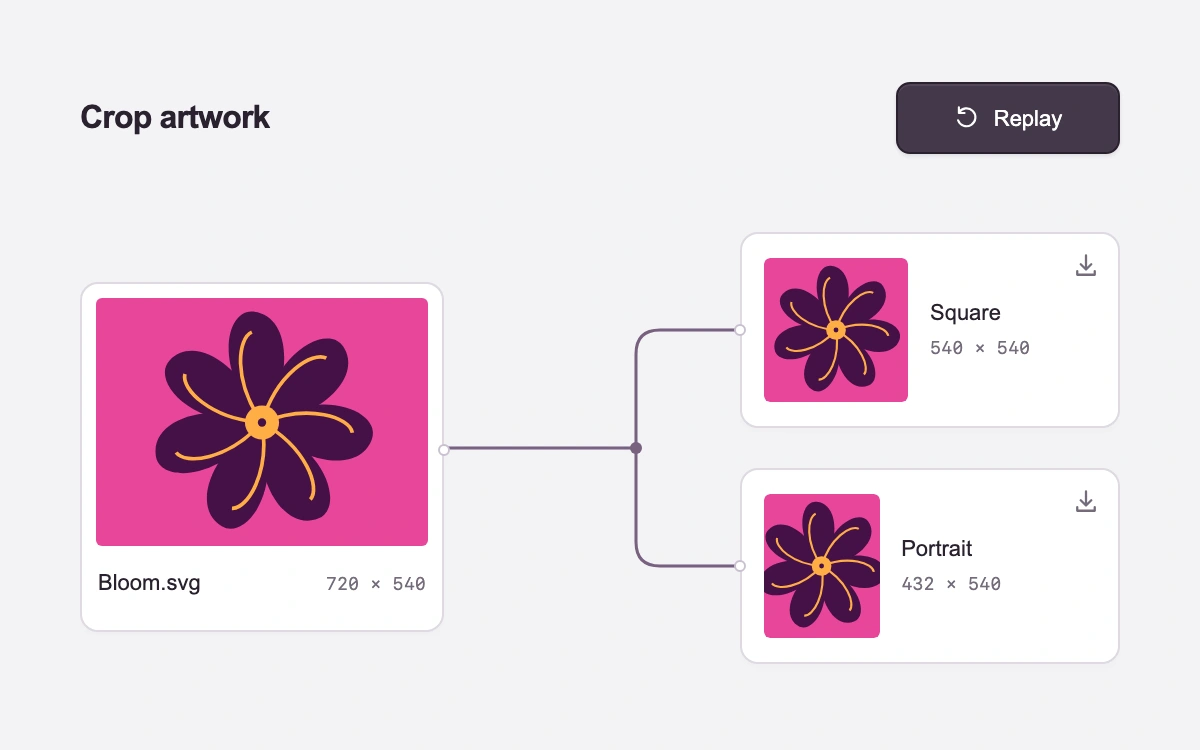
Create crops, cancel or replay, then download either SVG
Subframe Original · MIT
Add to your project
Component source
Standalone React component. Styles are included.
React only. No additional packages.
Render the default export inside a container with a defined height. Its optional active prop stops movement when false. This example works with React 19; Next.js projects can use it as a client component.
View source code
/**
 * MIT License
 *
 * Copyright (c) 2026 Subframe
 *
 * Permission is hereby granted, free of charge, to any person obtaining a copy
 * of this software and associated documentation files (the "Software"), to deal
 * in the Software without restriction, including without limitation the rights
 * to use, copy, modify, merge, publish, distribute, sublicense, and/or sell
 * copies of the Software, and to permit persons to whom the Software is
 * furnished to do so, subject to the following conditions:
 *
 * The above copyright notice and this permission notice shall be included in all
 * copies or substantial portions of the Software.
 *
 * THE SOFTWARE IS PROVIDED "AS IS", WITHOUT WARRANTY OF ANY KIND, EXPRESS OR
 * IMPLIED, INCLUDING BUT NOT LIMITED TO THE WARRANTIES OF MERCHANTABILITY,
 * FITNESS FOR A PARTICULAR PURPOSE AND NONINFRINGEMENT. IN NO EVENT SHALL THE
 * AUTHORS OR COPYRIGHT HOLDERS BE LIABLE FOR ANY CLAIM, DAMAGES OR OTHER
 * LIABILITY, WHETHER IN AN ACTION OF CONTRACT, TORT OR OTHERWISE, ARISING FROM,
 * OUT OF OR IN CONNECTION WITH THE SOFTWARE OR THE USE OR OTHER DEALINGS IN THE
 * SOFTWARE.
 */

"use client"

import { memo, useEffect, useRef, useState } from "react"

const DURATION = 1120
const clamp = (value: number) => Math.max(0, Math.min(1, value))
const segment = (value: number, start: number, end: number) => clamp((value - start) / (end - start))
const easeOut = (value: number) => 1 - Math.pow(1 - value, 3)
const crops = [
  { name: "Square", width: 540, x: 90, viewBox: "90 0 540 540", start: 0.48, end: 0.7 },
  { name: "Portrait", width: 432, x: 144, viewBox: "144 0 432 540", start: 0.72, end: 0.94 },
]

const Artwork = memo(function Artwork({ viewBox = "0 0 720 540" }: { viewBox?: string }) {
  return (
    <svg viewBox={viewBox} preserveAspectRatio="xMidYMid meet" aria-hidden="true">
      <path fill="#e8469a" d="M0 0h720v540H0z" />
      <g fill="#451047">
        {Array.from({ length: 7 }, (_, index) => (
          <path
            key={index}
            d="M360 270C204 283 118 178 160 135C217 75 330 156 360 270Z"
            transform={`rotate(${index * (360 / 7)} 360 270)`}
          />
        ))}
      </g>
      <g fill="none" stroke="#ffae46" strokeWidth="8">
        {Array.from({ length: 7 }, (_, index) => (
          <path key={index} d="M360 270C249 263 184 197 193 165" transform={`rotate(${index * (360 / 7)} 360 270)`} />
        ))}
      </g>
      <circle cx="360" cy="270" r="37" fill="#ffae46" />
      <circle cx="360" cy="270" r="9" fill="#451047" />
    </svg>
  )
})

function CropIcon() {
  return (
    <svg width="20" height="20" viewBox="0 0 20 20" fill="none" aria-hidden="true">
      <path
        d="M6 2v12h12M2 6h12v12"
        stroke="currentColor"
        strokeWidth="1.4"
        strokeLinecap="round"
        strokeLinejoin="round"
      />
    </svg>
  )
}

export default function ProcessChoreography({ active = true }: { active?: boolean }) {
  const [progress, setProgress] = useState(0)
  const [running, setRunning] = useState(false)
  const [reduced, setReduced] = useState(true)
  const [visible, setVisible] = useState(true)
  const [downloads, setDownloads] = useState<string[]>([])
  const root = useRef<HTMLElement>(null)
  const elapsed = useRef(0)
  const action = useRef<HTMLButtonElement>(null)
  const complete = progress === 1

  useEffect(() => {
    const query = matchMedia("(prefers-reduced-motion: reduce)")
    const motion = () => setReduced(query.matches)
    const visibility = () => setVisible(!document.hidden)
    motion()
    visibility()
    query.addEventListener("change", motion)
    document.addEventListener("visibilitychange", visibility)
    return () => {
      query.removeEventListener("change", motion)
      document.removeEventListener("visibilitychange", visibility)
    }
  }, [])

  useEffect(() => {
    if (!running) return
    if (reduced) {
      elapsed.current = DURATION
      setProgress(1)
      setRunning(false)
      return
    }
    if (!active || !visible) return
    let frame = 0
    let previous = performance.now()
    const tick = (now: number) => {
      elapsed.current += Math.min(now - previous, 48)
      previous = now
      const next = clamp(elapsed.current / DURATION)
      setProgress(next)
      if (next === 1) setRunning(false)
      else frame = requestAnimationFrame(tick)
    }
    frame = requestAnimationFrame(tick)
    return () => cancelAnimationFrame(frame)
  }, [running, active, visible, reduced])

  useEffect(() => {
    if (!complete) return
    const results = root.current?.querySelectorAll<SVGSVGElement>(".sf-cropflow-result svg")
    if (!results) return
    setDownloads(
      Array.from(results, (element, index) => {
        const svg = element.cloneNode(true) as SVGSVGElement
        svg.setAttribute("xmlns", "http://www.w3.org/2000/svg")
        svg.setAttribute("width", String(crops[index].width))
        svg.setAttribute("height", "540")
        svg.removeAttribute("aria-hidden")
        return `data:image/svg+xml;charset=utf-8,${encodeURIComponent(svg.outerHTML)}`
      }),
    )
  }, [complete])

  const cancel = () => {
    setDownloads([])
    setRunning(false)
    elapsed.current = 0
    setProgress(0)
  }
  const reveal = (instant: boolean) => {
    setDownloads([])
    elapsed.current = instant ? DURATION : 0
    setProgress(instant ? 1 : 0)
    setRunning(!instant)
  }
  const trunk = segment(progress, 0, 0.2)
  const branch = [segment(progress, 0.18, 0.48), segment(progress, 0.4, 0.72)]

  return (
    <section
      ref={root}
      className="sf-cropflow"
      data-progress={progress.toFixed(3)}
      data-running={running}
      data-active={active}
      aria-label="Artwork crop workflow"
      onKeyDown={(event) => {
        if (event.key === "Escape" && running) {
          event.preventDefault()
          cancel()
          action.current?.focus()
        }
      }}
    >
      <header className="sf-cropflow-header">
        <span className="sf-cropflow-title">Crop artwork</span>
        <button
          ref={action}
          type="button"
          className="sf-cropflow-action"
          disabled={!active && !running}
          onClick={() => (running ? cancel() : reveal(reduced))}
        >
          {running ? (
            <svg width="13" height="13" viewBox="0 0 16 16" aria-hidden="true">
              <path d="m4 4 8 8M12 4l-8 8" fill="none" stroke="currentColor" strokeWidth="1.5" strokeLinecap="round" />
            </svg>
          ) : complete ? (
            <svg width="13" height="13" viewBox="0 0 16 16" aria-hidden="true">
              <path
                d="M3 5.3A5.5 5.5 0 1 1 2.5 10M3 2v3.5h3.5"
                fill="none"
                stroke="currentColor"
                strokeWidth="1.3"
                strokeLinecap="round"
                strokeLinejoin="round"
              />
            </svg>
          ) : (
            <CropIcon />
          )}
          {running ? "Cancel" : complete ? "Replay" : "Create crops"}
        </button>
      </header>
      <div className="sf-cropflow-workspace">
        <svg
          className="sf-cropflow-paths"
          viewBox="0 0 520 242"
          preserveAspectRatio="none"
          fill="none"
          aria-hidden="true"
        >
          <g stroke="#d8d4dd" strokeWidth="1.2">
            <path d="M182 122h96" />
            <path d="M278 122V75q0-12 12-12h40M278 122v47q0 12 12 12h40" />
          </g>
          <g stroke="#786180" strokeWidth="1.5">
            <path d="M182 122h96" pathLength="100" strokeDasharray="100 101" strokeDashoffset={(1 - trunk) * 100} />
            {["M278 122V75q0-12 12-12h40", "M278 122v47q0 12 12 12h40"].map((d, index) => (
              <path
                key={d}
                d={d}
                pathLength="100"
                strokeDasharray="100 101"
                strokeDashoffset={(1 - branch[index]) * 100}
              />
            ))}
          </g>
          <circle cx="278" cy="122" r="3" fill={trunk === 1 ? "#786180" : "#d8d4dd"} />
        </svg>
        <div className="sf-cropflow-source">
          <div className="sf-cropflow-art">
            <Artwork />
            <svg className="sf-cropflow-guides" viewBox="0 0 720 540" fill="none" aria-hidden="true">
              {crops.map((crop, index) => (
                <rect
                  key={crop.name}
                  x={crop.x}
                  y="3"
                  width={crop.width}
                  height="534"
                  stroke="white"
                  strokeWidth="4"
                  strokeDasharray="12 8"
                  opacity={
                    running && progress >= (index === 0 ? 0.12 : 0.57) && progress < (index === 0 ? 0.57 : 0.97)
                      ? 0.9
                      : 0
                  }
                />
              ))}
            </svg>
          </div>
          <div className="sf-cropflow-file">
            <span>Bloom.svg</span>
            <span>720 × 540</span>
          </div>
          <span className="sf-cropflow-port sf-cropflow-port-source" aria-hidden="true" />
        </div>
        {crops.map((crop, index) => {
          const arrival = easeOut(segment(progress, crop.start, crop.end))
          return (
            <div
              key={crop.name}
              className={`sf-cropflow-output sf-cropflow-output-${index}`}
              data-ready={arrival === 1}
            >
              <span className="sf-cropflow-port sf-cropflow-port-output" aria-hidden="true" />
              <div className="sf-cropflow-thumbnail" style={{ width: index === 0 ? 72 : 57.6 }}>
                <div className="sf-cropflow-placeholder" style={{ opacity: 1 - arrival }}>
                  <CropIcon />
                </div>
                <div
                  className="sf-cropflow-result"
                  style={{
                    opacity: arrival,
                    transform: `translateY(${(1 - arrival) * 6}px) scale(${0.96 + arrival * 0.04})`,
                  }}
                >
                  <Artwork viewBox={crop.viewBox} />
                </div>
              </div>
              <div className="sf-cropflow-output-label">
                <span>{crop.name}</span>
                <span>{crop.width} × 540</span>
              </div>
              {downloads[index] ? (
                <a
                  className="sf-cropflow-download"
                  href={downloads[index]}
                  download={`Bloom-${crop.name.toLowerCase()}.svg`}
                  aria-label={`Download ${crop.name.toLowerCase()} crop as SVG, ${crop.width} by 540 pixels`}
                >
                  <svg width="14" height="14" viewBox="0 0 16 16" fill="none" aria-hidden="true">
                    <path
                      d="M8 2v8m-3-3 3 3 3-3M3 11v2h10v-2"
                      stroke="currentColor"
                      strokeWidth="1.3"
                      strokeLinecap="round"
                      strokeLinejoin="round"
                    />
                  </svg>
                </a>
              ) : null}
            </div>
          )
        })}
      </div>
      <span className="sf-cropflow-status" role="status">
        {complete ? "Square and portrait crops ready." : running ? "Revealing square and portrait crops." : ""}
      </span>
      <style>{`
.sf-cropflow{width:100%;height:100%;min-height:300px;background:#f4f3f6;color:#29212e;font:12px Arial,sans-serif;overflow:hidden;position:relative;isolation:isolate;display:flex;flex-direction:column;justify-content:center;padding:29px 40px 24px;box-sizing:border-box}.sf-cropflow *{box-sizing:border-box}.sf-cropflow-header{height:44px;display:flex;align-items:center;justify-content:space-between;margin-bottom:21px}.sf-cropflow-title{font-size:16px;font-weight:550;letter-spacing:-.4px}.sf-cropflow-action{height:36px;min-width:112px;position:relative;display:flex;align-items:center;justify-content:center;gap:7px;border:1px solid #29212e;border-radius:7px;background:#29212e;color:white;font:11px Arial,sans-serif;padding:0 12px;cursor:pointer;touch-action:manipulation;box-shadow:0 1px 2px #2115251a,inset 0 1px #ffffff12;transition:background 150ms ease,transform 150ms cubic-bezier(.25,.46,.45,.94)}.sf-cropflow-action:before{content:"";position:absolute;inset:-4px 0}.sf-cropflow-action>svg{width:13px;height:13px}.sf-cropflow-action:active{transform:scale(.97)}.sf-cropflow-action:focus-visible{outline:2px solid #9479a4;outline-offset:3px}.sf-cropflow-workspace{position:relative;flex:none;height:242px;width:100%}.sf-cropflow-paths{position:absolute;inset:0;width:100%;height:100%;overflow:visible}.sf-cropflow-source{position:absolute;left:0;top:39px;width:35%;padding:7px;border:1px solid #ded9e2;background:#fff;border-radius:9px;box-shadow:0 2px 5px #24162906}.sf-cropflow-art{position:relative;aspect-ratio:4/3;border-radius:3px;overflow:hidden}.sf-cropflow-art>svg:first-child{display:block;width:100%;height:100%}.sf-cropflow-guides{position:absolute;inset:0;width:100%;height:100%}.sf-cropflow-file{display:flex;align-items:center;justify-content:space-between;gap:4px;height:35px;padding:1px 1px 0}.sf-cropflow-file>span:first-child{font-size:11px}.sf-cropflow-file>span:last-child{font:9px ui-monospace,SFMono-Regular,Consolas,monospace;color:#746b7a;white-space:nowrap}.sf-cropflow-port{position:absolute;width:6px;height:6px;background:#fff;border:1px solid #c9c0d0;border-radius:50%}.sf-cropflow-port-source{right:-3.5px;top:80px}.sf-cropflow-output{position:absolute;left:63.46%;right:0;height:98px;display:flex;align-items:center;gap:11px;padding:12px 11px;background:#fff;border:1px solid #ded9e2;border-radius:9px;box-shadow:0 2px 5px #24162906}.sf-cropflow-output-0{top:14px}.sf-cropflow-output-1{top:132px}.sf-cropflow-port-output{left:-3.5px;top:45px}.sf-cropflow-thumbnail{position:relative;height:72px;flex:none;margin-right:0;overflow:hidden;border-radius:3px}.sf-cropflow-placeholder{position:absolute;inset:0;display:grid;place-items:center;border:1px dashed #d3ccd9;border-radius:3px;background:#faf9fb;color:#b3a7bc}.sf-cropflow-result{position:absolute;inset:0;transform-origin:center;overflow:hidden;border-radius:3px}.sf-cropflow-result>svg{width:100%;height:100%;display:block}.sf-cropflow-output-label{align-self:center;display:flex;flex-direction:column;gap:6px;white-space:nowrap}.sf-cropflow-output-label>span:first-child{font-size:11px}.sf-cropflow-output-label>span:last-child{font:9px ui-monospace,SFMono-Regular,Consolas,monospace;color:#746b7a}.sf-cropflow-download{position:absolute;inset:-1px;border:1px solid transparent;border-radius:9px;color:#746b7a}.sf-cropflow-download>svg{position:absolute;right:9px;top:9px}.sf-cropflow-download:focus-visible{outline:2px solid #9479a4;outline-offset:3px}.sf-cropflow-action:disabled{cursor:default;opacity:.5}.sf-cropflow-action:disabled:active{transform:none}.sf-cropflow-status{position:absolute;width:1px;height:1px;padding:0;margin:-1px;overflow:hidden;clip:rect(0,0,0,0);white-space:nowrap;border:0}@media(hover:hover) and (pointer:fine){.sf-cropflow-action:not(:disabled):hover{background:#44394a}.sf-cropflow-download:hover{border-color:#b8a9c2;color:#451047}}@media(prefers-reduced-motion:reduce){.sf-cropflow-action{transition:none}}.sf-cropflow[data-active=false] .sf-cropflow-action{transition:none}@media(max-width:440px){.sf-cropflow{padding-right:20px;padding-left:20px}.sf-cropflow-source{width:35%}.sf-cropflow-file{align-items:flex-start;justify-content:center;flex-direction:column;gap:4px;height:37px}.sf-cropflow-file>span:first-child{font-size:10px}.sf-cropflow-file>span:last-child{font-size:8px}.sf-cropflow-output{padding:8px;gap:7px}.sf-cropflow-thumbnail{max-width:43%;height:auto;aspect-ratio:1}.sf-cropflow-output-1 .sf-cropflow-thumbnail{aspect-ratio:4/5}.sf-cropflow-output-label>span:first-child{font-size:10px}.sf-cropflow-output-label>span:last-child{font-size:8px}.sf-cropflow-output-label{gap:4px}}
      `}</style>
    </section>
  )
}
Where it works well
Explain an asset transformation through directed connections and concrete outputs that retain the source image's identity.
Reduced motion
Both crops appear immediately. The native action and SVG downloads stay available.
Things to know
Two centered viewBox crops of an original SVG artwork. The short reveal sequence explains their relationship; it does not represent network or rendering progress. No image upload, raster conversion or external service.