
Animation & motionPendulum metronome
Pendulum tempo
A metal pendulum and sliding counterweight make an adjustable beat visible.
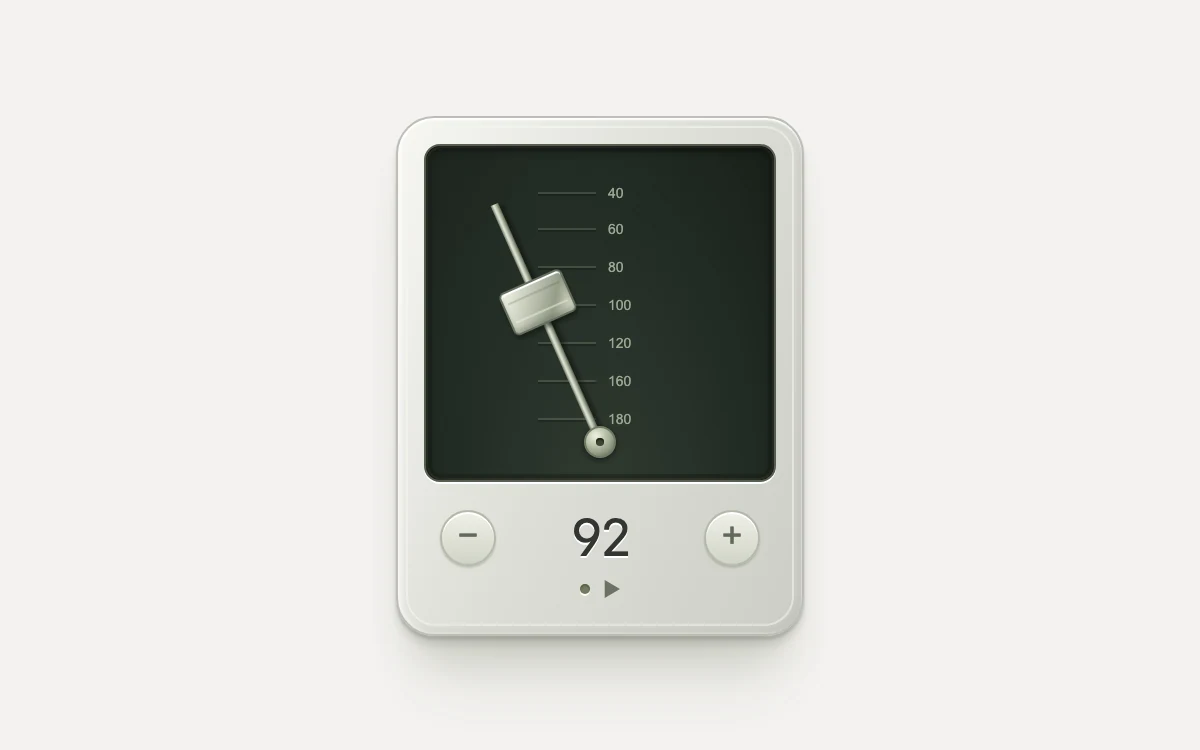
Start the pendulum and change its tempo
Subframe Original · MIT
Add to your project
Component source
Standalone React component. Styles are included.
React only. No additional packages.
Render the default export inside a container with a defined height. Its optional active prop stops movement when false. This example works with React 19; Next.js projects can use it as a client component.
View source code
/**
 * MIT License
 *
 * Copyright (c) 2026 Subframe
 *
 * Permission is hereby granted, free of charge, to any person obtaining a copy
 * of this software and associated documentation files (the "Software"), to deal
 * in the Software without restriction, including without limitation the rights
 * to use, copy, modify, merge, publish, distribute, sublicense, and/or sell
 * copies of the Software, and to permit persons to whom the Software is
 * furnished to do so, subject to the following conditions:
 *
 * The above copyright notice and this permission notice shall be included in all
 * copies or substantial portions of the Software.
 *
 * THE SOFTWARE IS PROVIDED "AS IS", WITHOUT WARRANTY OF ANY KIND, EXPRESS OR
 * IMPLIED, INCLUDING BUT NOT LIMITED TO THE WARRANTIES OF MERCHANTABILITY,
 * FITNESS FOR A PARTICULAR PURPOSE AND NONINFRINGEMENT. IN NO EVENT SHALL THE
 * AUTHORS OR COPYRIGHT HOLDERS BE LIABLE FOR ANY CLAIM, DAMAGES OR OTHER
 * LIABILITY, WHETHER IN AN ACTION OF CONTRACT, TORT OR OTHERWISE, ARISING FROM,
 * OUT OF OR IN CONNECTION WITH THE SOFTWARE OR THE USE OR OTHER DEALINGS IN THE
 * SOFTWARE.
 */

"use client"

import { type CSSProperties, useState } from "react"

export default function PendulumTempo({ active = true }: { active?: boolean }) {
  const [bpm, setBpm] = useState(92)
  const [playing, setPlaying] = useState(false)

  return (
    <div className="sf-tempo" data-running={active && playing} style={{ "--period": `${120 / bpm}s` } as CSSProperties}>
      <style>{`
.sf-tempo { height:100%; min-height:300px; display:grid; place-items:center; overflow:hidden; background:#f3f2ef; color:#333533; font-family:Arial,sans-serif; }
.sf-tempo * { box-sizing:border-box; }
.sf-tempo-body { width:204px; height:260px; position:relative; padding:13px; border:1px solid #bdbdb6; border-radius:19px; background:linear-gradient(115deg,#f7f7f3 0%,#ddded7 48%,#cccdc6 100%); box-shadow:inset 0 1px 1px #fff,inset 2px 0 2px #fff9,inset -2px -3px 3px #898b8126,0 2px 1px #8b8d8066,0 5px 3px #64675b26,0 18px 20px -8px #5a5f4833,0 36px 32px -16px #5a5f481f; }
.sf-tempo-body:before { content:""; position:absolute; inset:4px; border:1px solid #f7f8f188; border-radius:15px; pointer-events:none; }
.sf-tempo-face { height:169px; position:relative; overflow:hidden; border:1px solid #565d50; border-radius:8px; background:radial-gradient(ellipse at 50% 110%,#313b31 0%,#222c24 60%,#182019 100%); box-shadow:0 1px 0 #fff,inset 0 2px 5px #050b06a6,inset 0 0 0 3px #191e1780; }
.sf-tempo-face:after { content:""; position:absolute; inset:0; pointer-events:none; background:linear-gradient(130deg,#ffffff06,transparent 45%); border-radius:inherit; box-shadow:inset 0 0 0 1px #bccca014; }
.sf-tempo-ticks { position:absolute; top:20px; bottom:27px; left:50%; width:62px; transform:translateX(-50%); display:flex; flex-direction:column; justify-content:space-between; }
.sf-tempo-tick { display:flex; align-items:center; gap:6px; color:#9ba691; font:7px Arial,sans-serif; font-variant-numeric:tabular-nums; }
.sf-tempo-tick:before { content:""; width:29px; height:1px; background:#9aa88e40; box-shadow:0 1px #0003; }
.sf-tempo-arm { position:absolute; bottom:19px; left:calc(50% - 2px); width:4px; height:130px; transform-origin:50% 100%; transform:rotate(-24deg); animation:sf-tempo-swing var(--period) cubic-bezier(.37,0,.63,1) infinite; animation-play-state:paused; background:linear-gradient(90deg,#737967,#e7ebdc 35%,#acb49d 65%,#5b6252); box-shadow:2px 1px 2px #0006; }
.sf-tempo-weight { position:absolute; top:var(--weight-position); left:-15px; width:34px; height:23px; border:1px solid #666f5e; border-radius:3px; background:linear-gradient(125deg,#f4f5e8 0%,#c8cdbc 35%,#969e8a 72%,#e6e9d6 100%); box-shadow:inset 0 1px #fff,inset 0 -2px 2px #48533c4d,0 2px 2px #09100980; }
.sf-tempo-weight:after { content:""; position:absolute; inset:5px 2px; border-top:1px solid #48503b33; border-bottom:1px solid #eef1e180; }
.sf-tempo-pivot { position:absolute; bottom:11px; left:calc(50% - 8px); width:16px; height:16px; border:1px solid #727b63; border-radius:50%; background:radial-gradient(circle at 35% 28%,#f0f3df,#99a28a 60%,#55614d); box-shadow:0 1px 3px #0008; }
.sf-tempo-pivot:after { content:""; position:absolute; inset:5px; border-radius:50%; background:#3e4838; box-shadow:inset 0 1px 1px #182017; }
.sf-tempo-controls { position:relative; display:flex; align-items:center; justify-content:space-between; height:48px; margin-top:4px; }
.sf-tempo-step { width:44px; height:44px; display:grid; place-items:center; padding:0; border:0; border-radius:50%; color:#62685c; background:transparent; cursor:pointer; }
.sf-tempo-step span { width:28px; height:28px; display:grid; place-items:center; border-radius:50%; font:18px Arial,sans-serif; border:1px solid #b4b9aa; background:linear-gradient(#f0f1e8,#d0d3c7); box-shadow:inset 0 1px #fff,0 1px 1px #66704d4d; transition:transform 120ms cubic-bezier(.25,.46,.45,.94); }
.sf-tempo-step:active span { transform:translateY(1px); box-shadow:inset 0 1px 2px #7782644d; }
.sf-tempo-step:disabled { opacity:.35; cursor:default; }
.sf-tempo-controls output { min-width:48px; font:26px/1 ui-monospace,SFMono-Regular,Consolas,monospace; font-variant-numeric:tabular-nums; letter-spacing:-1.5px; text-align:center; text-shadow:0 1px #fff; }
.sf-tempo-play { display:flex; align-items:center; justify-content:center; gap:6px; position:absolute; bottom:0; left:calc(50% - 38px); width:76px; height:44px; margin:0; padding:0; border:0; background:transparent; color:#6d7265; cursor:pointer; }
.sf-tempo-play:before { content:""; width:5px; height:5px; border-radius:50%; background:#737b62; box-shadow:inset 0 1px 1px #29341766,0 1px #ffffed; }
.sf-tempo-play:after { content:""; width:9px; height:9px; background:currentColor; clip-path:polygon(15% 0,100% 50%,15% 100%); }
.sf-tempo-play[aria-pressed=true]:before { background:#f59c56; box-shadow:0 0 4px #ed813166,inset 0 1px #ffce90; }
.sf-tempo-play[aria-pressed=true]:after { clip-path:polygon(10% 5%,40% 5%,40% 95%,10% 95%,10% 5%,60% 5%,90% 5%,90% 95%,60% 95%,60% 5%); }
.sf-tempo button:focus-visible { outline:2px solid #526946; outline-offset:1px; border-radius:8px; }
.sf-tempo[data-running=true] .sf-tempo-arm { animation-play-state:running; }
@keyframes sf-tempo-swing { 0%,100% { transform:rotate(-24deg); } 50% { transform:rotate(24deg); } }
@media(prefers-reduced-motion:reduce) { .sf-tempo .sf-tempo-arm { animation:none; transform:rotate(0); } .sf-tempo-step span { transition:none; } }
`}</style>
      <div className="sf-tempo-body">
        <div className="sf-tempo-face" aria-hidden="true">
          <div className="sf-tempo-ticks">
            {[40, 60, 80, 100, 120, 160, 180].map((value) => (
              <span className="sf-tempo-tick" key={value}>
                {value}
              </span>
            ))}
          </div>
          <div
            className="sf-tempo-arm"
            style={{ "--weight-position": `${12 + ((bpm - 40) / 140) * 80}px` } as CSSProperties}
          >
            <span className="sf-tempo-weight" />
          </div>
          <span className="sf-tempo-pivot" />
        </div>
        <div className="sf-tempo-controls">
          <button
            type="button"
            className="sf-tempo-step"
            aria-label="Decrease tempo"
            disabled={bpm <= 40}
            onClick={() => setBpm((b) => Math.max(40, b - 4))}
          >
            <span aria-hidden="true">−</span>
          </button>
          <output aria-label={`${bpm} beats per minute`}>{bpm}</output>
          <button
            type="button"
            className="sf-tempo-step"
            aria-label="Increase tempo"
            disabled={bpm >= 180}
            onClick={() => setBpm((b) => Math.min(180, b + 4))}
          >
            <span aria-hidden="true">+</span>
          </button>
        </div>
        <button
          type="button"
          className="sf-tempo-play"
          aria-label={playing ? "Stop metronome" : "Start metronome"}
          aria-pressed={playing}
          onClick={() => setPlaying((p) => !p)}
        />
      </div>
    </div>
  )
}
Where it works well
A visual tempo reference for rehearsing timing or motion cadence.
Reduced motion
The pendulum stays upright; tempo controls remain available.
Things to know
Visual-only tempo; no audio click or sample-accurate clock. Changing tempo retimes the CSS cycle and may shift its phase.