
Components & interactionsPiano keyboard
Octave keys
A one-octave instrument pairs independently raised key faces with opt-in synthesized notes.
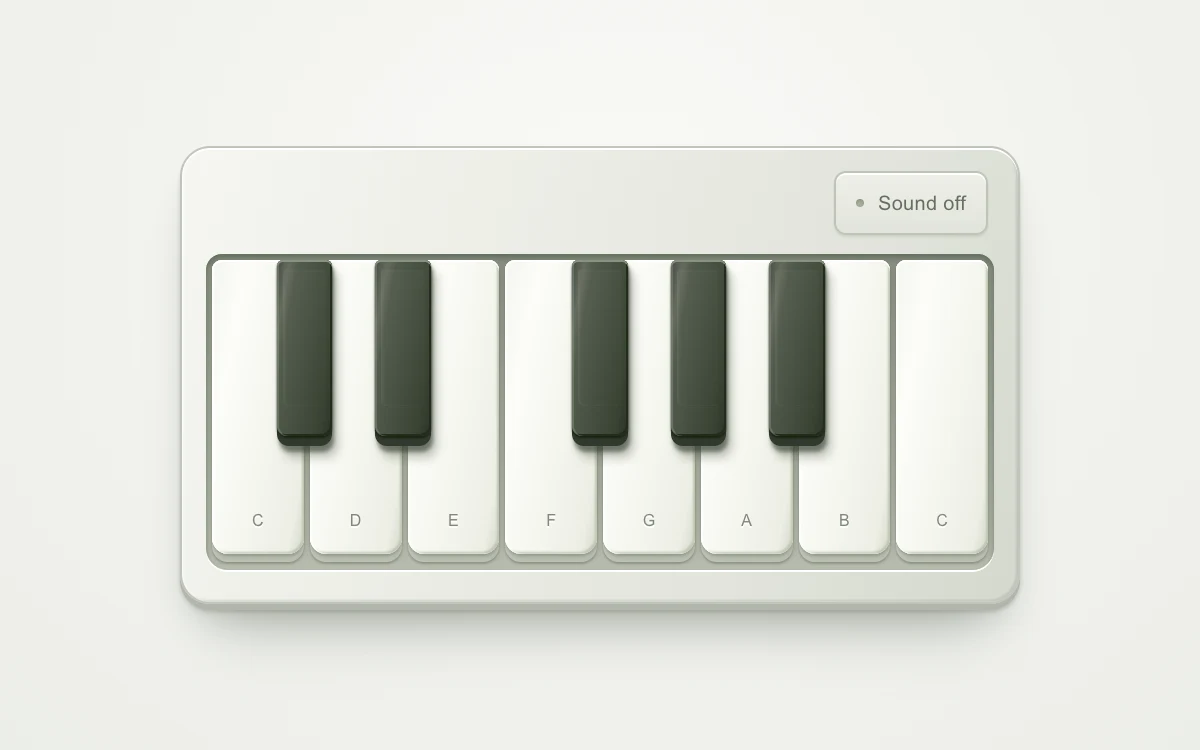
Enable sound, then press a key
Subframe Original · MIT
Add to your project
Component source
Standalone React component. Styles are included.
React only. No additional packages.
Render the default export inside a container with a defined height. Its optional active prop stops movement when false. This example works with React 19; Next.js projects can use it as a client component.
View source code
/**
 * MIT License
 *
 * Copyright (c) 2026 Subframe
 *
 * Permission is hereby granted, free of charge, to any person obtaining a copy
 * of this software and associated documentation files (the "Software"), to deal
 * in the Software without restriction, including without limitation the rights
 * to use, copy, modify, merge, publish, distribute, sublicense, and/or sell
 * copies of the Software, and to permit persons to whom the Software is
 * furnished to do so, subject to the following conditions:
 *
 * The above copyright notice and this permission notice shall be included in all
 * copies or substantial portions of the Software.
 *
 * THE SOFTWARE IS PROVIDED "AS IS", WITHOUT WARRANTY OF ANY KIND, EXPRESS OR
 * IMPLIED, INCLUDING BUT NOT LIMITED TO THE WARRANTIES OF MERCHANTABILITY,
 * FITNESS FOR A PARTICULAR PURPOSE AND NONINFRINGEMENT. IN NO EVENT SHALL THE
 * AUTHORS OR COPYRIGHT HOLDERS BE LIABLE FOR ANY CLAIM, DAMAGES OR OTHER
 * LIABILITY, WHETHER IN AN ACTION OF CONTRACT, TORT OR OTHERWISE, ARISING FROM,
 * OUT OF OR IN CONNECTION WITH THE SOFTWARE OR THE USE OR OTHER DEALINGS IN THE
 * SOFTWARE.
 */

"use client"

import { useEffect, useRef, useState } from "react"
const keys = [
  { name: "C", semitone: 0 },
  { name: "D", semitone: 2 },
  { name: "E", semitone: 4 },
  { name: "F", semitone: 5 },
  { name: "G", semitone: 7 },
  { name: "A", semitone: 9 },
  { name: "B", semitone: 11 },
  { name: "C", semitone: 12 },
]
export default function OctaveKeys({ active = true }: { active?: boolean }) {
  const [pressed, setPressed] = useState<number[]>([])
  const [sound, setSound] = useState(false)
  const context = useRef<AudioContext | null>(null)
  const voices = useRef(new Map<number, { osc: OscillatorNode; gain: GainNode }>())
  const stop = (n: number) => {
    setPressed((p) => p.filter((x) => x !== n))
    const v = voices.current.get(n),
      c = context.current
    if (v && c) {
      v.gain.gain.setTargetAtTime(0, c.currentTime, 0.04)
      v.osc.stop(c.currentTime + 0.2)
      voices.current.delete(n)
    }
  }
  const start = (n: number) => {
    setPressed((p) => (p.includes(n) ? p : [...p, n]))
    if (!sound || !active || voices.current.has(n)) return
    const c = context.current ?? (context.current = new AudioContext())
    void c.resume()
    const osc = c.createOscillator(),
      gain = c.createGain()
    osc.type = "triangle"
    osc.frequency.value = 261.626 * 2 ** (n / 12)
    gain.gain.setValueAtTime(0, c.currentTime)
    gain.gain.linearRampToValueAtTime(0.07, c.currentTime + 0.015)
    osc.connect(gain)
    gain.connect(c.destination)
    osc.onended = () => {
      osc.disconnect()
      gain.disconnect()
    }
    osc.start()
    voices.current.set(n, { osc, gain })
  }
  useEffect(() => {
    if (!active || !sound) {
      voices.current.forEach((v) => {
        v.osc.stop()
        v.gain.disconnect()
      })
      voices.current.clear()
      setPressed([])
    }
  }, [active, sound])
  useEffect(
    () => () => {
      voices.current.forEach((v) => v.osc.stop())
      voices.current.clear()
      void context.current?.close()
    },
    [],
  )
  return (
    <div className="sf-octave" data-active={active}>
      <style>{`

.sf-octave{height:100%;min-height:300px;display:grid;place-items:center;background:radial-gradient(ellipse at 50% 30%,#fafaf7,#ebede8);font-family:Arial,sans-serif;color:#52554f;-webkit-font-smoothing:antialiased}
.sf-octave *{box-sizing:border-box}
.sf-octave-instrument{position:relative;width:min(420px,90%);padding:10px 12px 16px;border:1px solid #c1c4bc;border-radius:15px;background:linear-gradient(112deg,#f6f6f1,#e2e4dc 70%,#d4d8ce);box-shadow:inset 0 1px 0 #fff,inset 1px 0 1px #fff9,inset -1px -1px 1px #92978b55,0 3px 0 #b2b6ab,0 4px 2px #747c7055,0 12px 18px -8px #4e584d55,0 28px 32px -18px #48524255}
.sf-octave-top{display:flex;justify-content:flex-end;align-items:center;height:43px;padding:0 3px 8px}


.sf-octave-top button{display:flex;align-items:center;gap:7px;min-height:32px;padding:0 10px;border:1px solid #bfc4b8;border-radius:6px;background:linear-gradient(#eeefe9,#e1e4db);box-shadow:0 1px 1px #7a837133,inset 0 1px #fff;color:#666e60;cursor:pointer;font:10px Arial;letter-spacing:.015em}
.sf-octave-top button:before{content:"";width:4px;height:4px;border-radius:50%;background:#a4ae99;box-shadow:inset 0 1px 1px #66735a55}
.sf-octave-top button[aria-pressed=true]:before{background:#c36637;box-shadow:0 0 4px #e4854255}
.sf-octave-top button:active{background:#dce0d4;box-shadow:inset 0 1px 2px #76806533}
.sf-octave-keybed{position:relative;height:158px;display:flex;gap:3px;background:linear-gradient(#868d7f,#b7bcae);border-radius:8px 8px 11px 11px;padding:3px 3px 4px;box-shadow:inset 0 2px 3px #4c574999,0 1px 0 #fff}
.sf-octave-key{position:relative;flex:1;min-width:0;border:0;border-radius:5px 5px 8px 8px;background:#c4c7bb;box-shadow:0 1px 1px #69736180;cursor:pointer;touch-action:none;padding:0;color:#828779;-webkit-tap-highlight-color:transparent}
.sf-octave-key-face{position:absolute;inset:0 0 4px;pointer-events:none;border-radius:5px 5px 8px 8px;background:linear-gradient(101deg,#f4f5ef,#fdfdf9 24%,#edeee5 88%,#d5d8ca);box-shadow:inset 0 1px 0 #fff,inset 1px 0 1px #fff, inset -1px -1px 1px #bfc5b1,0 1px 1px #6b74645c,1px 3px 4px #68726140;transition:transform 110ms cubic-bezier(.22,1,.36,1);transform-origin:50% 0}
.sf-octave-key-face:after{content:"";position:absolute;inset:0;border-radius:inherit;box-shadow:inset 0 12px 13px -10px #79837166;opacity:0;transition:opacity 100ms ease-out}
.sf-octave-key-note{position:absolute;bottom:12px;left:0;right:0;font-size:8px;font-weight:500;text-shadow:0 1px #fff}
.sf-octave-key[data-pressed=true] .sf-octave-key-face{transform:translateY(3px);box-shadow:inset 0 1px 0 #fff9,inset -1px -1px 1px #bfc5b1,0 1px 1px #6b74643d}
.sf-octave-key[data-pressed=true] .sf-octave-key-face:after{opacity:1}
.sf-octave-black{position:absolute;top:3px;width:max(7%,24px);height:59%;margin-left:min(-3.5%,-12px);z-index:1;flex:none;background:#30392f;border-radius:3px 3px 6px 6px;box-shadow:1px 3px 2px #26302088,3px 6px 5px #46503d55}
.sf-octave-black .sf-octave-key-face{inset:0 0 5px;border-radius:3px 3px 5px 5px;background:linear-gradient(100deg,#454c42,#666c5f 15%,#535b4d 25%,#3b4535 80%,#2c3528);box-shadow:inset 0 1px #89917f,inset 1px 0 #92998966,inset -1px -1px #222c1c,0 1px 1px #18230e}
.sf-octave-black .sf-octave-key-face:before{content:"";position:absolute;inset:5px 3px 15px;border-radius:1px 1px 3px 3px;background:linear-gradient(#aeb8a309,#1b271600);box-shadow:inset 1px 0 1px #e0ead711}
.sf-octave-black[data-pressed=true] .sf-octave-key-face{box-shadow:inset 0 1px #89917f,inset -1px -1px #222c1c;transform:translateY(3px)}
.sf-octave button:focus-visible{outline:2px solid #be6237;outline-offset:3px;z-index:3}
.sf-octave-key[data-input=keyboard] .sf-octave-key-face,.sf-octave-key[data-input=keyboard] .sf-octave-key-face:after,.sf-octave[data-active=false] *{transition:none}
@media(prefers-reduced-motion:reduce){.sf-octave *{transition:none}.sf-octave-key[data-pressed=true] .sf-octave-key-face{transform:none;filter:brightness(.93)}}

`}</style>
      <div className="sf-octave-instrument">
        <div className="sf-octave-top">
          <button type="button" aria-pressed={sound} onClick={() => setSound(!sound)}>
            {sound ? "Sound on" : "Sound off"}
          </button>
        </div>
        <div className="sf-octave-keybed">
          {keys.map((k, i) => (
            <button
              type="button"
              key={i}
              className="sf-octave-key"
              data-pressed={pressed.includes(k.semitone)}
              aria-label={`Play ${k.name}${i === 7 ? 5 : 4}`}
              onPointerDown={(e) => {
                e.currentTarget.dataset.input = "pointer"
                e.currentTarget.setPointerCapture(e.pointerId)
                start(k.semitone)
              }}
              onPointerUp={() => stop(k.semitone)}
              onPointerCancel={() => stop(k.semitone)}
              onLostPointerCapture={() => stop(k.semitone)}
              onKeyDown={(e) => {
                if ((e.key === " " || e.key === "Enter") && !e.repeat) {
                  e.preventDefault()
                  e.currentTarget.dataset.input = "keyboard"
                  start(k.semitone)
                }
              }}
              onKeyUp={(e) => {
                if (e.key === " " || e.key === "Enter") {
                  e.preventDefault()
                  stop(k.semitone)
                }
              }}
              onBlur={() => stop(k.semitone)}
            >
              <span className="sf-octave-key-face" aria-hidden="true">
                <span className="sf-octave-key-note">{k.name}</span>
              </span>
            </button>
          ))}
          {[
            { n: 1, x: 12.5 },
            { n: 3, x: 25 },
            { n: 6, x: 50 },
            { n: 8, x: 62.5 },
            { n: 10, x: 75 },
          ].map((k) => (
            <button
              type="button"
              key={k.n}
              className="sf-octave-key sf-octave-black"
              style={{ left: `${k.x}%` }}
              data-pressed={pressed.includes(k.n)}
              aria-label={`Play ${
                ["", "C sharp", "", "D sharp", "", "", "F sharp", "", "G sharp", "", "A sharp"][k.n]
              }4`}
              onPointerDown={(e) => {
                e.currentTarget.dataset.input = "pointer"
                e.currentTarget.setPointerCapture(e.pointerId)
                start(k.n)
              }}
              onPointerUp={() => stop(k.n)}
              onPointerCancel={() => stop(k.n)}
              onLostPointerCapture={() => stop(k.n)}
              onKeyDown={(e) => {
                if ((e.key === " " || e.key === "Enter") && !e.repeat) {
                  e.preventDefault()
                  e.currentTarget.dataset.input = "keyboard"
                  start(k.n)
                }
              }}
              onKeyUp={(e) => {
                if (e.key === " " || e.key === "Enter") {
                  e.preventDefault()
                  stop(k.n)
                }
              }}
              onBlur={() => stop(k.n)}
            >
              <span className="sf-octave-key-face" aria-hidden="true" />
            </button>
          ))}
        </div>
      </div>
    </div>
  )
}
Where it works well
Playable instrument previews and audio interfaces with immediate press feedback.
Reduced motion
Key travel settles instantly. Sound stays explicitly opt-in.
Things to know
Web Audio triangle oscillators, not sampled piano audio. Browser audio activation requires a user gesture.