
Components & interactionsMicrophone level meter
Microphone check
A compact audio preflight reveals available input devices and a measured level meter.
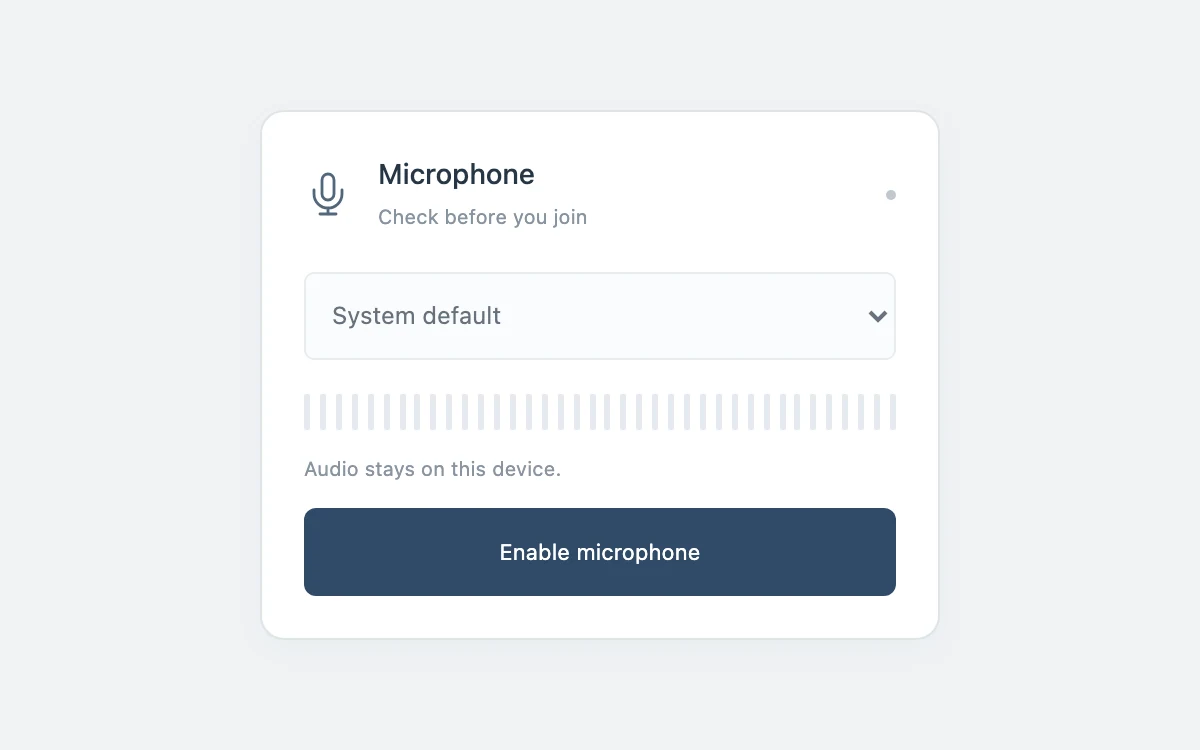
Enable the microphone, choose a device, then mute or disconnect.
Subframe Original · MIT
Add to your project
Component source
Standalone React component. Styles are included.
React only. No additional packages.
Render the default export inside a container with a defined height. Its optional active prop stops movement when false. This example works with React 19; Next.js projects can use it as a client component.
View source code
/**
 * MIT License
 * Copyright (c) 2026 Subframe
 *
 * Permission is hereby granted, free of charge, to any person obtaining a copy
 * of this software and associated documentation files (the "Software"), to deal
 * in the Software without restriction, including without limitation the rights
 * to use, copy, modify, merge, publish, distribute, sublicense, and/or sell
 * copies of the Software, and to permit persons to whom the Software is
 * furnished to do so, subject to the following conditions:
 *
 * The above copyright notice and this permission notice shall be included in all
 * copies or substantial portions of the Software.
 *
 * THE SOFTWARE IS PROVIDED "AS IS", WITHOUT WARRANTY OF ANY KIND, EXPRESS OR
 * IMPLIED, INCLUDING BUT NOT LIMITED TO THE WARRANTIES OF MERCHANTABILITY,
 * FITNESS FOR A PARTICULAR PURPOSE AND NONINFRINGEMENT. IN NO EVENT SHALL THE
 * AUTHORS OR COPYRIGHT HOLDERS BE LIABLE FOR ANY CLAIM, DAMAGES OR OTHER
 * LIABILITY, WHETHER IN AN ACTION OF CONTRACT, TORT OR OTHERWISE, ARISING FROM,
 * OUT OF OR IN CONNECTION WITH THE SOFTWARE OR THE USE OR OTHER DEALINGS IN THE
 * SOFTWARE.
 */
"use client"
import * as React from "react"
function useReduced() {
  const [reduced, setReduced] = React.useState(true)
  React.useEffect(() => {
    const media = matchMedia("(prefers-reduced-motion: reduce)"),
      update = () => setReduced(media.matches)
    update()
    media.addEventListener("change", update)
    return () => media.removeEventListener("change", update)
  }, [])
  return reduced
}

function closeContext(ctx: AudioContext) {
  if (ctx.state !== "closed") void ctx.close().catch(() => {})
}

type InputSession = { stream: MediaStream; ctx: AudioContext; analyser: AnalyserNode }
export default function Example({ active = true }: { active?: boolean }) {
  const [devices, setDevices] = React.useState<MediaDeviceInfo[]>([]),
    [device, setDevice] = React.useState(""),
    [connected, setConnected] = React.useState(false),
    [busy, setBusy] = React.useState(false),
    [muted, setMuted] = React.useState(false),
    [level, setLevel] = React.useState(0),
    [notice, setNotice] = React.useState("Audio stays on this device.")
  const session = React.useRef<InputSession | null>(null),
    generation = React.useRef(0),
    reduced = useReduced()
  const release = React.useCallback(() => {
    generation.current++
    const s = session.current
    session.current = null
    if (s) {
      s.stream.getTracks().forEach((t) => t.stop())
      closeContext(s.ctx)
    }
    setConnected(false)
    setBusy(false)
    setLevel(0)
  }, [])
  React.useEffect(() => {
    const requestGeneration = generation
    const refresh = () => {
      void navigator.mediaDevices
        ?.enumerateDevices()
        .then((d) => setDevices(d.filter((x) => x.kind === "audioinput")))
        .catch(() => {})
    }
    navigator.mediaDevices?.addEventListener("devicechange", refresh)
    return () => {
      requestGeneration.current++
      const s = session.current
      if (s) {
        s.stream.getTracks().forEach((t) => t.stop())
        closeContext(s.ctx)
        session.current = null
      }
      navigator.mediaDevices?.removeEventListener("devicechange", refresh)
    }
  }, [])
  React.useEffect(() => {
    if (!active) release()
  }, [active, release])
  async function connect(id = "") {
    release()
    const gen = ++generation.current
    setBusy(true)
    let stream: MediaStream | null = null,
      ctx: AudioContext | null = null
    try {
      if (!navigator.mediaDevices?.getUserMedia) throw Error("Microphone access is unavailable.")
      stream = await navigator.mediaDevices.getUserMedia({ audio: id ? { deviceId: { exact: id } } : true })
      if (gen !== generation.current) {
        stream.getTracks().forEach((t) => t.stop())
        return
      }
      ctx = new AudioContext()
      const analyser = ctx.createAnalyser()
      analyser.fftSize = 512
      ctx.createMediaStreamSource(stream).connect(analyser)
      session.current = { stream, ctx, analyser }
      await ctx.resume()
      if (gen !== generation.current) {
        stream.getTracks().forEach((t) => t.stop())
        closeContext(ctx)
        return
      }
      const actual = stream.getAudioTracks()[0].getSettings().deviceId || id
      setDevice(actual)
      setMuted(false)
      setConnected(true)
      setBusy(false)
      setNotice("Speak to check the input level.")
      void navigator.mediaDevices
        .enumerateDevices()
        .then((d) => {
          if (gen === generation.current) setDevices(d.filter((x) => x.kind === "audioinput"))
        })
        .catch(() => {})
      stream.getAudioTracks().forEach((t) =>
        t.addEventListener(
          "ended",
          () => {
            if (gen === generation.current) release()
          },
          { once: true },
        ),
      )
    } catch (e) {
      stream?.getTracks().forEach((t) => t.stop())
      if (ctx) closeContext(ctx)
      if (session.current?.ctx === ctx) session.current = null
      if (gen === generation.current) {
        setBusy(false)
        setNotice(
          e instanceof DOMException && e.name === "NotAllowedError"
            ? "Microphone access was denied. You can try again."
            : "No microphone could be opened.",
        )
      }
    }
  }
  React.useEffect(() => {
    const s = session.current
    if (!connected || !active || !s) return
    const data = new Float32Array(s.analyser.fftSize)
    const id = setInterval(
      () => {
        s.analyser.getFloatTimeDomainData(data)
        setLevel(muted ? 0 : Math.min(1, Math.sqrt(data.reduce((a, v) => a + v * v, 0) / data.length) * 5))
      },
      reduced ? 250 : 65,
    )
    return () => clearInterval(id)
  }, [connected, active, muted, reduced])
  function mute() {
    const next = !muted
    setMuted(next)
    session.current?.stream.getAudioTracks().forEach((t) => (t.enabled = !next))
    if (next) setLevel(0)
  }
  return (
    <div className="sf-microphone-check">
      <section className="preflight">
        <header>
          <svg viewBox="0 0 24 24" aria-hidden>
            <rect x="9" y="2" width="6" height="13" rx="3" />
            <path d="M5 10v2a7 7 0 0 0 14 0v-2M12 19v3M8 22h8" />
          </svg>
          <div>
            <h3>Microphone</h3>
            <span>{connected ? "Input connected" : "Check before you join"}</span>
          </div>
          <i data-on={connected && !muted} />
        </header>
        <select
          aria-label="Input device"
          value={device}
          disabled={!active || !connected || busy}
          onChange={(e) => void connect(e.target.value)}
        >
          {!devices.length && <option value="">System default</option>}
          {devices.map((d, i) => (
            <option value={d.deviceId} key={d.deviceId}>
              {d.label || "Input " + (i + 1)}
            </option>
          ))}
        </select>
        <div className="meter" aria-label={`Input level ${Math.round(level * 100)} percent`}>
          {Array.from({ length: 38 }, (_, i) => (
            <i key={i} data-on={i / 38 < level} />
          ))}
        </div>
        <p role="status">{notice}</p>
        <footer>
          <button
            disabled={!active || busy}
            className="connect"
            onClick={() => (connected ? release() : void connect())}
          >
            {busy ? "Opening…" : connected ? "Disconnect" : "Enable microphone"}
          </button>
          {connected && (
            <button className="mute" disabled={!active} aria-pressed={muted} onClick={mute}>
              {muted ? "Unmute" : "Mute"}
            </button>
          )}
        </footer>
      </section>
      <style>{`.sf-microphone-check{width:100%;height:100%;min-height:260px;box-sizing:border-box;display:grid;grid-template-columns:minmax(0,1fr);place-items:center;padding:16px;background:#f4f4f3;color:#191a1b;font:14px/1.4 -apple-system,BlinkMacSystemFont,"Segoe UI",sans-serif;isolation:isolate;overflow:hidden;container-type:inline-size}.sf-microphone-check *{box-sizing:border-box}.sf-microphone-check button,.sf-microphone-check input,.sf-microphone-check select,.sf-microphone-check textarea{font:inherit;color:inherit}.sf-microphone-check button{cursor:pointer;touch-action:manipulation}.sf-microphone-check button:disabled{cursor:default;opacity:.45}.sf-microphone-check :focus-visible{outline:2px solid #2767dc;outline-offset:3px}.sf-microphone-check input[type=range]{min-height:44px;accent-color:currentColor;min-width:0}.sf-microphone-check .sr{position:absolute;width:1px;height:1px;overflow:hidden;clip-path:inset(50%)}.sf-microphone-check[data-paused=true] *{animation-play-state:paused!important}@media(prefers-reduced-motion:reduce){.sf-microphone-check *{animation:none!important;transition:none!important;scroll-behavior:auto!important}}.sf-microphone-check{background:#f0f3f5;padding:24px;color:#273646}.sf-microphone-check .preflight{width:min(100%,340px);background:#fff;border:1px solid #dfe4e7;border-radius:12px;padding:21px;box-shadow:0 5px 17px #26364709}.sf-microphone-check header{display:flex;align-items:center;gap:13px}.sf-microphone-check header svg{width:24px;height:24px;fill:none;stroke:#53677c;stroke-width:1.4;stroke-linecap:round}.sf-microphone-check h3{font-size:14px;font-weight:500;margin:0}.sf-microphone-check header span{font-size:10px;color:#8794a0}.sf-microphone-check header i{width:5px;height:5px;background:#c0c8d0;border-radius:50%;margin-left:auto}.sf-microphone-check header i[data-on=true]{background:#4675a6}.sf-microphone-check select{width:100%;height:44px;background:#fafcfd;border:1px solid #dde4e9;border-radius:5px;font-size:12px;padding:0 9px;margin:19px 0 17px;min-width:0}.sf-microphone-check .meter{height:18px;display:flex;justify-content:space-between;gap:3px}.sf-microphone-check .meter i{height:100%;width:3px;background:#e5eaf0;border-radius:1px}.sf-microphone-check .meter i[data-on=true]{background:#597da7}.sf-microphone-check p{font-size:10px;line-height:1.5;color:#8995a2;min-height:15px;margin:12px 0}.sf-microphone-check footer{display:flex;gap:8px}.sf-microphone-check button{min-height:44px;border-radius:6px;font-size:11px;padding:0 13px;border:0}.sf-microphone-check .connect{flex:1;background:#304b68;color:white}.sf-microphone-check .mute{background:#f0f3f6;color:#536b83}@container(max-width:300px){.sf-microphone-check .preflight{padding:17px}}`}</style>
    </div>
  )
}
Where it works well
Select a working input before entering a call.
Reduced motion
The real level meter updates at four samples per second without tweening.
Things to know
Requires an explicit permission grant and an available input device. Audio stays local and is not recorded or sent.